
Grid Games is made and published by Guy Barker. AppBrain is an independent app data site and isn't affiliated with Guy Barker. The app name, icon, screenshots and description belong to Guy Barker and are shown as published on the App Store.
AppBrain's verdict
- Last updated
- March 14, 2023
Rankings
App Store top chartsApp Store Rankings for Grid Games
Competitors
Similar apps and more from Guy BarkerAlternatives to Grid Games





More from Guy Barker

Releases
Updates seen on the App Store- Version
- 2.9
- Launched
- March 2022
No changelog data
User feedback
Ratings and reviews on the App StoreComments on Grid Games for iOS
We don't have enough comments to show example comments. Please check back later.
Technology
Found in the app by AppBrain- Price
- Free
- App size
- 60.2 MB
- Content rating
- Everyone
Technologies used by Grid Games
About the app and developer
About Grid Games
Grid Games is a games app developed by Guy Barker.
User Ratings
The app has no ratings yet.
App Information
Grid Games is freely available from the App Store. The app size is 60.16 MB. The latest version available is 2.9. The last update was on March 14, 2023.
Technical Requirements
The app has a content rating of Everyone. The app has been available on the App Store since March 2022.
Developer information for Guy Barker
Address:
Store listing
By Guy Barker, from the App Store




Description by Guy Barker Written by the developer, not by AppBrain. Click to read.
Details on how to play the Sudoku and Leaf Sweeper games are available in the app's help content.
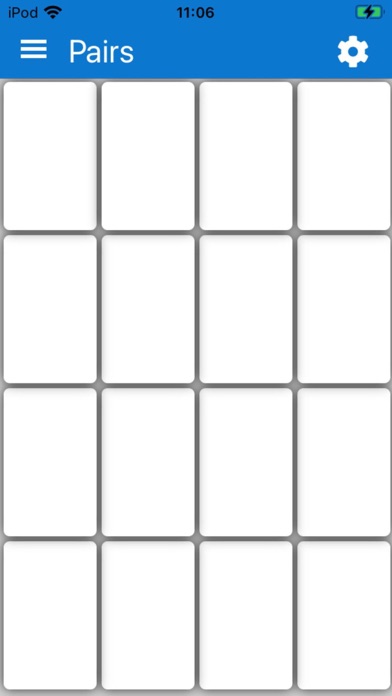
The Pairs Game is based on a traditional card matching game, where face-down cards are turned over in order to find pairs of cards.
When the game is run, a 4 by 4 grid of blank squares appears, each square representing a card. When a card is tapped, an image is shown on the card. When another card is clicked, an image is also shown on that second card. If the two images are the same, then the cards are considered to be matched, and will not change again for the rest of the game. If the images do not match, then the cards are considered to be unmatched, and cards must be turned back over by tapping on any card. These steps are to be repeated until all matching images have been found, and a "Congratulations" window appears.
The Squares Game is based on a square sliding puzzle, where squares in a grid of squares are rearranged by the player to form an ordered sequence in the grid.
When the game is run, a 4 by 4 grid of squares appears, with fifteen of those squares occupied with a movable element, and one square being empty. When a square is tapped, if it is adjacent to the empty square, the tapped square moves into the empty square. The space where the tapped square was then becomes the empty square. The aim is to arrange all the squares in a sorted order, leaving the empty square in the bottom right corner of the grid. Once all the squares are ordered, a "Congratulations" window appears.
When the game first runs, the setting to have numbers shown on squares is on, and the settings to have pictures shown on the squares is off. This means a number is shown in the top left corner of the squares. When the squares are sorted, the square showing number 1 is at the top left of the grid, and the numbers increase from left to right then top to bottom.
When the game setting to have a picture shown on the squares is on, then a single picture is shown across all the squares. The sections of the picture will appear jumbled until the squares are arranged in their sorted order.
The Where's WCAG? game help players remember the grouping of some of the Web Content Accessibility Standards (WCAG).