

Gridley - Image Grid Generator
Gridley - Image Grid Generator is made and published by Emerson Design. AppBrain is an independent app data site and isn't affiliated with Emerson Design. The app name, icon, screenshots and description belong to Emerson Design and are shown as published on the App Store.
AppBrain's verdict
- Rating on App Store
- 5.00
- 3 ratings
- Last updated
- August 18, 2025
- Size
- 16.9 MB
It doesn't have enough ratings yet to judge what users think.
User feedback
Ratings and reviews on the App StoreComments on Gridley - Image Grid Generator for iOS
We don't have enough comments to show example comments. Please check back later.
Store listing
By Emerson Design, from the App Store




Description by Emerson Design Written by the developer, not by AppBrain. Click to read.
**Special Launch Pricing!**
Get started with Gridley Pro at a special introductory rate: just $1.99 for the first month (regularly $2.99) or $12.99 lifetime. These prices available for a limited time!
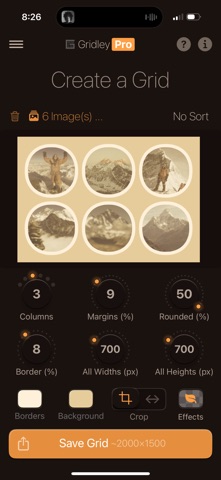
Gridley makes it simple to turn a few images—or a whole collection—into clean, high-resolution grids in seconds. Whether you’re a designer, photographer, or just organizing screenshots, Gridley helps you control spacing, layout, borders, backgrounds, and more. Preview changes instantly and export your grid as an image or PDF at full quality.
---
Why Gridley Stands Out
---
* Combine up to 5 images per grid for Free, or up to 30 with Gridley Pro.
* Adjust spacing, borders, corners, and other grid settings
* Live preview — see edits as you make them
* Export sharp images or PDFs
* Save or share as photos, PDFs, or zipped PDF files
* Available in 8 languages: English, Japanese, Chinese, French, Hindi, German, Korean, Russian
---
Powerful Layout Options
---
* Set columns (images per row)
* Customize margins, borders, corners, and fixed image sizes
* Crop or stretch images to fit your grid
* Change background and border colors with a full HSB color picker with opacity controls
* Apply an image effect from options like Vibrant Pop, Warm, Dramatic, Pixelated, Color Leak, Black & White… and more.
* Global opacity settings
---
Designed for Flexibility
---
* Export grids up to 1,000 px in Free mode and up to 15,000 px with Gridley Pro
* Set all images to a fixed width or height, from 200 px up to 3,000 px
* Sort images by date, name, or size
* Responsive UI with smooth, animated controls
* Choose from a variety of light and dark app themes to suit your style
---
Go Gridley Pro Your Way
---
* Work with up to 30 images per grid
* Export at maximum resolution — up to 15,000 px
* Unlock all image filters, including Pixelated effect
* Access the full list of 15 app themes to fully customize your interface
* Save grids as Photos, PDFs, or zipped PDFs
* Access full control of all grid settings
* Optionally remove the watermark
* Upgrade with either a one-time Lifetime purchase or a flexible monthly subscription — choose what fits you best
---
Perfect For
---
* Designers previewing layouts
* Quickly stitching photos together or consolidating multiple screenshots
* Making collages, visual summaries, or storyboards
* Students, bloggers, or teams organizing images efficiently
* Photographers sharing polished sets or print-ready photo grids
* Content creators making social posts or marketing visuals
* Anyone who wants clean, high-resolution grids in seconds
---
Download Gridley and start building your perfect grid today.
---
Terms of Use: https://www.apple.com/legal/internet-services/itunes/dev/stdeula
Safety and technology
Found in the app by AppBrain- Price
- Free
- App size
- 16.9 MB
- Content rating
- Everyone
Technologies used by Gridley - Image Grid Generator
Releases
Updates seen on the App Store- Version
- 1.0
- Launched
- August 2025
No changelog data
Alternatives
Similar apps and more from Emerson DesignAlternatives to Gridley - Image Grid Generator


More from Emerson Design


Rankings
App Store top chartsApp Store Rankings for Gridley - Image Grid Generator
About the app and developer
About Gridley - Image Grid Generator
Gridley - Image Grid Generator is an utilities app developed by Emerson Design.
User Ratings
Gridley - Image Grid Generator is rated 5.00 out of 5 stars. The rating is based on 3 ratings.
App Information
Gridley - Image Grid Generator is freely available from the App Store. The app size is 16.88 MB. The latest version available is 1.0. The last update was on August 18, 2025.
Technical Requirements
The app has a content rating of Everyone. The app has been available on the App Store since August 2025.
Developer information for Emerson Design
Address:
Frequently asked questions about Gridley - Image Grid Generator
Is Gridley - Image Grid Generator free?
Yes. Gridley - Image Grid Generator is free on the App Store.
Is Gridley - Image Grid Generator still available?
Yes. Gridley - Image Grid Generator is on the App Store, and the last update we saw was on August 18, 2025.
How large is Gridley - Image Grid Generator?
Gridley - Image Grid Generator is 16.88 MB.
Is Gridley - Image Grid Generator suitable for children?
App Store rates the content of Gridley - Image Grid Generator as suitable for everyone.
How do people rate Gridley - Image Grid Generator?
Gridley - Image Grid Generator scores 5.00 out of 5 stars, from 3 ratings on the App Store.
Who made Gridley - Image Grid Generator?
Gridley - Image Grid Generator was developed by Emerson Design. It is listed in the utilities category on the App Store.
What are the best alternatives to Gridley - Image Grid Generator?
People looking at Gridley - Image Grid Generator also look at these utilities apps: Exiflow, Meraki Diary, Reverse Image Search Pro HD, GottaGo: Bathroom Codes, ArveleaWriter.