

GRIT - Time Management
GRIT - Time Management is made and published by Rix Data GmbH. AppBrain is an independent app data site and isn't affiliated with Rix Data GmbH. The app name, icon, screenshots and description belong to Rix Data GmbH and are shown as published on the App Store.
AppBrain's verdict
Established- Rating on App Store
- 5.00
- 1 ratings
- Last updated
- June 26, 2023
It doesn't have enough ratings yet to judge what users think.
Rankings
App Store top chartsApp Store Rankings for GRIT - Time Management
Competitors
Similar apps and more from Rix Data GmbHAlternatives to GRIT - Time Management






More from Rix Data GmbH

Releases
Updates seen on the App Store- Version
- 3.20
- Launched
- August 2021
No changelog data
User feedback
Ratings and reviews on the App StoreComments on GRIT - Time Management for iOS
We don't have enough comments to show example comments. Please check back later.
Technology
Found in the app by AppBrain- Price
- Free
- App size
- 4.09 MB
- Content rating
- Everyone
Technologies used by GRIT - Time Management
About the app and developer
About GRIT - Time Management
GRIT - Time Management is a productivity app developed by Rix Data GmbH.
What is the rating of GRIT - Time Management?
GRIT - Time Management is rated 5.00 out of 5 stars, based on one rating ratings.
Is GRIT - Time Management free?
GRIT - Time Management is free. The app size is 4.09 MB. The latest version available is 3.20. The last update was on June 26, 2023.
What are the requirements for GRIT - Time Management?
The app has a content rating of Everyone. The app has been available on the App Store since August 2021.
Developer information for Rix Data GmbH
Address:
Store listing
By Rix Data GmbH, from the App Store




Description by Rix Data GmbH Written by the developer, not by AppBrain. Click to read.
It's easy to get started with a new goal, but many fail to follow through long enough in order to reach their potential.
With GRIT app you can turn an abstract new years resolution into 365 tangible daily tasks with a defined deadline and incentive.
Incentives
You can define how much money will be deducted from your account for missing a certain goal.
For completing a goal you receive a reward of 10% of the committed credits.
To allow new users to familiarize themselves with the app features, there is a free starting balance of 5 credits.
After the credit balance becomes negative, you have to top up the balance within 3 days otherwise the app will be disabled.
After trying out different amounts of credits as incentive, you may realise that some goals require a higher amount of credits. For example "No smoking" may require 10 credits to offset the temptation and for "clean apartment" 0.1 credits may be sufficient.
For all tasks, you have to evaluate yourself whether it was completed on time.
Tasks
In the home screen, you can add new tasks with a due date and an amount of credits to motivate you to follow through.
You can also add to-do's here, which are not connected to any long term goals so that you do not have to maintain multiple to do lists.
Examples for tasks are:
- Submit Job Application
- Buy groceries
If you complete the task before the due date or on the due date, then it should be evaluated to "done", then the credit balance will not be changed.
If you complete the task after the due date or don't complete it at all then it should be evaluated to "not done", then the specified amount of credits will be deducted from the balance.
If tasks are overdue and "pending" (i.e. not yet evaluated), then they will be displayed in red font.
Once tasks are evaluated to "done" or "not done" you can view them in the history, which can be accessed by clicking on the menu icon on the top left.
Habits
When adding a new task, you can specify whether the task should repeat and define on which weekdays it should be scheduled.
Examples for repeating tasks are:
- Leave home by 9 AM for Monday to Friday
- Take vitamin supplements
These tasks can be viewed and edited under the Repeating tasks section in the Dashboard.
When you open the app on a new day, all corresponding repeating tasks will be scheduled for that day and also for the days in which you did not open the app.
When you edit a repeating tasks, the changes will only be applied from the next day onwards. Instances of repeating tasks for the current day or past days cannot be edited.
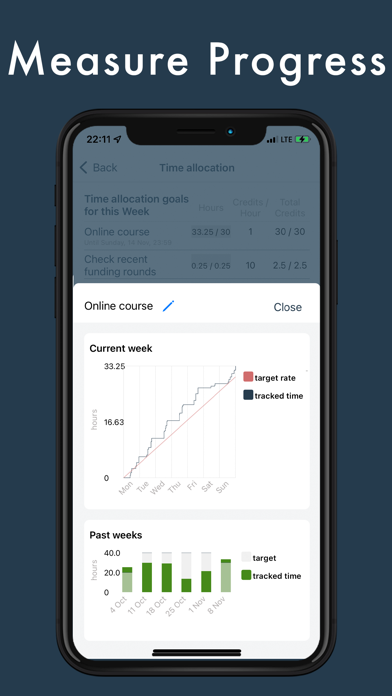
Time allocation
With weekly time allocation goals you can make sure that you spend a certain amount of time every week on a specific activity.
Examples are:
- Do 30 minutes of running every week
- Spend 2 hours every week studying for an online course
There are two main differences between activity goals and repeating tasks:
1. It does not matter on which day of the week you do the weekly activity as long as you do it before the end of the week. In contrast tasks always have a specific due date.
2. Even if you only manage to complete a small part of a weekly activity goal, this will have an effect on your credits balance so every minute of activity counts. In contrast tasks can only be either completed or not completed which will result in either no credits deducted or the full amount of credits defined in the tasks deducted.
Time Tracking
With the time tracking section you can keep track of your weekly goals and other activities. For every tracked hour you receive a 0.01 credit reward.
Data export
Your data can be exported in CSV format from the settings menu.