

GTK - Banjo Player's Toolkit
GTK - Banjo Player's Toolkit is made and published by Jon Machtynger. AppBrain is an independent app data site and isn't affiliated with Jon Machtynger. The app name, icon, screenshots and description belong to Jon Machtynger and are shown as published on the App Store.
AppBrain's verdict
- Last updated
- October 30, 2026
- Size
- 22.5 MB
User feedback
Ratings and reviews on the App StoreComments on GTK - Banjo Player's Toolkit for iOS
We don't have enough comments to show example comments. Please check back later.
Store listing
By Jon Machtynger, from the App Store



Description by Jon Machtynger Written by the developer, not by AppBrain. Click to read.
When I originally built the Guitar Player's Toolkit, they were tools that I wanted to use, and still continue to use. I have taken those tools and applied them to banjo players. It provides everything from theory, tuning, chord composition, and tempo as well as some good practice utilities.
A story that I hear from many casual players of stringed instruments (Guitar, Ukulele, Banjo) is that they try to get their head around concepts such as chord composition, triads, scales, modes, and transpositions, but then have difficulty applying this to the fretboard. A disconnect between the theory and the instrument holds them back, like it did me.
This application is not a primer on music theory, but it does provide you with succinct, focused tools to let you see how the theory applies to your playing, finger positions, song composition etc.
This application is under constant development. If you have any feedback for improvements, or any issues with the app, please use the 'Contact Us' button in Settings and we will respond.
No ads, no subscriptions, and no internet required.
CHORD TOOLS
This provides support for both 4, and 5 string banjos with multiple tunings and over 10,000 chord entries.
- 5-string Open G
- 5-string C Tuning
- 5-string Open G Low
- 5-string Double-C
- 5-string G Moda
- 4-string Tenor Standard (CGDA)
- 4-string Tenor Irish (GDAE)
- 4-string Plectrum
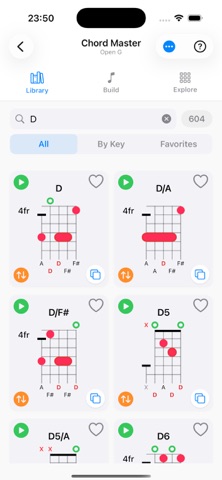
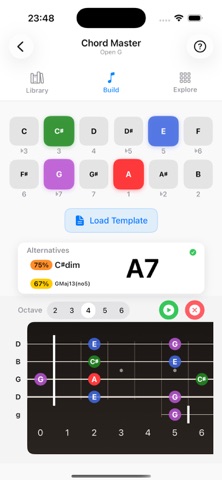
• Chord Master - Browse by key, build chords note-by-note, or place fingers on an interactive fretboard to discover what you're playing. Hear every chord played in whole, or arpeggiated.
• Chord Library - View thousands of chord diagrams. Search across chord types with strict or fuzzy matching. Filter by key, browse diatonic and borrowed chords, save favourites.
• Custom Chords - Create and name your own chords on an interactive grid. Auto-detect the chord name, play it back, and export/import to share with others.
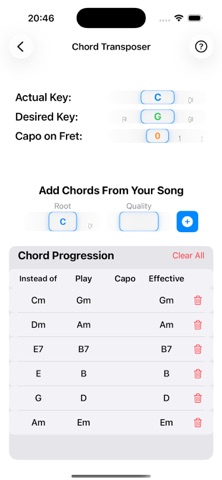
• Transpose - Move song chords to any other key in seconds, with capo-aware transposition.
THEORY TOOLS
• Scales — 80+ scales across 14 categories: major, minor, modes, pentatonic, blues, jazz, Arabic, Indian ragas, Japanese, Chinese, and more. Interactive fretboard shows colour-coded positions with diatonic chord analysis. Tuning-aware for Standard, Low G, D Tuning, and Baritone.
• Scale Sharing — When playing songs with multiple chords, see where they overlap, if plucking individual strings, then know where the chord homes are (root, 3rd, and 5th). Minimise your hand movement by staying in the same general area.
• Circle of Fifths — Tap any key to explore its modes, and diatonic chords.
• Position Finder — Pick a fret and pick your key. Instantly see which scale modes fit there. Covers major, minor, harmonic minor, melodic minor, and chord tone patterns.
• Mode Converter — See exactly how any mode transforms into another — note by note, semitone by semitone.
PRACTICE TOOLS
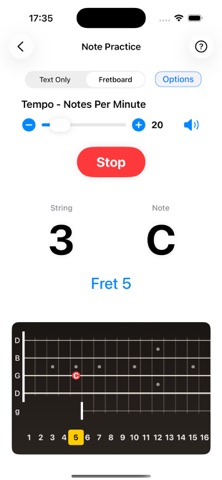
• Note Practice — Drill fretboard note names at your own pace. Set tempo (5–120 BPM), choose strings and notes, display as text or fretboard diagram, and hear each note played. Includes a timed challenge mode.
• Metronome — 40–240 BPM with tap tempo, configurable time signatures, first-beat accent, and four click sounds (Woodblock, Click, Cowbell, Bell).
• Chromatic Tuner — Real-time pitch detection with ±1 cent accuracy, visual needle gauge, colour-coded feedback, and Hz display. Covers the full ukulele range (C3–C6).
TECHNICAL
Works completely offline
Adaptive layout for iPhone and iPad
Full light and dark mode support
Your audio is processed entirely on-device and never recorded or transmitted
Safety and technology
Found in the app by AppBrain- Price
- $9.99
- App size
- 22.5 MB
- Content rating
- Everyone
Technologies used by GTK - Banjo Player's Toolkit
Releases
Updates seen on the App Store- Version
- 1.3.3
- Launched
- August 2026
No changelog data
Alternatives
Similar apps and more from Jon MachtyngerMore from Jon Machtynger


Rankings
App Store top chartsApp Store Rankings for GTK - Banjo Player's Toolkit
About the app and developer
About GTK - Banjo Player's Toolkit
GTK - Banjo Player's Toolkit is a music app developed by Jon Machtynger.
User Ratings
The app has no ratings yet.
App Information
GTK - Banjo Player's Toolkit costs $9.99. The app size is 22.55 MB. The latest version available is 1.3.3. The last update was on October 30, 2026.
Technical Requirements
The app has a content rating of Everyone. The app has been available on the App Store since August 2026.
Developer information for Jon Machtynger
Address:
Frequently asked questions about GTK - Banjo Player's Toolkit
Is GTK - Banjo Player's Toolkit free?
No. GTK - Banjo Player's Toolkit costs $9.99 on the App Store.
Is GTK - Banjo Player's Toolkit still available?
Yes. GTK - Banjo Player's Toolkit is on the App Store, and the last update we saw was on October 30, 2026.
How large is GTK - Banjo Player's Toolkit?
GTK - Banjo Player's Toolkit is 22.55 MB.
Is GTK - Banjo Player's Toolkit suitable for children?
App Store rates the content of GTK - Banjo Player's Toolkit as suitable for everyone.
Who made GTK - Banjo Player's Toolkit?
GTK - Banjo Player's Toolkit was developed by Jon Machtynger. It is listed in the music category on the App Store.