Gugu Pinyin - Private Engine is made and published by
海洋 杨.
AppBrain is an independent app data site and isn't affiliated with 海洋 杨.
The app name, icon, screenshots and description belong to 海洋 杨 and are shown as
published on the App Store.
About Gugu Pinyin - Private Engine
Gugu Pinyin - Private Engine is a productivity app developed by 海洋 杨.
What is the rating of Gugu Pinyin - Private Engine?
Gugu Pinyin - Private Engine has no ratings yet.
Is Gugu Pinyin - Private Engine free?
Gugu Pinyin - Private Engine is free. The app size is 74.57 MB. The latest version available is 3.1.4. The last update was on October 2, 2026.
What are the requirements for Gugu Pinyin - Private Engine?
The app has a content rating of Everyone. The app has been available on the App Store since August 2026.
Description by 海洋 杨(from the App Store)
Gugu Pinyin is a privacy-focused Chinese Pinyin input method powered by a self-developed local engine. It runs entirely offline with zero network access - no tracking, no data collection, no uploads.
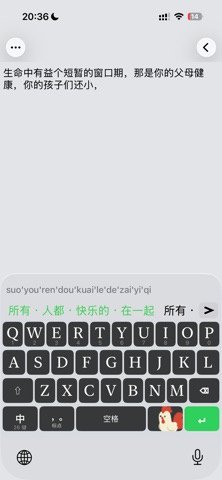
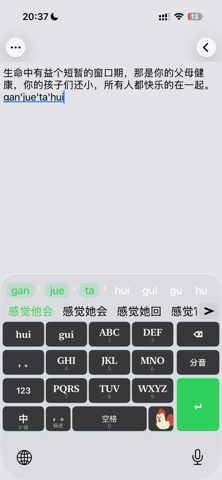
Smart Pinyin Guidance As you type, valid next letters are highlighted while invalid ones fade, helping you navigate the keyboard faster. Combined with phrase prediction and a large local dictionary, your typing is smooth and efficient.
Flow Commit (experimental) Confirmed words commit automatically - no need to tap each candidate, and words commit as whole units instead of being split. Choose a Conservative / Standard / Aggressive tier; enable it in Settings, with a free trial for non-subscribers.
9-key (T9) & 26-key Layouts Both a full 26-key QWERTY layout and a 9-key (T9) grid are supported - long-press the 中/En key to switch. T9 decoding runs entirely on-device, with full / abbreviated / mixed pinyin, syllable selection and segment-by-segment commit.
Self-developed Local Engine All pinyin conversion, phrase matching, and prediction happen on-device. No cloud dependency means zero network latency and absolute privacy.
QWERTY + Swipe Typing Full QWERTY layout with swipe-to-type support and dual-label keys (letters + numbers). Backspace swipe gestures for clearing or batch deleting text, and swipe down to undo a deletion.
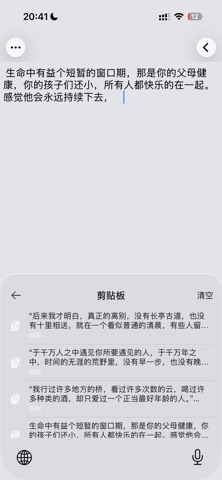
Advanced Features (some are membership perks, with a free trial) • Cursor mode: long-press a trigger key (G on 26-key / ' on punctuation / 5 on 9-key) and drag to move the cursor • Clipboard history: long-press the space bar to bring up copied text and tap to insert it • One-handed mode: shrink the keyboard to one side; swipe the space bar to switch hands
Beautiful Themes 20 premium keyboard themes (free + membership) - all keys change color instantly when you switch.
Popup System Long-press a/e keys for punctuation popups, l key for emoji - all in an 18-cell grid layout.
Absolute Privacy Unlike keyboards that require "Allow Full Access", Gugu Pinyin works without it. The keyboard extension has zero network capability - system-enforced isolation means your keystrokes stay on your device.
Each subscription will automatically renew 3 days before the expiration date for
the same time period. Subscriptions can be cancelled at any time before the renewal.