

HA Remote
HA Remote is made and published by Carsten Schmiemann. AppBrain is an independent app data site and isn't affiliated with Carsten Schmiemann. The app name, icon, screenshots and description belong to Carsten Schmiemann and are shown as published on the App Store.
AppBrain's verdict
- Last updated
- October 28, 2026
- Size
- 23.1 MB
User feedback
Ratings and reviews on the App StoreComments on HA Remote for iOS
We don't have enough comments to show example comments. Please check back later.
Store listing
By Carsten Schmiemann, from the App Store



Description by Carsten Schmiemann Written by the developer, not by AppBrain. Click to read.
FUNKTIONEN
• Demo-Modus: läuft direkt nach der Installation mit simulierten Geräten zum Ausprobieren, endet automatisch bei der ersten eigenen Verbindung.
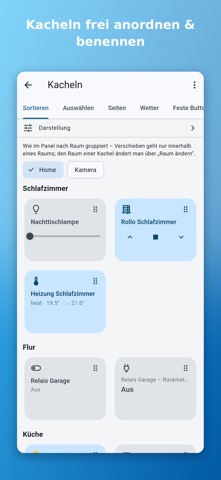
• Mehrere Seiten: das Panel bei Bedarf in Tabs aufteilen, jede Kachel einer Seite zuordnen.
• Kacheln frei wählbar: alle Entitäten durchsuchen, anordnen, pro Kachel Name, Raum und Symbol anpassen.
• Ein Tipp genügt: Lampen, Steckdosen, Szenen, Skripte, Schalter, Schlösser und mehr direkt schalten.
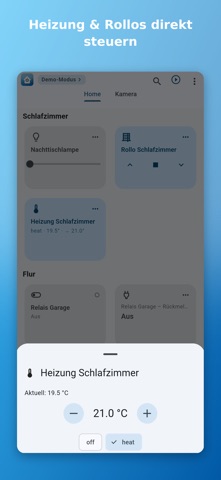
• Detail-Regler: Helligkeit/Farbe/Farbtemperatur für Lampen, Position für Rollos, Solltemperatur/Modus für Thermostate, Steuerung für Media-Player.
• Kachel-Regler: Helligkeit und Rollo-Position optional direkt auf der Kachel.
• Sensor-Kacheln: Temperatur, Luftfeuchte, Verbrauch, Batteriestand anzeigen.
• Wetter-Kachel: Innen-/Außentemperatur oben im Panel, aufklappbar für weitere Werte (gefühlt, Taupunkt, Luftfeuchte, Wind), Sensoren frei zuweisbar.
• Kamera-Kacheln: Vorschaubild auf der Kachel, Tippen öffnet Vollbild mit Zoom und Live-Aktualisierung.
• Schalter absichern: pro Kachel eine Sicherheitsabfrage, Freigabe per Face ID/Touch ID oder Gerätecode oder ein abbrechbarer Countdown.
• Status-Sensor: Schalter mit einem Sensor verknüpfen (z. B. Relais- Rückmeldung) – zeigt den echten Zustand statt nur „geschaltet".
• „Alles aus": optionaler Schalter je Raum und global, mit auswählbaren Geräten.
• Panel-Suche zum schnellen Filtern – tolerant gegenüber Umlauten und mehreren Suchwörtern.
• Live-Updates per WebSocket, mit automatischem Wiederverbinden – auch nach Rückkehr aus dem Hintergrund.
• Lokale und entfernte Adresse: zweite URL (z. B. per VPN oder externer Domain) hinterlegen, die App wechselt unterwegs automatisch.
• Automatische Suche der Instanz per mDNS im lokalen Netzwerk. Token per QR-Code scannen.
• Konfiguration exportieren/importieren (ohne Token) für schnellen Geräte-Umzug.
• Invisible-Modus für Wandtablets: ein Home-Assistant-Helfer blendet Suche und Menü aus.
• App-Sperre per Face ID/Touch ID oder Gerätecode.
• Kacheln pro Zeile und Kachelgröße einstellbar, Raum-Überschriften optional ausblendbar. Hell- und Dunkel-Design, folgt dem System.
• Kachel-Aussehen frei anpassbar: Rahmendicke, -farbe und Hintergrundfarbe (auch pro Kachel); im Sortieren-Tab Mehrfachauswahl zum Löschen.
• App-Sprache Deutsch oder Englisch – oder automatisch nach Geräte-Einstellung.
EINRICHTUNG
In Home Assistant unten links auf deinen Benutzernamen → „Sicherheit" → einen langlebigen Zugriffstoken erstellen.
In der App die Instanz suchen (oder Adresse eingeben), Token einfügen oder QR-Code scannen, Verbindung testen.
Unter „Kacheln verwalten" die gewünschten Entitäten auswählen und sortieren.
DATENSCHUTZ
• HA Remote verbindet sich ausschließlich mit dem von dir angegebenen Server.
• URL und Token werden nur lokal auf deinem Gerät gespeichert.
• Keine Benutzerkonten, keine Werbung, kein Tracking, keine Analyse. Es werden keine Daten an den Entwickler oder Dritte übertragen.
• Kamera – nur zum Scannen des Setup-QR-Codes, keine Speicherung oder Übertragung.
HINWEISE
• HA Remote ist eine inoffizielle, unabhängige App und steht in keiner Verbindung zu Home Assistant, Nabu Casa oder der Open Home Foundation und wird von diesen nicht unterstützt. Home Assistant ist eine Marke der jeweiligen Inhaber.
• Für unterwegs brauchst du eine eigene Erreichbarkeit der Instanz (z. B. VPN oder Reverse Proxy) – die App bringt keinen eigenen Fernzugriff mit.
• Home Assistant 2023.x oder neuer wird empfohlen.
Safety and technology
Found in the app by AppBrain- Price
- Free
- App size
- 23.1 MB
- Content rating
- Everyone
Technologies used by HA Remote
Releases
Updates seen on the App Store- Version
- 1.7.5
- Launched
- October 2026
No changelog data
Alternatives
Similar apps and more from Carsten SchmiemannMore from Carsten Schmiemann

Rankings
App Store top chartsApp Store Rankings for HA Remote
About the app and developer
About HA Remote
HA Remote is an utilities app developed by Carsten Schmiemann.
User Ratings
The app has no ratings yet.
App Information
HA Remote is freely available from the App Store. The app size is 23.08 MB. The latest version available is 1.7.5. The last update was on October 28, 2026.
Technical Requirements
The app has a content rating of Everyone. The app has been available on the App Store since October 2026.
Developer information for Carsten Schmiemann
Address: