

Habits - Routine Planner
Habits - Routine Planner is made and published by 筱彤 余. AppBrain is an independent app data site and isn't affiliated with 筱彤 余. The app name, icon, screenshots and description belong to 筱彤 余 and are shown as published on the App Store.
AppBrain's verdict
- Last updated
- October 31, 2025
- Size
- 52.7 MB
User feedback
Ratings and reviews on the App StoreComments on Habits - Routine Planner for iOS
We don't have enough comments to show example comments. Please check back later.
Store listing
By 筱彤 余, from the App Store


Description by 筱彤 余 Written by the developer, not by AppBrain. Click to read.
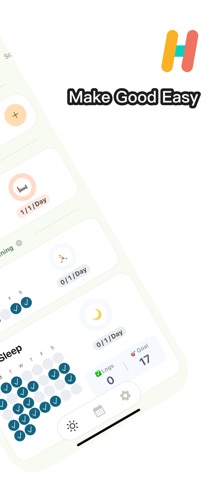
Struggling to build healthy habits? Habits offers the most thoughtful, professional solution for habit formation!
Curated Habit Library – Add in One Tap
• Rich built-in categories: Life, Fitness, Pets, Work, and more
• Custom habits: Create your personal growth plan
Smart Time Management
• Precision scheduling: All Day, Morning, Afternoon, Evening
• Plan habits purposefully for every time block
• Avoid conflicts and boost efficiency
Multi-Dimensional Tracking Views
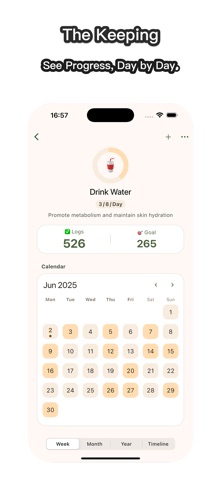
• Daily View: Track daily progress clearly
• Weekly View: Identify your weekly trends
• Monthly View: Visualize long-term growth
• Data-driven visuals to boost your sense of achievement
Flexible Tracking Modes
• Count Mode: Log repetitions (workouts, water intake)
• Timer Mode: Track durations (reading, meditation)
• Adapts to all habit types
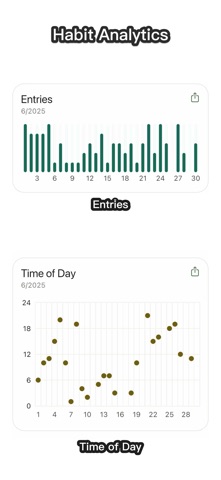
Timeline Review
• Visual history: Witness every step of progress
• Reflect on your journey and draw motivation
• Analyze patterns to optimize routines
Payments and Renewal:
After confirming the purchase, your Apple account will be charged, and the subscription will be automatically renewed if you purchase a monthly or yearly subscription, your Apple account will be charged 24 hours before the expiration date, and the subscription cycle will be postponed to the next subscription cycle after the successful deduction of the charge.
If you want to cancel the automatic subscription, please turn off the auto-renewal function 24 hours before the end of the current subscription cycle. You can cancel your subscription by going to "Settings" --> click "Apple ID", click "Subscribe" and select "Habits" to unsubscribe.
If the recharge does not arrive, please send your Apple ID and debit voucher to dev@bapaws.com.
Terms of Service: https://privacy.bapaws.com/habits/terms.html.
Privacy Policy: https://privacy.bapaws.com/habits/privacy.html.
Billing Issues?
If payment fails or access is delayed, email your Apple ID and receipt to: dev@bapaws.com
Safety and technology
Found in the app by AppBrain- Price
- Free
- App size
- 52.7 MB
- Content rating
- Everyone
Technologies used by Habits - Routine Planner
Releases
Updates seen on the App Store- Version
- 1.4.1
- Launched
- July 2025
No changelog data
Alternatives
Similar apps and more from 筱彤 余Alternatives to Habits - Routine Planner


More from 筱彤 余


Rankings
App Store top chartsApp Store Rankings for Habits - Routine Planner
About the app and developer
About Habits - Routine Planner
Habits - Routine Planner is a productivity app developed by 筱彤 余.
User Ratings
The app has no ratings yet.
App Information
Habits - Routine Planner is freely available from the App Store. The app size is 52.65 MB. The latest version available is 1.4.1. The last update was on October 31, 2025.
Technical Requirements
The app has a content rating of Everyone. The app has been available on the App Store since July 2025.
Developer information for 筱彤 余
Address:
Frequently asked questions about Habits - Routine Planner
Is Habits - Routine Planner free?
Yes. Habits - Routine Planner is free on the App Store.
Is Habits - Routine Planner still available?
Yes. Habits - Routine Planner is on the App Store, and the last update we saw was on October 31, 2025.
How large is Habits - Routine Planner?
Habits - Routine Planner is 52.65 MB.
Is Habits - Routine Planner suitable for children?
App Store rates the content of Habits - Routine Planner as suitable for everyone.
Who made Habits - Routine Planner?
Habits - Routine Planner was developed by 筱彤 余. It is listed in the productivity category on the App Store.
What are the best alternatives to Habits - Routine Planner?
People looking at Habits - Routine Planner also look at these productivity apps: Memoit - Capture What Matters, Habitly-Quick Record & Count, PicShield: Photo Privacy Lab, TimeBlock: Focus Timer & Tasks, X-生活·时间管理.