

HACCP Record Management
HACCP Record Management is made and published by Akira Yamada. AppBrain is an independent app data site and isn't affiliated with Akira Yamada. The app name, icon, screenshots and description belong to Akira Yamada and are shown as published on the App Store.
AppBrain's verdict
- Last updated
- April 7, 2023
Rankings
App Store top chartsApp Store Rankings for HACCP Record Management
Competitors
Similar apps and more from Akira YamadaAlternatives to HACCP Record Management





More from Akira Yamada





Releases
Updates seen on the App Store- Version
- 7.3.7
- Launched
- January 2019
No changelog data
User feedback
Ratings and reviews on the App StoreComments on HACCP Record Management for iOS
We don't have enough comments to show example comments. Please check back later.
Technology
Found in the app by AppBrain- Price
- Free
- App size
- 43.1 MB
- Content rating
- Everyone
Technologies used by HACCP Record Management
About the app and developer
About HACCP Record Management
HACCP Record Management is a productivity app developed by Akira Yamada.
What is the rating of HACCP Record Management?
HACCP Record Management has no ratings yet.
Is HACCP Record Management free?
HACCP Record Management is free. The app size is 43.13 MB. The latest version available is 7.3.7. The last update was on April 7, 2023.
What are the requirements for HACCP Record Management?
The app has a content rating of Everyone. The app has been available on the App Store since January 2019.
Developer information for Akira Yamada
Address:
Store listing
By Akira Yamada, from the App Store


Description by Akira Yamada Written by the developer, not by AppBrain. Click to read.
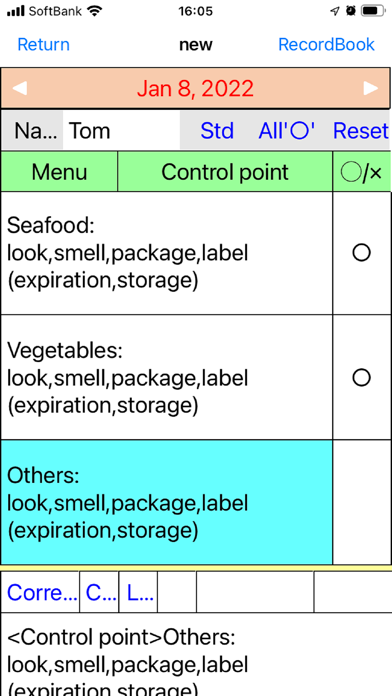
1.Record input
Enter confirmation (good, bad, no work) by touch, or enter measured values such as temperature with a rolling scale. In the case of unexpected events, this application can aid in corrective action, can attach photos to make this easier. You can also refer to and edit past input.
As for the input method, in addition to the method of inputting each item sequentially, you can also select the method of inputting at one time.
2.Record history
Upon entering or modifying any data, it will be automatically saved along with the recording date and time and your name.
3.Verification
Review the entered records on a weekly or monthly basis. If you confirm verification, the record will be locked and can not be easily changed.
When reviewing, you can refer to only the corrective action for the target period in the list and proceed as necessary.
4.Plan creation
You can create a plan from scratch, but you can also use the following two methods.
[Create and import a plan with EXCEL]
You should analyze the hazards according to HACCP procedure and enter the completed work plan in the EXCEL plan (posted on our site).
Generate and upload the data for this application with this plan file.
After that, if you touch "Your own plan" in the Download plan example function of this application, it will be loaded.
[Download and use sample model plan]
Plan models are being prepared in each industry. This is being converted into data in this project and posted on the WEB. (Registered and updated sequentially) Download this with the plan example download function of this application, and add your own modification to use it.
You can set the menu plan by season. By adjusting the plan, unselected items will not be displayed on the recording screen, while not deleted from the overall plan.
In addition, you can set work items for a limited time. This can be set, for example, to check the warehouse arrangement status in the first week of every month.
5.Addition of workplace
When first using this application, the only workplace will be the Main shop, but you can increase the number of workplaces.
In this case, you will need to prepare a device(iPad, iPhone) for each workplace, and set the plan, employee registration, verification period, etc. for each workplace. The status of each workplace can be selected and displayed on one device.
6.Device use in clean areas vs. other areas
By linking the app, you can use the iPad for work in a clean area, and work in other areas with this app on the iPhone.
Since the iPhone can be used exclusively for input, a function to change the layout of the input screen is also available.
7.Keeping and printing records
With this app, you can attach photos as point of the record in addition to the confirmation results and corrective actions. Therefore, it is necessary to organize the data to print these.
You can copy this data to the Windows environment through iCloud and print the records by using EXCEL.