

HalfwayHub is made and published by Curtis Pierce. AppBrain is an independent app data site and isn't affiliated with Curtis Pierce. The app name, icon, screenshots and description belong to Curtis Pierce and are shown as published on the App Store.
AppBrain's verdict
- Last updated
- November 14, 2025
Rankings
App Store top chartsApp Store Rankings for HalfwayHub
Competitors
Similar apps and more from Curtis PierceAlternatives to HalfwayHub


More from Curtis Pierce

Releases
Updates seen on the App Store- Version
- 1.1
- Launched
- October 2025
No changelog data
User feedback
Ratings and reviews on the App StoreComments on HalfwayHub for iOS
We don't have enough comments to show example comments. Please check back later.
Technology
Found in the app by AppBrain- Price
- Free
- App size
- 4.76 MB
- Content rating
- High
Technologies used by HalfwayHub
About the app and developer
About HalfwayHub
HalfwayHub is a navigation app developed by Curtis Pierce.
What is the rating of HalfwayHub?
HalfwayHub has no ratings yet.
Is HalfwayHub free?
HalfwayHub is free. The app size is 4.76 MB. The latest version available is 1.1. The last update was on November 14, 2025.
What are the requirements for HalfwayHub?
The app has a content rating of High Maturity. The app has been available on the App Store since October 2025.
Developer information for Curtis Pierce
Address:
Frequently asked questions about HalfwayHub
Is HalfwayHub free?
Yes. HalfwayHub is free on the App Store.
Is HalfwayHub still available?
Yes. HalfwayHub is on the App Store, and the last update we saw was on November 14, 2025.
How large is HalfwayHub?
HalfwayHub is 4.76 MB.
Is HalfwayHub suitable for children?
App Store gives HalfwayHub a high maturity rating. It is meant for adults.
Who made HalfwayHub?
HalfwayHub was developed by Curtis Pierce. It is listed in the navigation category on the App Store.
What are the best alternatives to HalfwayHub?
People looking at HalfwayHub also look at these navigation apps: Meet Midway, PowerPump, Flight Tracker Radar Air Track, Self Guide, GoCarma.
Store listing
By Curtis Pierce, from the App Store


Description by Curtis Pierce Written by the developer, not by AppBrain. Click to read.
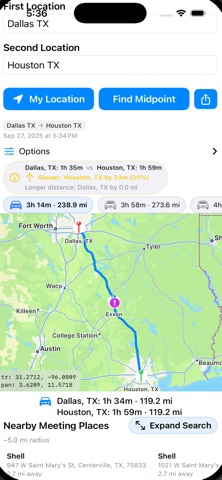
How it works:
Enter two locations (or use My Location).
Choose categories you care about.
Get balanced suggestions around the midpoint, with helpful details.
Open in your favorite maps app to go.
Why you’ll love it:
Smart midpoint suggestions: Find fair options fast—no more guesswork.
Popular categories: Coffee, food, parks, gas stations, and more.
Clear travel context: See rough balance at a glance so plans feel fair.
Simple by design: Clean, distraction‑free UI that’s quick to use.
Privacy‑minded: Your locations stay on your device for search; share only what you choose.
Reliable map results: Works across cities and towns with sensible defaults.
Great for:
Coffee catch‑ups.
Business meets between offices.
Road‑trip rendezvous.
Parents meeting coaches, tutors, or other families.
Friends from opposite sides of town.