

Handwriting to Text Converter
Handwriting to Text Converter is made and published by EclixTech UK LTD. AppBrain is an independent app data site and isn't affiliated with EclixTech UK LTD. The app name, icon, screenshots and description belong to EclixTech UK LTD and are shown as published on the App Store.
AppBrain's verdict
Well rated- Rating on App Store
- 4.48
- 120 ratings
- Last updated
- October 15, 2026
Users rate it well: 4.5 stars from 120 ratings.
Rankings
App Store top chartsApp Store Rankings for Handwriting to Text Converter
Competitors
Similar apps and more from EclixTech UK LTDMore from EclixTech UK LTD


Releases
Updates seen on the App Store- Version
- 1.0.16
- Launched
- July 2025
No changelog data
User feedback
Ratings and reviews on the App StoreComments on Handwriting to Text Converter for iOS
We don't have enough comments to show example comments. Please check back later.
Technology
Found in the app by AppBrain- Price
- Free
- App size
- 79.4 MB
- Content rating
- Everyone
Technologies used by Handwriting to Text Converter
About the app and developer
About Handwriting to Text Converter
Handwriting to Text Converter is an education app developed by EclixTech UK LTD.
What is the rating of Handwriting to Text Converter?
Handwriting to Text Converter is rated 4.48 out of 5 stars, based on 120 ratings.
Is Handwriting to Text Converter free?
Handwriting to Text Converter is free. The app size is 79.37 MB. The latest version available is 1.0.16. The last update was on October 15, 2026.
What are the requirements for Handwriting to Text Converter?
The app has a content rating of Everyone. The app has been available on the App Store since July 2025.
Developer information for EclixTech UK LTD
Address:
Store listing
By EclixTech UK LTD, from the App Store



Description by EclixTech UK LTD Written by the developer, not by AppBrain. Click to read.
Convert your PDF files into editable, searchable text in seconds. Easily extract content from scanned PDFs or documents and copy, share, or edit without retyping. Fast, accurate, and user-friendly.
Advanced handwriting to text scanner OCR (Optical Character Recognition) engine accurately extracts handwritten content from scanned paper notes and converts it into editable digital text. Unlike typical OCR Handwriting to text apps, it’s purpose-built to recognize handwriting — even cursive or messy styles — making it ideal for converting images of handwritten notes into clear, readable text.
OCR is the core of image to text apps and document scanners.
Key Features of Handwriting to Text Converter app:
Image to Text Conversion:
Accurately convert handwritten notes into editable and searchable digital text.
Image-Based Scanning:
Capture handwritten content using your phone’s camera or upload existing images for instant conversion.
PDF to Text Converter:
Easily convert PDF documents into editable text in seconds. Extract content from scanned or digital PDFs with accuracy and use it for notes, editing, or sharing—fast, simple, and reliable.
Ai Summarize Text:
AI text summarization uses artificial intelligence to shorten long texts by extracting key points. It helps users quickly grasp important information from articles, emails, or documents using natural language processing for clear, concise summaries.
Advanced OCR Engine:
Powered by smart OCR specifically trained to recognize cursive, messy, and printed handwriting styles.
History Management:
Automatically saves converted texts so you can revisit, copy, or delete them anytime.
Multi-Language Support:
Supports handwriting recognition in English, Hindi, and several other regional languages.
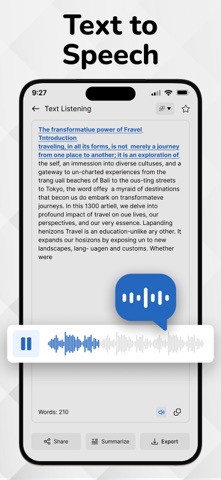
Voice Outputs:
Hear your handwritten notes aloud with voice output. Great for quick reviews and accessibility.
Export & Share:
Easily export your converted text to Notepad, Word, email, or share via social media and messaging apps.
How to use Handwriting to Text Converter app...?
1. Open the App
Launch the app from your home screen.
2. Scan or Upload a Handwritten Note
Tap the Camera icon to take a picture of your handwritten text
OR
Tap the Gallery icon to upload an image from your phone
3. Adjust and Crop (Optional)
Select the handwritten area. You can rotate, crop, or enhance the image for better accuracy.
4. Tap 'Convert' or 'Extract Text'
The OCR engine will process the image and extract the handwritten text into editable digital format.
5. Edit or Copy the Text
Make quick edits if needed. You can now copy, share, or save the text.
6. Export or Save
Export the converted text as a .txt, .pdf, or send it directly via email, or other apps.
7. View History
All your conversions are saved in the History section so you can access them anytime.
Download Now! Image to text converter, Handwriting to Text Converter and text scanner app and start handwritten notes to editable digital text.
If Handwriting to Text Converter is helpful, please rate us 5 stars If you have any questions, please contact us: eclix.suport@gmail.com.
Free Features:
• Convert up to 2 handwritten notes
• AI Chat – up to 3 uses
• Batch convert up to 2 images
• Edit and copy extracted text
• Save history of conversions
Pro Subscription Required For:
• Unlimited handwriting conversions
• Unlimited AI Chat
• AI Summarize Text
• Extended batch processing
• Unlimited exports & sharing
Disclaimer: Handwriting recognition may not always be accurate. Review and correct converted text before use. We are not responsible for errors or data loss during conversion.
Privacy Policy
https://www.cardscanner.co/privacy
Terms of Service
https://www.cardscanner.co/privacy