




AppBrain's verdict
- Last updated
- September 21, 2026
- Size
- 34.0 MB
User feedback
Ratings and reviews on the App StoreComments on Handwriting to Text Converter for iOS
We don't have enough comments to show example comments. Please check back later.
Store listing
By Adnan Munye, from the App StoreDescription by Adnan Munye Written by the developer, not by AppBrain. Click to read.
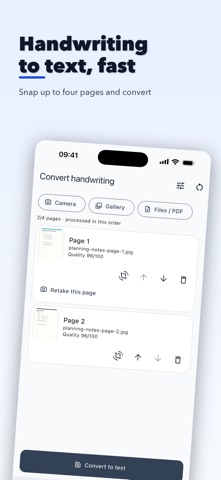
Capture a page with the camera, choose images, or import selected PDF pages. Arrange up to four pages in reading order. The Convert to text action stays visible, and Match layout is selected by default, so you can convert without choosing an output first. Open Conversion options only when you want Plain text or a language hint.
PLAIN TEXT OR MATCH LAYOUT
Plain text keeps visible wording, spelling and punctuation as written. Match layout rebuilds clear headings, paragraphs, lists, checkboxes and simple tables while keeping the source wording.
REVIEWABLE RESULTS
The converted text opens automatically in a focused result panel. Compare each source page with its transcription and review explicit uncertainty markers where writing may be unclear. Edit with undo and redo, preview the formatted result, then copy one page or the complete document.
SAVE AND USE YOUR TEXT
Save and search documents locally, share them through the system share sheet, export UTF-8 text or Markdown, read converted text aloud, and view local document, page, word and language statistics.
PRIVACY AND IMPORTANT LIMITS
Conversion uses a cloud AI service. After your permission, selected prepared pages are sent through Firebase to OpenAI. The app has no advertising, product-behaviour analytics, public sharing, or social feed. Firebase Authentication may collect limited SDK diagnostic data for service operation; no document content is sent as a product-analytics event. Documents and edits saved in the app stay in its local application storage until you delete them.
AI transcription can be incomplete or wrong. Always compare important text with the original. Do not upload passwords, payment details, identity documents, medical records, privileged legal material, or confidential records you are not authorised to process. This app is not a certified legal, medical, financial, archival, or accessibility transcription service.
Safety and technology
Found in the app by AppBrain- Price
- Free
- App size
- 34.0 MB
- Content rating
- Medium
Technologies used by Handwriting to Text Converter
Releases
Updates seen on the App Store- Version
- 1.0
- Launched
- September 2026
No changelog data
Alternatives
Similar apps and more from Adnan MunyeAlternatives to Handwriting to Text Converter


More from Adnan Munye


Rankings
App Store top chartsApp Store Rankings for Handwriting to Text Converter
About the app and developer
About Handwriting to Text Converter
Handwriting to Text Converter is a productivity app developed by Adnan Munye.
What is the rating of Handwriting to Text Converter?
Handwriting to Text Converter has no ratings yet.
Is Handwriting to Text Converter free?
Handwriting to Text Converter is free. The app size is 34.02 MB. The latest version available is 1.0. The last update was on September 21, 2026.
What are the requirements for Handwriting to Text Converter?
The app has a content rating of Medium Maturity. The app has been available on the App Store since September 2026.
Handwriting to Text Converter is made and published by Adnan Munye. AppBrain is an independent app data site and isn't affiliated with Adnan Munye. The app name, icon, screenshots and description belong to Adnan Munye and are shown as published on the App Store.
Developer information for Adnan Munye
Address:
Frequently asked questions about Handwriting to Text Converter
Is Handwriting to Text Converter free?
Yes. Handwriting to Text Converter is free on the App Store.
Is Handwriting to Text Converter still available?
Yes. Handwriting to Text Converter is on the App Store, and the last update we saw was on September 21, 2026.
How large is Handwriting to Text Converter?
Handwriting to Text Converter is 34.02 MB.
Is Handwriting to Text Converter suitable for children?
App Store gives Handwriting to Text Converter a medium maturity rating, so it is not meant for young children.
Who made Handwriting to Text Converter?
Handwriting to Text Converter was developed by Adnan Munye. It is listed in the productivity category on the App Store.
What are the best alternatives to Handwriting to Text Converter?
People looking at Handwriting to Text Converter also look at these productivity apps: The Twinkle Club, HD Document Scan - PDF Scanner, PDF Scanner: Sign Documents, Inksight: Handwriting to Text, Hindi Keyboard: Voice Typing.