

Happened: Event Logger
Happened: Event Logger is made and published by Pavel Shlyapnikov. AppBrain is an independent app data site and isn't affiliated with Pavel Shlyapnikov. The app name, icon, screenshots and description belong to Pavel Shlyapnikov and are shown as published on the App Store.
AppBrain's verdict
- Rating on App Store
- 3.67
- 3 ratings
- Last updated
- September 15, 2025
It doesn't have enough ratings yet to judge what users think.
Rankings
App Store top chartsApp Store Rankings for Happened: Event Logger
Competitors
Similar apps and more from Pavel ShlyapnikovMore from Pavel Shlyapnikov


Releases
Updates seen on the App Store- Version
- 1.5
- Launched
- July 2024
No changelog data
User feedback
Ratings and reviews on the App StoreComments on Happened: Event Logger for iOS
We don't have enough comments to show example comments. Please check back later.
Technology
Found in the app by AppBrain- Price
- Free
- App size
- 1.53 MB
- Content rating
- Everyone
Technologies used by Happened: Event Logger
About the app and developer
About Happened: Event Logger
Happened: Event Logger is an utilities app developed by Pavel Shlyapnikov.
User Ratings
Happened: Event Logger is rated 3.67 out of 5 stars. The rating is based on 3 ratings.
App Information
Happened: Event Logger is freely available from the App Store. The app size is 1.53 MB. The latest version available is 1.5. The last update was on September 15, 2025.
Technical Requirements
The app has a content rating of Everyone. The app has been available on the App Store since July 2024.
Developer information for Pavel Shlyapnikov
Address:
Frequently asked questions about Happened: Event Logger
Is Happened: Event Logger free?
Yes. Happened: Event Logger is free on the App Store.
Is Happened: Event Logger still available?
Yes. Happened: Event Logger is on the App Store, and the last update we saw was on September 15, 2025.
How large is Happened: Event Logger?
Happened: Event Logger is 1.53 MB.
Is Happened: Event Logger suitable for children?
App Store rates the content of Happened: Event Logger as suitable for everyone.
How do people rate Happened: Event Logger?
Happened: Event Logger scores 3.67 out of 5 stars, from 3 ratings on the App Store.
Who made Happened: Event Logger?
Happened: Event Logger was developed by Pavel Shlyapnikov. It is listed in the utilities category on the App Store.
Store listing
By Pavel Shlyapnikov, from the App Store

Description by Pavel Shlyapnikov Written by the developer, not by AppBrain. Click to read.
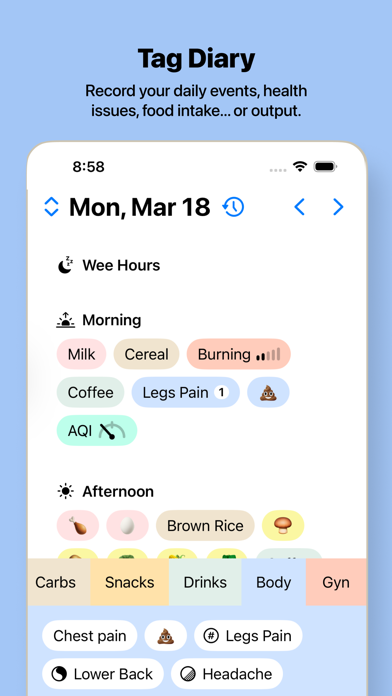
Log events happening in your life with one simple tap. Whether it’s symptoms, birdwatching, superstitions, you name it. Collect data and analyze it with metrics.
Taxonomy
The app supports four types of tags:
- Valueless: Just to log events that happened.
- Quantified: Each event has a numeric value. Users can also add a measurement unit.
- Balance: Events have a visual gauge in the range of –1 to 1. Suitable for cases such as “better or worse than the baseline”.
- Binary: Events have a true or false value, representing the outcome of an event.
Timeline
To speed up the creation and management of events, the day is divided into five parts. Tapping on a tag creates an event in the current part of today. Drag & drop tags to add events to any part of any day.
Management
Tags are categorized into groups, each with its own color. Add, edit and move your tags without losing associated events.
Analytics
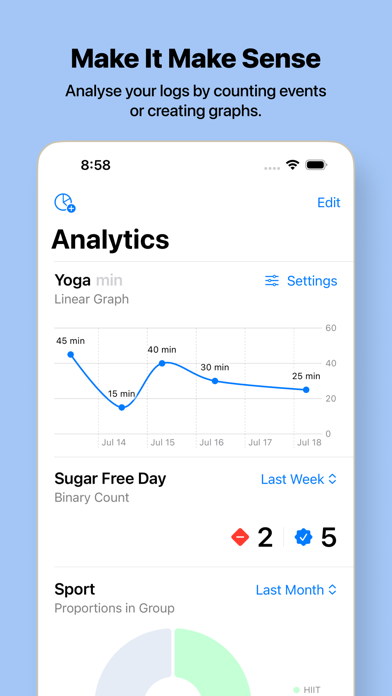
The app offers 10 types of metrics to visually represent data, including counters, min/avg/max calculators, pie charts, linear graphs, and more. Each tag type has a specific set of metrics.
Each metric can be limited by a time range: last week or the last one, three, six, or twelve months.
Convenience
- Gestures: swipe left and right on the timeline to navigate between days. Double-tap on the timeline returns to today’s view.
- Swiping right on the Tag Groups stripe reveals a sandwich glyph (three horizontal lines). Dragging it vertically changes the height of the area with tags.
- Change the order of Tag Groups and Metrics by holding and dragging them in the corresponding sections.
- The plus glyph in the tag area on the home screen allows you to quickly add a new tag to the selected group.
Privacy
All your data is stored using the CloudKit framework provided by Apple. This means it’s either stored locally on the device or in your iCloud account. For encryption, opt into Advanced Data Protection in your iCloud settings (availability may vary by region). In any case, the developer DOES NOT have access to user data. The app DOES NOT use any analytics tools, so feel free to log your sensitive data. It stays only with you and no one else.