

HappyLens is made and published by 常坤 赵. AppBrain is an independent app data site and isn't affiliated with 常坤 赵. The app name, icon, screenshots and description belong to 常坤 赵 and are shown as published on the App Store.
AppBrain's verdict
- Last updated
- October 8, 2026
- Size
- 3.66 MB
User feedback
Ratings and reviews on the App StoreComments on HappyLens for iOS
We don't have enough comments to show example comments. Please check back later.
Store listing
By 常坤 赵, from the App Store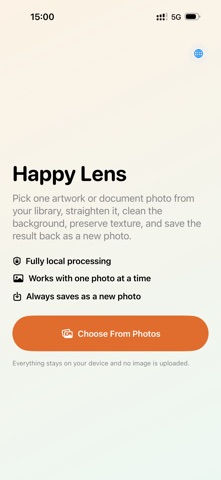


Screenshots by 常坤 赵, from the the App Store listing
Description by 常坤 赵 Written by the developer, not by AppBrain. Click to read.
Straighten artwork, homework, notes, and document photos. Clean the background, preserve paper texture, and save a new photo. All processing stays on your device.
Description
Happy Lens is a lightweight local photo cleanup tool for artwork, homework, handwritten pages, notes, and document photos.
When you take a quick photo of a paper sheet or artwork, the image is often tilted, uneven, shadowed, or surrounded by a messy background. Some scanner apps also process images too heavily, losing color, paper texture, and real brush or pencil details. Happy Lens focuses on one photo at a time, making the cleanup flow simple and fast.
Choose a photo from your library, and Happy Lens will detect the main paper or artwork area, crop the edges, and correct perspective so the result looks more straight and natural. If automatic detection is not perfect, you can manually drag the four corners to adjust the frame.
Key features:
Detect artwork or document edges automatically
Adjust the four-corner frame by hand
Correct perspective for tilted photos
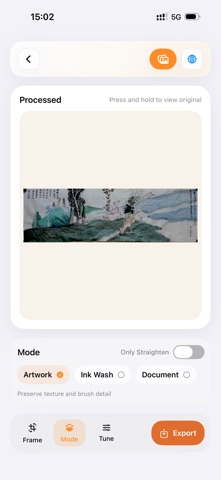
Artwork mode to preserve texture, color, and brush details
Ink Wash mode for soft ink tones and paper highlights
Document mode for cleaner pages and clearer lines
Fine-tune brightness, contrast, and background cleanup
Press and hold to compare with the original photo
Export results as new photos without replacing the original
Happy Lens does not require an account and does not rely on cloud processing. Your image processing stays on your device, and your photos are not uploaded to a server.
Great for:
Children’s drawings, crafts, homework, and practice sheets
Classroom handouts, paper notices, handwritten notes, and sketches
Artwork, ink wash, calligraphy, and document photos taken at an angle
Turning a quick photo into a cleaner image for saving or sharing
Happy Lens is not a complex scanning, OCR, or file management app. It is a quiet, focused tool for straightening one photo, cleaning the background, preserving the original feel, and saving the result back to Photos.
Description
Happy Lens is a lightweight local photo cleanup tool for artwork, homework, handwritten pages, notes, and document photos.
When you take a quick photo of a paper sheet or artwork, the image is often tilted, uneven, shadowed, or surrounded by a messy background. Some scanner apps also process images too heavily, losing color, paper texture, and real brush or pencil details. Happy Lens focuses on one photo at a time, making the cleanup flow simple and fast.
Choose a photo from your library, and Happy Lens will detect the main paper or artwork area, crop the edges, and correct perspective so the result looks more straight and natural. If automatic detection is not perfect, you can manually drag the four corners to adjust the frame.
Key features:
Detect artwork or document edges automatically
Adjust the four-corner frame by hand
Correct perspective for tilted photos
Artwork mode to preserve texture, color, and brush details
Ink Wash mode for soft ink tones and paper highlights
Document mode for cleaner pages and clearer lines
Fine-tune brightness, contrast, and background cleanup
Press and hold to compare with the original photo
Export results as new photos without replacing the original
Happy Lens does not require an account and does not rely on cloud processing. Your image processing stays on your device, and your photos are not uploaded to a server.
Great for:
Children’s drawings, crafts, homework, and practice sheets
Classroom handouts, paper notices, handwritten notes, and sketches
Artwork, ink wash, calligraphy, and document photos taken at an angle
Turning a quick photo into a cleaner image for saving or sharing
Happy Lens is not a complex scanning, OCR, or file management app. It is a quiet, focused tool for straightening one photo, cleaning the background, preserving the original feel, and saving the result back to Photos.
Safety and technology
Found in the app by AppBrain- Price
- $1.99
- App size
- 3.66 MB
- Content rating
- Everyone
Technologies used by HappyLens
Releases
Updates seen on the App Store- Version
- 1.1.0
- Launched
- June 2026
No changelog data
Alternatives
Similar apps and more from 常坤 赵Alternatives to HappyLens


More from 常坤 赵

Rankings
App Store top chartsApp Store Rankings for HappyLens
This app is not ranked
About the app and developer
About HappyLens
HappyLens is a photo & video app developed by 常坤 赵.
What is the rating of HappyLens?
HappyLens has no ratings yet.
Is HappyLens free?
HappyLens costs $1.99. The app size is 3.66 MB. The latest version available is 1.1.0. The last update was on October 8, 2026.
What are the requirements for HappyLens?
The app has a content rating of Everyone. The app has been available on the App Store since June 2026.
Developer information for 常坤 赵
Address: