

HC ROP
HC ROP is made and published by Panasonic Holdings Corporation. AppBrain is an independent app data site and isn't affiliated with Panasonic Holdings Corporation. The app name, icon, screenshots and description belong to Panasonic Holdings Corporation and are shown as published on the App Store.
AppBrain's verdict
Established- Rating on App Store
- 1.44
- 9 ratings
- Last updated
- May 28, 2025
- Size
- 40.5 MB
It doesn't have enough ratings yet to judge what users think.
User feedback
Ratings and reviews on the App StoreComments on HC ROP for iOS
We don't have enough comments to show example comments. Please check back later.
Store listing
By Panasonic Holdings Corporation, from the App Store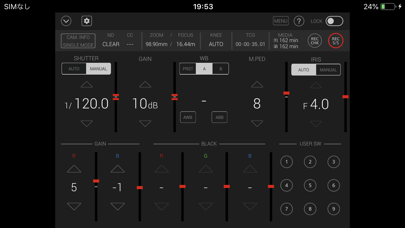

Description by Panasonic Holdings Corporation Written by the developer, not by AppBrain. Click to read.
HC ROP (HC series memory camera recorder Remote Operation Panel)
=== Description ===
HC ROP is a control program that enables the wireless remote control of the memory camera recorder "Panasonic HC-X series" and "Panasonic AG-CX series"(excluding some models).
It provides a GUI that displays status information, settings and user switch status in a single screen and the ability to change camera settings intuitively using a screen touch.
Buttons such as user buttons and REC S/S button in screen can manipulate camera recorder.
HC ROP cam manipulate one memory camera reorder by switching up to eight memory camera reorders. Please tap a "?" button to see a hint for usage of this app.
=== Applicable Model ===
HC-X1500, HC-X2000、HC-X1200、HC-X1600、HC-X1800、HC-X2100、HC-X2、HC-X20
AG-CX7, AG-CX8, AG-CX10, AG-CX98、AG-CX20、AG-CX100、AG-CX18
=== Supported OS ===
iOS 15 or later
iPadOS 15 or later
=== Features ===
1. Camera status display
- List of camera information
- ND/CC FILTER
- ZOOM/FOCUS
- KNEE
- TCG
- Remaining time of recording media
2. CONTROLLABLE FUNCTIONS
- SHUTTER (AUTO/MANUAL)
- GAIN
- WHITE BALANCE(PRE/A/B, AWB, ABB)
- MASTER PEDESTAL
- IRIS(AUTO/MANUAL)
- Painting GAIN(R/B)
- USER SW (1-9)
- MENU display and setting
- HELP
- LOCK(disable operation on HC ROP)
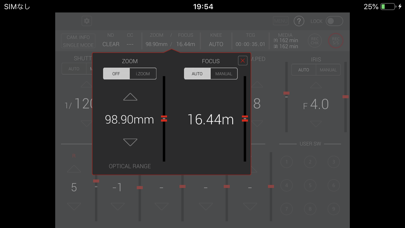
- ZOOM(i.ZOOM/i.ZOOM_OFF)
- FOCUS(AUTO/MANUAL)
- KNEE(AUTO/MANUAL(MID))
- TCG(TC/UB display and setting)
- REC CHECK
- REC Start/Stop
3. Settings and switching of a connected camera
You can set or switch connected cameras in a connect setting panel by tapping a connect manipulation button in the screen. Please refer to "CONNECTION" item by tapping "?" for details.
=== NOTE ===
(1)Permission for the local network is required since iOS14. If you cannot connect the app to the camera, make the following settings.
1. Open "Settings" on iPhone/iPad
2. Select "Privacy">"Local Network"
3. Set "HC ROP" to "ON"
(2)In iOS, camera information may not be displayed correctly on the app screen.This can be fixed by turning on airplane mode and then turning off again.
1. Close "CX ROP".
2. Select "Settings" on the device home screen
3. Turn on "Airplane mode"
4. Turn off "Airplane mode"
5. Launch "CX ROP"
*These settings need to be repeated after turning off or restarting the device.
Safety and technology
Found in the app by AppBrain- Price
- Free
- App size
- 40.5 MB
- Content rating
- Everyone
Technologies used by HC ROP
Releases
Updates seen on the App Store- Version
- 1.4
- Launched
- February 2020
No changelog data
Alternatives
Similar apps and more from Panasonic Holdings CorporationAlternatives to HC ROP








More from Panasonic Holdings Corporation



Rankings
App Store top chartsApp Store Rankings for HC ROP
About the app and developer
About HC ROP
HC ROP is a business app developed by Panasonic Holdings Corporation.
What is the rating of HC ROP?
HC ROP is rated 1.44 out of 5 stars, based on 9 ratings.
Is HC ROP free?
HC ROP is free. The app size is 40.54 MB. The latest version available is 1.4. The last update was on May 28, 2025.
What are the requirements for HC ROP?
The app has a content rating of Everyone. The app has been available on the App Store since February 2020.
Developer information for Panasonic Holdings Corporation
Panasonic Holdings Corporation
Address: