

HDMI Cam - OBS Camera
HDMI Cam - OBS Camera is made and published by 成昭 苑. AppBrain is an independent app data site and isn't affiliated with 成昭 苑. The app name, icon, screenshots and description belong to 成昭 苑 and are shown as published on the App Store.
AppBrain's verdict
- Last updated
- May 13, 2026
- Size
- 684.0 KB
User feedback
Ratings and reviews on the App StoreComments on HDMI Cam - OBS Camera for iOS
We don't have enough comments to show example comments. Please check back later.
Store listing
By 成昭 苑, from the App Store



Description by 成昭 苑 Written by the developer, not by AppBrain. Click to read.
HDMI Cam is designed for OBS streaming, video meetings, capture cards, and teaching demos. Connect your iPhone to an HDMI adapter and capture card to get a clean, watermark-free camera feed with no distracting UI.
PRO OUTPUT IN 2.0
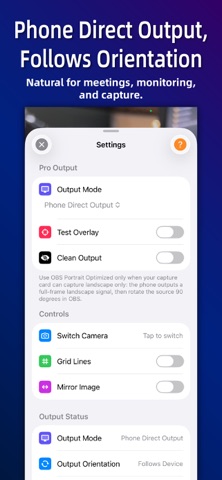
- Phone Direct Output: follows your phone orientation by default, ideal for monitoring, meetings, and regular capture.
- OBS Portrait Optimized: for capture cards that can capture landscape only. Output a full-frame landscape signal, then rotate the source 90 degrees in OBS to get a full-pixel portrait feed.
- Clean Output: hide all overlays before going live.
LIVE CONTROL
- Tap to focus, long press to lock AF/AE and avoid focus hunting or exposure jumps.
- Double tap to open Settings and quickly control camera switching, grid, mirroring, test overlay, and clean output.
- Front camera auto mirroring for better self-facing capture and portrait workflows.
TEST OVERLAY
Before going live, check device model, active camera, AF/AE status, screen orientation, output frame, battery, power connection, and thermal state.
iOS NATIVE VIDEO EFFECTS
HDMI Cam works with iOS native video effects. While the app is running, open Control Center and tap “Video Effects” to enable supported system features such as Portrait, Studio Light, and Voice Isolation.
Perfect for:
- OBS streaming and portrait live streams
- E-commerce live selling and teaching demos
- Video meetings and remote classes
- Face cam and secondary camera workflows
For best results, use an official Apple HDMI adapter or a reliable USB-C/Lightning HDMI adapter with a mainstream HDMI capture card.
Safety and technology
Found in the app by AppBrain- Price
- $1.99
- App size
- 684.0 KB
- Content rating
- Everyone
Technologies used by HDMI Cam - OBS Camera
Releases
Updates seen on the App Store- Version
- 2.0.0
- Launched
- January 2026
No changelog data
Rankings
App Store top charts- Highest rank
- #40
- Chart
- Top Paid
- Photo & Video
- Country
- India
App Store Rankings for HDMI Cam - OBS Camera
Top rankings
| Rank | Country | Category | List |
|---|---|---|---|
| 40 | India | Photo & Video | Top Paid |
Ranking history in India
About the app and developer
About HDMI Cam - OBS Camera
HDMI Cam - OBS Camera is a photo & video app developed by 成昭 苑.
User Ratings
The app has no ratings yet.
App Information
HDMI Cam - OBS Camera costs $1.99. The app size is 684.00 kB. The latest version available is 2.0.0. The last update was on May 13, 2026.
Technical Requirements
The app has a content rating of Everyone. The app has been available on the App Store since January 2026.
Developer information for 成昭 苑
Address: