HDRI Studio is a photo & video app developed by Gianluca Gatto.
What is the rating of HDRI Studio?
HDRI Studio has no ratings yet.
Is HDRI Studio free?
HDRI Studio is free to download. The download size is 153.12 MB. The latest version available is 1.0.7. The last update was on September 15, 2026.
What are the requirements for HDRI Studio?
The app has a content rating of Everyone. The app has been available on the App Store since July 2026.
Description
Turn the light around you into a relative scene-linear, 32-bit OpenEXR (.exr) environment map for image-based lighting, realistic reflections, VFX, archviz, and product rendering.
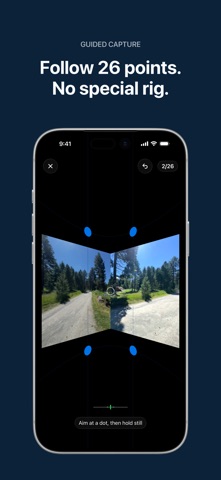
HDRI Studio guides your iPhone through 26 positions around a full sphere and automatically captures RAW exposure brackets when you are aimed and steady. Hosted processing merges the brackets, corrects the ultra-wide lens, and stitches a 360° equirectangular panorama. Save the finished .exr to Files or export it for use in any 3D or compositing tool that supports OpenEXR. No chrome ball, dedicated panorama camera, or capture rig is required.
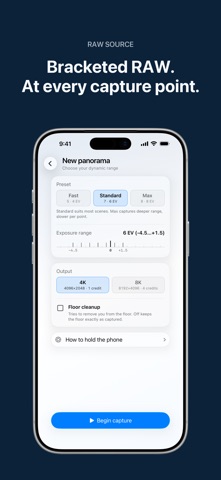
OUTPUT YOU CAN USE • RGB, 32-bit floating-point OpenEXR (.exr) • Exact 2:1 equirectangular 360° panorama • PIZ compression with linear Rec.709/D65 color metadata • 4K (4096 × 2048), with 8K (8192 × 4096) where available • Standard float channels for environment and world textures
CAPTURE WITH CONFIDENCE • Guided 26-point coverage, including zenith and nadir • Configurable RAW exposure brackets and dynamic range • Automatic capture only when aimed and steady • Locked focus and white balance across the sphere • Lens calibration and measured device pose for stitching
PREVIEW, INSPECT, EXPORT • Explore results in a swipe- and gyro-controlled 360° viewer • Adjust preview exposure from −4 to +6 EV without changing the EXR • Inspect dimensions, channels, compression, file size, peak and mean radiance, and contrast EV • Open compatible .exr files from Files and inspect them in your Library • Reprocess a saved capture at another available resolution • Export the complete original RAW bracket set plus capture metadata with Pro
FOR REAL 3D WORKFLOWS Import the .exr as an environment or world texture for: • Image-based lighting and realistic reflections • Look development and rendering • VFX and compositing • Architecture and product visualization
Use it in Blender, Unreal Engine, Nuke, Houdini, Cinema 4D, Maya, and other OpenEXR-compatible tools. Your captures remain yours to use in personal or commercial projects.
NO ACCOUNT REQUIRED Capture, Library access, previews, and downloaded EXRs do not require a subscription. Two starter render credits are included. Additional hosted renders use one-time render credits or Pro. 4K uses one credit; 8K uses four. Failed or cancelled renders return reserved credits.
Processing requires an internet connection. Captures and downloaded EXRs remain on your iPhone until you delete them. Temporary hosted results are retained privately for up to 7 days so interrupted downloads can resume.
REQUIREMENTS • iOS 17 or later • An iPhone with a RAW-capable ultra-wide camera • Internet connection for processing
Privacy Policy: https://hdristudio.app/privacy Terms of Use: https://hdristudio.app/terms Apple Standard EULA: https://www.apple.com/legal/internet-services/itunes/dev/stdeula/
Each subscription will automatically renew 3 days before the expiration date for
the same time period. Subscriptions can be cancelled at any time before the renewal.