

HeartSense: Pulse & Stress
HeartSense: Pulse & Stress is made and published by MANAGE CONSULT LTD. AppBrain is an independent app data site and isn't affiliated with MANAGE CONSULT LTD. The app name, icon, screenshots and description belong to MANAGE CONSULT LTD and are shown as published on the App Store.
AppBrain's verdict
- Rating on App Store
- 4.36
- 11 ratings
- Last updated
- November 29, 2025
It doesn't have enough ratings yet to judge what users think.
Rankings
App Store top chartsApp Store Rankings for HeartSense: Pulse & Stress
Competitors
Similar apps and more from MANAGE CONSULT LTDAlternatives to HeartSense: Pulse & Stress




Releases
Updates seen on the App Store- Version
- 1.9
- Launched
- March 2025
No changelog data
User feedback
Ratings and reviews on the App StoreComments on HeartSense: Pulse & Stress for iOS
We don't have enough comments to show example comments. Please check back later.
Technology
Found in the app by AppBrain- Price
- Free
- App size
- 33.9 MB
- Content rating
- Medium
Technologies used by HeartSense: Pulse & Stress
About the app and developer
About HeartSense: Pulse & Stress
HeartSense: Pulse & Stress is an utilities app developed by MANAGE CONSULT LTD.
User Ratings
HeartSense: Pulse & Stress is rated 4.36 out of 5 stars. The rating is based on 11 ratings.
App Information
HeartSense: Pulse & Stress is freely available from the App Store. The app size is 33.87 MB. The latest version available is 1.9. The last update was on November 29, 2025.
Technical Requirements
The app has a content rating of Medium Maturity. The app has been available on the App Store since March 2025.
Developer information for MANAGE CONSULT LTD
Address:
Store listing
By MANAGE CONSULT LTD, from the App Store


Description by MANAGE CONSULT LTD Written by the developer, not by AppBrain. Click to read.
### 1. How It Works
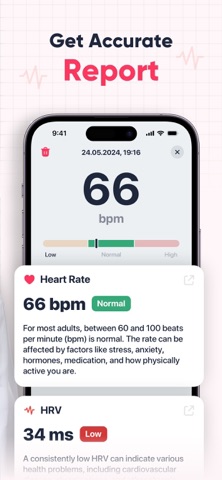
HeartSense relies on photoplethysmography, detecting subtle changes in skin color caused by blood flow with each heartbeat. By analyzing these signals, it calculates your beats per minute (BPM) and provides a rough stress indicator (low, medium, or high) based on heart rate variability (HRV).
### 2. Core Features
- **Heart Rate Measurement**: Check your BPM before or after exercise to understand how quickly you recover.
- **Stress Estimation**: Get an approximate stress level that can encourage better self-awareness, though it’s not a medical assessment.
- **History Log**: Every measurement is automatically saved with a timestamp. Feel free to add notes like “after workout” or “morning coffee.”
- **Graphs & Stats**: Review your trends over time, spotting patterns in heart rate and possible links to daily habits or stressors.
### 3. Quick Start Guide
1. **Open HeartSense** and tap “Measure Pulse.”
2. **Cover the camera lens** (and flash, if available) gently with your fingertip.
3. **Hold still** for about 10–15 seconds until the app locks onto your pulse.
4. **View Your Results**: The screen will display your BPM and an estimated stress index.
5. **Save & Analyze**: The reading is stored automatically, and you can revisit stats anytime to see how your body responds under different conditions.
### 4. Who Benefits
- **Fitness Enthusiasts**: Monitor your pulse to avoid overtraining and stay in the correct cardiovascular zone.
- **Busy Professionals**: Detect spikes in stress throughout the day and remember to take breaks.
- **Health-Conscious Individuals**: Get a clearer view of how lifestyle changes (sleep, diet, exercise) impact your heart’s performance.
### 5. Important Notes
- HeartSense is **not** a medical device, nor does it diagnose or treat any conditions.
- If you experience consistent irregularities in heart rate or unusual symptoms, seek professional advice.
- The stress indicator is approximate and serves as a general reference rather than a definitive measurement.
### 6. Data Security
All measurements remain **on your device** unless you choose to export or share them. We do not collect or distribute your personal health data to third parties.
### 7. Tips for Accuracy
- **Remain as motionless as possible** and avoid talking during readings.
- **Allow 30–60 seconds** of rest after a workout before measuring, so your heart rate can stabilize.
- **Keep the camera lens clean**, and ensure no external light sources are overly bright or reflective.
### Conclusion
HeartSense: Pulse & Stress is an accessible tool for keeping track of your heart rate and gaining insight into your stress trends. While it can guide more informed decisions regarding fitness and relaxation, remember that any serious or long-term health concerns should be addressed by a healthcare professional.
Terms of Use: https://drive.google.com/file/d/1E2p-9bi8At4pAJnLP2nmXhB4_yitD3u5/view
Privacy Policy: https://drive.google.com/file/d/1019qmdmgBDM4Kh-LCEdL2pw4Jbs9hPWb/view