

Hecate - PC Remote Control
Hecate - PC Remote Control is made and published by Maxim Yakovlev. AppBrain is an independent app data site and isn't affiliated with Maxim Yakovlev. The app name, icon, screenshots and description belong to Maxim Yakovlev and are shown as published on the App Store.
AppBrain's verdict
- Rating on App Store
- 5.00
- 4 ratings
- Last updated
- October 30, 2023
- Size
- 30.9 MB
It doesn't have enough ratings yet to judge what users think.
User feedback
Ratings and reviews on the App StoreComments on Hecate - PC Remote Control for iOS
We don't have enough comments to show example comments. Please check back later.
Store listing
By Maxim Yakovlev, from the App Store
Description by Maxim Yakovlev Written by the developer, not by AppBrain. Click to read.
Here's a closer look at some of the key features of Hecate:
• Mouse control:
With Hecate, you can control the mouse on your computer using your phone. You can click the left and right mouse buttons by tapping on the touchpad area, and you can use two-finger swipes to simulate mouse wheel up/down movements.
• Type text from your phone:
Hecate allows you to type text on your phone and have it instantly appear on your computer's screen. Simply click on the keyboard icon in the app and start typing.
• Launch applications from the taskbar:
Hecate makes it easy to launch applications on your computer that are pinned to the taskbar (to the right of the start button). You can simply select the application from the Hecate app on your phone and it will open on your computer.
• Computer volume control:
Hecate allows you to adjust the volume on your computer directly from your phone. You can also use Hecate to control the playback of media on your computer, with the ability to skip tracks, play/pause, and more.
• Sending links from phone to computer:
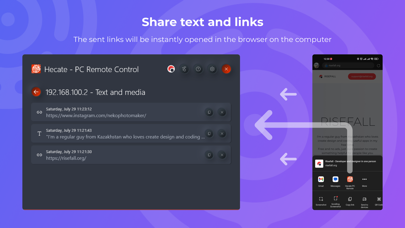
Hecate makes it easy to send links from your phone to your computer. Simply click on the "Share" icon in any browser on your phone and select Hecate - PC Remote Control. The link will immediately open in a browser on your computer.
• Send text from phone to computer:
With Hecate, you can easily send text from your phone to your computer. Simply highlight the text you want to send, click on the ellipsis, then click on the "Share" icon and select Hecate - PC Remote Control. The text will be copied to your computer's clipboard.
• Access to the history of sent data:
Hecate keeps a record of all the data that you have sent from your phone to your computer, so you can easily access it later.
• Connecting multiple devices:
Hecate allows you to connect multiple devices to your computer, so you can control your PC from multiple phones if you want.
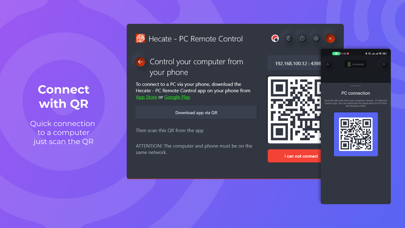
To use Hecate - PC Remote Control, your phone and PC must be on the same network. For example, if your computer is connected to your home network via cable or Wi-Fi, your phone must also be connected to the same Wi-Fi network in order to use Hecate.
Overall, Hecate - PC Remote Control is a versatile and convenient app that allows you to easily control your PC from your phone. You can download Hecate - PC Remote Control for your computer from the Windows Store.
Install Hecate - PC Remote Control for your computer from Windows Store:
https://apps.microsoft.com/store/detail/hecate-pc-remote-control/9MXQTF885MJP
Safety and technology
Found in the app by AppBrain- Price
- Free
- App size
- 30.9 MB
- Content rating
- Everyone
Technologies used by Hecate - PC Remote Control
Releases
Updates seen on the App Store- Version
- 1.6.0
- Launched
- October 2022
No changelog data
Alternatives
Similar apps and more from Maxim Yakovlev







Rankings
App Store top chartsApp Store Rankings for Hecate - PC Remote Control
About the app and developer
About Hecate - PC Remote Control
Hecate - PC Remote Control is an utilities app developed by Maxim Yakovlev.
What is the rating of Hecate - PC Remote Control?
Hecate - PC Remote Control is rated 5.00 out of 5 stars, based on 4 ratings.
Is Hecate - PC Remote Control free?
Hecate - PC Remote Control is free. The app size is 30.89 MB. The latest version available is 1.6.0. The last update was on October 30, 2023.
What are the requirements for Hecate - PC Remote Control?
The app has a content rating of Everyone. The app has been available on the App Store since October 2022.
Developer information for Maxim Yakovlev
Address:
Frequently asked questions about Hecate - PC Remote Control
Is Hecate - PC Remote Control free?
Yes. Hecate - PC Remote Control is free on the App Store.
Is Hecate - PC Remote Control still available?
Yes. Hecate - PC Remote Control is on the App Store, and the last update we saw was on October 30, 2023.
How large is Hecate - PC Remote Control?
Hecate - PC Remote Control is 30.89 MB.
Is Hecate - PC Remote Control suitable for children?
App Store rates the content of Hecate - PC Remote Control as suitable for everyone.
How do people rate Hecate - PC Remote Control?
Hecate - PC Remote Control scores 5.00 out of 5 stars, from 4 ratings on the App Store.
Who made Hecate - PC Remote Control?
Hecate - PC Remote Control was developed by Maxim Yakovlev. It is listed in the utilities category on the App Store.
What are the best alternatives to Hecate - PC Remote Control?
People looking at Hecate - PC Remote Control also look at these utilities apps: Onkyo X-MD20, HEBI Mobile I/O, PC Pointer, PO Contacts, Paranoia File Encryption PRO.