

Heic to PDF - Image Converter
Heic to PDF - Image Converter is made and published by Anna Wrobel. AppBrain is an independent app data site and isn't affiliated with Anna Wrobel. The app name, icon, screenshots and description belong to Anna Wrobel and are shown as published on the App Store.
AppBrain's verdict
- Last updated
- July 2, 2026
Rankings
App Store top chartsApp Store Rankings for Heic to PDF - Image Converter
Releases
Updates seen on the App Store- Version
- 1.1
- Launched
- December 2025
No changelog data
User feedback
Ratings and reviews on the App StoreComments on Heic to PDF - Image Converter for iOS
We don't have enough comments to show example comments. Please check back later.
Technology
Found in the app by AppBrain- Price
- Free
- App size
- 26.6 MB
- Content rating
- Everyone
Technologies used by Heic to PDF - Image Converter
About the app and developer
About Heic to PDF - Image Converter
Heic to PDF - Image Converter is a productivity app developed by Anna Wrobel.
User Ratings
The app has no ratings yet.
App Information
Heic to PDF - Image Converter is freely available from the App Store. The app size is 26.62 MB. The latest version available is 1.1. The last update was on July 2, 2026.
Technical Requirements
The app has a content rating of Everyone. The app has been available on the App Store since December 2025.
Developer information for Anna Wrobel
Address:
Frequently asked questions about Heic to PDF - Image Converter
Is Heic to PDF - Image Converter free?
Yes. Heic to PDF - Image Converter is free on the App Store.
Is Heic to PDF - Image Converter still available?
Yes. Heic to PDF - Image Converter is on the App Store, and the last update we saw was on July 2, 2026.
How large is Heic to PDF - Image Converter?
Heic to PDF - Image Converter is 26.62 MB.
Is Heic to PDF - Image Converter suitable for children?
App Store rates the content of Heic to PDF - Image Converter as suitable for everyone.
Who made Heic to PDF - Image Converter?
Heic to PDF - Image Converter was developed by Anna Wrobel. It is listed in the productivity category on the App Store.
Store listing
By Anna Wrobel, from the App Store


Description by Anna Wrobel Written by the developer, not by AppBrain. Click to read.
The app supports multiple conversion options, allowing you to convert HEIC and other image formats to PDF and additional formats depending on your needs. You can choose the output quality and enable metadata preservation to keep important image information during conversion.
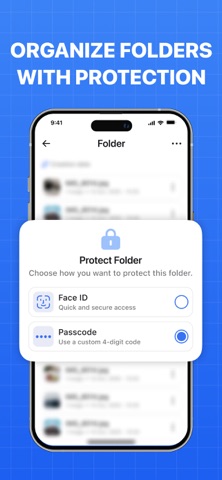
For better organization, the app includes folders to manage your files. Selected folders can be protected with app-level security, helping keep your converted content private and organized.
Key features:
• Multiple image conversion formats
• HEIC to PDF conversion
• Adjustable output quality
• Option to preserve image metadata
• File organization with folders
• Folder protection for additional privacy
All features are available through a subscription.
You can start with a free trial. The subscription automatically renews unless canceled at least 24 hours before the end of the current period.
You can manage or cancel your subscription at any time in your App Store account settings.
privacy - https://docs.google.com/document/d/1CNXddO0ZCyXzFDMX8_URz4xGjI31yIIx5HO7S4qIUoc/edit?usp=sharing
terms - https://docs.google.com/document/d/12lG40IGrkcQy3JjTbLn0mLDoh4kiwrxzIz8iftP_QV4/edit?usp=sharing