

Heliochron is made and published by ViSSee AG. AppBrain is an independent app data site and isn't affiliated with ViSSee AG. The app name, icon, screenshots and description belong to ViSSee AG and are shown as published on the App Store.
AppBrain's verdict
- Best rank
- #87
- Top Paid, Switzerland
- Last updated
- September 30, 2026
Rankings
App Store top charts- Highest rank
- #87
- Chart
- Top Paid
- Utilities
- Country
- Switzerland
App Store Rankings for Heliochron
Top rankings
| Rank | Country | Category | List |
|---|---|---|---|
| 87 | Switzerland | Utilities | Top Paid |
Ranking history in Switzerland
Competitors
Similar apps and more from ViSSee AGAlternatives to Heliochron


More from ViSSee AG

Releases
Updates seen on the App Store- Version
- 1.0.2
- Launched
- September 2026
No changelog data
User feedback
Ratings and reviews on the App StoreComments on Heliochron for iOS
We don't have enough comments to show example comments. Please check back later.
Technology
Found in the app by AppBrain- Price
- $0.99
- App size
- 28.5 MB
- Content rating
- Everyone
Technologies used by Heliochron
About the app and developer
About Heliochron
Heliochron is an utilities app developed by ViSSee AG.
User Ratings
The app has no ratings yet.
App Information
Heliochron costs $0.99. The app size is 28.49 MB. The latest version available is 1.0.2. The last update was on September 30, 2026.
Technical Requirements
The app has a content rating of Everyone. The app has been available on the App Store since September 2026.
Developer information for ViSSee AG
Address:
Store listing
By ViSSee AG, from the App Store


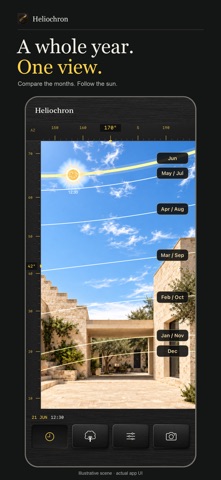
Screenshots by ViSSee AG, from the the App Store listing
Description by ViSSee AG Written by the developer, not by AppBrain. Click to read.
Follow the sun. Look at a familiar place differently.
Heliochron is a pocket instrument for light, time, and place. Use the AR view to see the calculated sun path over your surroundings, then explore the day and year with two slim, tactile thumbwheels.
Notice a courtyard on an architectural walk. Explore a roofline in another season. Look from a possible planter position, or find a reason to return to a favorite view.
THE PLACE COMES FIRST
On first launch, a short explanation shows why location and camera access are useful. Sun calculations happen on your iPhone, without uploading your location. Allow access to start exploring, or enter coordinates manually in Settings. Narrow azimuth and elevation rulers leave room for the world outside.
TIME AT YOUR FINGERTIPS
Use Sun to change the time of day and date with separate black-metal wheels. Compare seasonal paths or return to Now with a tap. With obstacle editing off, drag the sun or its path to explore another time; the wheels follow your movement.
COMPARE THE YEAR
Turn on Year paths in Sun to compare seven representative trajectories, pairing months with similar sun paths. Month labels start in a column on the right and can be dragged along their paths. The overlay starts off and remembers your choice. The paths approximate the 21st of the first named month.
MARK WHAT STANDS IN THE WAY
Optionally paint trees, buildings, or hills with your finger. Fine diagonal hatching shows your marks, and the sun path dims behind them. Open Obstacles to paint, erase, undo, adjust the brush, or save and restore a named place.
KEEP THE VIEW
Tap the camera button to save the current sun view, including the camera scene, path, and obstacle marks, to Photos. Photos access is requested only when saving. Saved places and drawings stay locally on your iPhone. No account is required.
STAY CURIOUS. KNOW THE LIMITS.
Heliochron shows calculated sun positions, not weather or shadows moving across buildings. Obstacle painting is manual, not automatic detection. Marks describe one viewpoint and need checking when you move or return. Alignment depends on location, compass heading, camera tracking, and conditions. Settings includes compass correction and tracking recovery.
Avoid pointing the camera directly at the sun for prolonged periods: this may damage the camera. The in-app warning and camera pause are reminders, not physical protection. Pausing capture cannot block sunlight; turn the lens away.
For architects and urban planners exploring off duty, garden and balcony growers, and anyone who enjoys looking closer. Not a certified survey, building-compliance, PV-design, or professional solar-assessment tool.
Heliochron is a pocket instrument for light, time, and place. Use the AR view to see the calculated sun path over your surroundings, then explore the day and year with two slim, tactile thumbwheels.
Notice a courtyard on an architectural walk. Explore a roofline in another season. Look from a possible planter position, or find a reason to return to a favorite view.
THE PLACE COMES FIRST
On first launch, a short explanation shows why location and camera access are useful. Sun calculations happen on your iPhone, without uploading your location. Allow access to start exploring, or enter coordinates manually in Settings. Narrow azimuth and elevation rulers leave room for the world outside.
TIME AT YOUR FINGERTIPS
Use Sun to change the time of day and date with separate black-metal wheels. Compare seasonal paths or return to Now with a tap. With obstacle editing off, drag the sun or its path to explore another time; the wheels follow your movement.
COMPARE THE YEAR
Turn on Year paths in Sun to compare seven representative trajectories, pairing months with similar sun paths. Month labels start in a column on the right and can be dragged along their paths. The overlay starts off and remembers your choice. The paths approximate the 21st of the first named month.
MARK WHAT STANDS IN THE WAY
Optionally paint trees, buildings, or hills with your finger. Fine diagonal hatching shows your marks, and the sun path dims behind them. Open Obstacles to paint, erase, undo, adjust the brush, or save and restore a named place.
KEEP THE VIEW
Tap the camera button to save the current sun view, including the camera scene, path, and obstacle marks, to Photos. Photos access is requested only when saving. Saved places and drawings stay locally on your iPhone. No account is required.
STAY CURIOUS. KNOW THE LIMITS.
Heliochron shows calculated sun positions, not weather or shadows moving across buildings. Obstacle painting is manual, not automatic detection. Marks describe one viewpoint and need checking when you move or return. Alignment depends on location, compass heading, camera tracking, and conditions. Settings includes compass correction and tracking recovery.
Avoid pointing the camera directly at the sun for prolonged periods: this may damage the camera. The in-app warning and camera pause are reminders, not physical protection. Pausing capture cannot block sunlight; turn the lens away.
For architects and urban planners exploring off duty, garden and balcony growers, and anyone who enjoys looking closer. Not a certified survey, building-compliance, PV-design, or professional solar-assessment tool.