

Hense: Kanban Task Board
Hense: Kanban Task Board is made and published by Alan Daniel Avalos Hernandez. AppBrain is an independent app data site and isn't affiliated with Alan Daniel Avalos Hernandez. The app name, icon, screenshots and description belong to Alan Daniel Avalos Hernandez and are shown as published on the App Store.
AppBrain's verdict
- Rating on App Store
- 5.00
- 1 ratings
- Last updated
- October 26, 2026
It doesn't have enough ratings yet to judge what users think.
Rankings
App Store top chartsApp Store Rankings for Hense: Kanban Task Board
Competitors
Similar apps and more from Alan Daniel Avalos HernandezMore from Alan Daniel Avalos Hernandez

Releases
Updates seen on the App Store- Version
- 1.2.4
- Launched
- January 2026
No changelog data
User feedback
Ratings and reviews on the App StoreComments on Hense: Kanban Task Board for iOS
We don't have enough comments to show example comments. Please check back later.
Technology
Found in the app by AppBrain- Price
- Free
- App size
- 8.88 MB
- Content rating
- Everyone
Technologies used by Hense: Kanban Task Board
About the app and developer
About Hense: Kanban Task Board
Hense: Kanban Task Board is a productivity app developed by Alan Daniel Avalos Hernandez.
What is the rating of Hense: Kanban Task Board?
Hense: Kanban Task Board is rated 5.00 out of 5 stars, based on one rating ratings.
Is Hense: Kanban Task Board free?
Hense: Kanban Task Board is free. The app size is 8.88 MB. The latest version available is 1.2.4. The last update was on October 26, 2026.
What are the requirements for Hense: Kanban Task Board?
The app has a content rating of Everyone. The app has been available on the App Store since January 2026.
Developer information for Alan Daniel Avalos Hernandez
Address:
Store listing
By Alan Daniel Avalos Hernandez, from the App Store


Description by Alan Daniel Avalos Hernandez Written by the developer, not by AppBrain. Click to read.
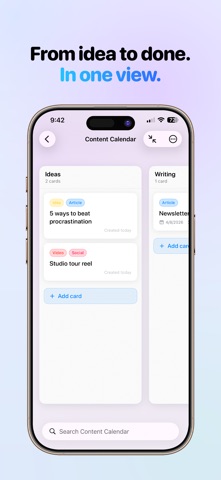
Hense: Kanban Task Board brings beautiful, tactile Kanban boards to iPhone, iPad, and Mac. Free to start. Pro is a one-time unlock, with no subscription, no account, and no data on anyone else's servers.
◆ SEE EVERYTHING AT A GLANCE
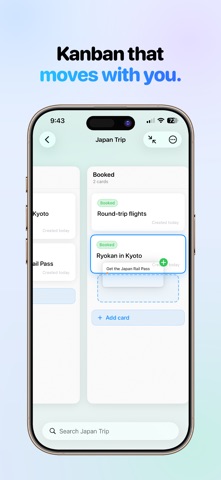
Drag and drop cards between columns to move work forward. Feel a satisfying tap with every move, and watch smooth animations bring your board to life. Whether you are planning a product launch, a trip, or your week, your boards adapt to the way you think. Attach a photo or file to any card, so every detail lives right where the work does.
◆ NATIVE ON iPad, Mac, AND iPhone Duo
Your board list lives in a sidebar, one tap from your work. On Mac, open any board in its own window and work side by side. Long-press, or right-click on Mac, any board, column, or card for quick actions, and move through everything with full keyboard shortcuts and menus. On iPhone Duo, unfold to see your boards in a sidebar beside the open board, then fold and keep working right where you left off.
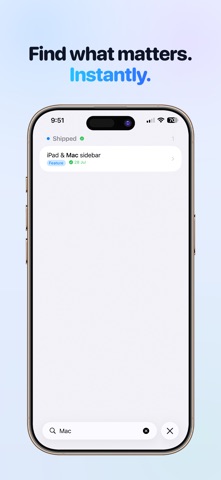
◆ FIND ANYTHING INSTANTLY
Search your boards and jump straight to the card you need. Pro adds global search across every board, plus filters like label: and column: to narrow results to exactly what matters.
◆ YOURS, AND PRIVATE
No account to create, no passwords to remember, no data stored on anyone else's servers. iCloud keeps every device in sync automatically, so your boards are always with you and always your own.
◆ HENSE PRO
One purchase removes every limit and unlocks the full toolkit: copy boards, columns, and cards across projects, mark columns as done, search every board at once, and filter with advanced operators. No subscription. No recurring fees. Yours to keep, with free updates.
◆ FREE INCLUDES
‣ 2 boards, up to 5 columns each
‣ 3 labels per board, checklists on every card
‣ Attach a photo or file to any card
‣ Drag and drop with haptic feedback
‣ Board search and multiple view modes (iPhone)
‣ Sidebar, board windows, and keyboard shortcuts on iPad and Mac
‣ Automatic iCloud sync across all your devices
‣ Universal app for iPhone, iPad, and Mac
‣ No account required. Private by design.
◆ HENSE PRO ADDS
‣ Unlimited boards, columns, labels, checklist items, and attachments
‣ Copy boards, columns, and cards
‣ End-state columns for finished work
‣ Global search across every board
‣ Advanced filters with column: and label:
Create your first board in minutes. No tutorial needed. Just add a few columns and start moving cards.