

0.00
0 reviews
Free

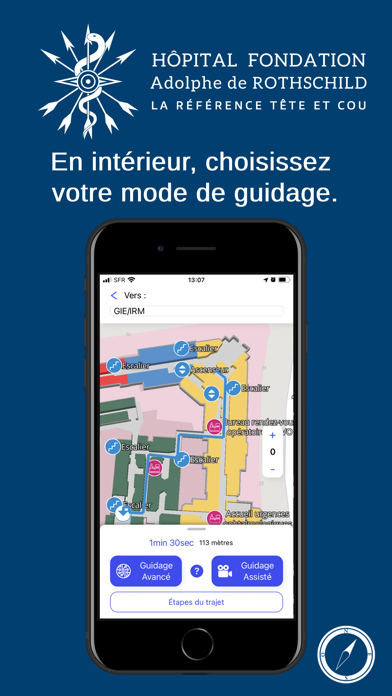
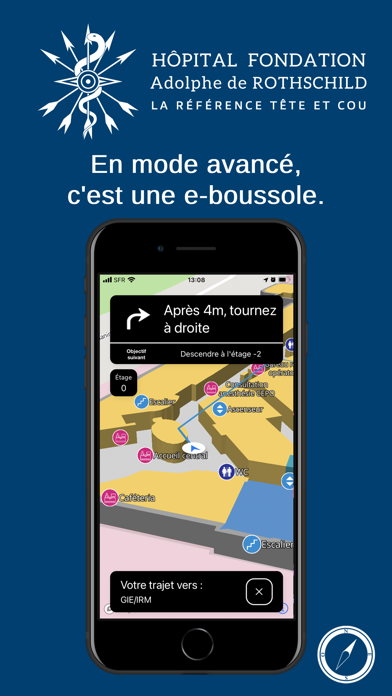

Screenshots by Solo Agilis, from the the App Store listing
AppBrain's verdict
- Last updated
- January 5, 2026
- Size
- 121.0 MB
User feedback
Ratings and reviews on the App StoreComments on HFAR_GPS for iOS
We don't have enough comments to show example comments. Please check back later.
Store listing
By Solo Agilis, from the App StoreDescription by Solo Agilis Written by the developer, not by AppBrain. Click to read.
HFAR_GPS, l’application de l’hôpital Fondation Rothschild est votre agenda de RDV mais aussi votre copilote au sein de l’établissement. Si vous ne savez pas comment vous rendre dans un service, HFAR_GPS vous y guidera (https://youtu.be/vqcRB_wqQR0).
Connectez-vous et récupérez la liste de vos RDV médicaux. Vous êtes déjà connecté(e), rafraîchissez la liste (↻) et lancez le guidage (▶).
Vous êtes perdus ? Cliquez sur “Trouvez-moi”. L’aventurier vous aidera à définir votre itinéraire.
Depuis chez vous, utilisez l’application comme n’importe quelle autre application GPS.
Depuis l’intérieur de l’hôpital, utilisez votre téléphone comme une boussole.
Choisissez entre les deux modes de guidage et suivez les instructions de l’aventurier. En fonction de l’état des capteurs de votre téléphone et de vos autorisations, il vous demandera d’effectuer certaines actions.
En mode avancé, il utilise les informations provenant des capteurs de votre téléphone pour suivre ses mouvements. Il considère que les mouvements du téléphone sont les vôtres. Pour cette raison, tenez le bien à plat devant vous comme une boussole pendant une course d’orientation.
En mode assisté, il prend la main sur tout. Vous êtes alors plus libre de tenir votre téléphone comme vous le voulez. Une fois votre vitesse réglée, vous n’avez plus qu’à lui dire que vous démarrez ou arrêtez votre parcours, et à vérifier que vous suivez les étapes à chaque intersection.
Dans tous les cas, ne vous inquiétez pas ! En cas de besoin, l’aventurier vous questionne. Pour améliorer votre expérience, il vous faudra peut-être corriger votre position de départ ou l’informer de votre changement d’étage.
En dehors de la Salle de conférence -1, du Secrétariat caputo, des accueils Consultation ophtalmologie spécialisée, des zones 1 et 2 de l’ophtalmologie spécialisée, des urgences ophtalmiques, du Bureau des RDV opératoires, de la Consultation neurochirurgie adulte et unité de traitement douleur, de l’Entrée principale, de l’Accueil central, de l’Entrée accueil dentaire et de la Sortie principale, l’aventurier n’est pas toujours certain de votre position. Il vous demandera alors de choisir votre position parmi une liste d’endroit possible ou alors de cliquer sur la carte pour renseigner votre position. Par ailleurs, si les conditions de température ne sont pas optimales ou si votre baromètre est fatigué, vous aurez peut-être à confirmer que vous êtes arrivé à l’étage de votre destination.
Dans tous les cas, faites attention, vous seuls voyez les obstacles que vous rencontrez. L’aventurier ne stocke ni envoi d’information sans votre consentement. Il n’utilise pas la caméra pour traquer vos déplacements et ceux des gens autour de vous. Il ne tient compte que des signaux des capteurs émis par votre téléphone et pas ceux du voisin. Ainsi, il ne voit pas si quelqu’un est devant vous, si une marche est sur votre chemin, etc. Au pire, dans certaine situation et si vous le permettez, il lit un panneau d’indication pour vous géolocaliser.
Safety and technology
Found in the app by AppBrain- Price
- Free
- App size
- 121.0 MB
- Content rating
- Everyone
Technologies used by HFAR_GPS
Releases
Updates seen on the App Store- Version
- 2.1.1
- Launched
- April 2021
No changelog data
Alternatives
Similar apps and more from Solo AgilisAlternatives to HFAR_GPS





More from Solo Agilis


Rankings
App Store top chartsApp Store Rankings for HFAR_GPS
This app is not ranked
About the app and developer
About HFAR_GPS
HFAR_GPS is a navigation app developed by Solo Agilis.
What is the rating of HFAR_GPS?
HFAR_GPS has no ratings yet.
Is HFAR_GPS free?
HFAR_GPS is free. The app size is 120.98 MB. The latest version available is 2.1.1. The last update was on January 5, 2026.
What are the requirements for HFAR_GPS?
The app has a content rating of Everyone. The app has been available on the App Store since April 2021.
HFAR_GPS is made and published by Solo Agilis. AppBrain is an independent app data site and isn't affiliated with Solo Agilis. The app name, icon, screenshots and description belong to Solo Agilis and are shown as published on the App Store.
Developer information for Solo Agilis
Address: