

SecretShot: Secure Photo Vault
SecretShot: Secure Photo Vault is made and published by Volodymyr Zorin. AppBrain is an independent app data site and isn't affiliated with Volodymyr Zorin. The app name, icon, screenshots and description belong to Volodymyr Zorin and are shown as published on the App Store.
AppBrain's verdict
- Last updated
- October 12, 2026
Rankings
App Store top chartsApp Store Rankings for SecretShot: Secure Photo Vault
Competitors
Similar apps and more from Volodymyr ZorinMore from Volodymyr Zorin

Releases
Updates seen on the App Store- Version
- 1.2.1
- Launched
- April 2026
No changelog data
User feedback
Ratings and reviews on the App StoreComments on SecretShot: Secure Photo Vault for iOS
We don't have enough comments to show example comments. Please check back later.
Technology
Found in the app by AppBrain- Price
- Free
- App size
- 28.8 MB
- Content rating
- Medium
Technologies used by SecretShot: Secure Photo Vault
About the app and developer
About SecretShot: Secure Photo Vault
SecretShot: Secure Photo Vault is an utilities app developed by Volodymyr Zorin.
User Ratings
The app has no ratings yet.
App Information
SecretShot: Secure Photo Vault is freely available from the App Store. The app size is 28.81 MB. The latest version available is 1.2.1. The last update was on October 12, 2026.
Technical Requirements
The app has a content rating of Medium Maturity. The app has been available on the App Store since April 2026.
Developer information for Volodymyr Zorin
Address:
Store listing
By Volodymyr Zorin, from the App Store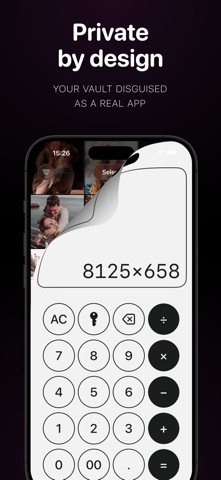



Description by Volodymyr Zorin Written by the developer, not by AppBrain. Click to read.
NO CLOUD. NO ACCOUNT. NO ADS.
Your files never leave your iPhone. No sign-up, no email, no server. Media is stored outside the Photos library and excluded from iCloud backup. Only your PIN and Recovery Key open the vault.
DISGUISE MODE
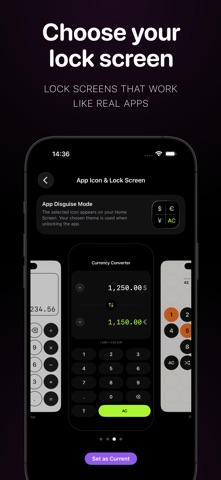
Pick how SecretShot looks: a working calculator, a currency converter, or a 15-puzzle game. Each disguise comes with a matching Home Screen icon. Type your PIN inside the disguise and the vault opens. Anyone else just sees a calculator.
LOCK INSTANTLY
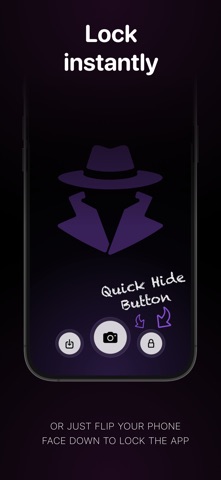
Tap the lock button, or flip your iPhone face down. SecretShot locks in under a second and can jump straight to Maps, App Store, Safari, or Calendar.
BREAK-IN REPORT
Wrong PIN? SecretShot logs the attempt and can silently take a photo with the front camera (with your permission). See exactly who tried and when.
BUILT-IN CAMERA
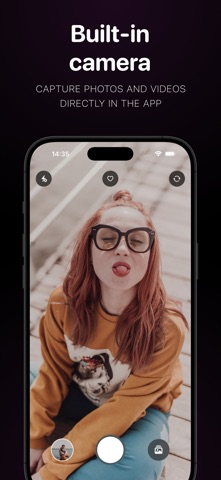
Shoot photos and videos directly inside the vault. They never touch your Photos library.
IMPORT FROM PHOTOS
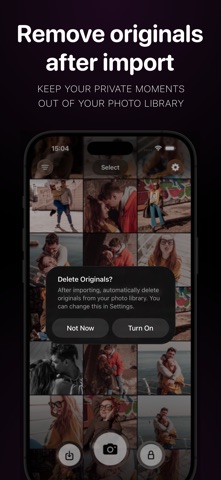
Move existing photos and videos into SecretShot in original quality, and optionally delete the originals from Photos in the same step.
HOW IT WORKS
1. Set a 4-digit PIN and save your Recovery Key.
2. Choose a disguise and its icon.
3. Import or capture. Flip the phone to lock.
RECOVERY KEY
Your Recovery Key resets the PIN if you forget it. Store it somewhere safe. Without it, the vault cannot be opened, and neither can we.
SECRETSHOT PRO
Every disguise, Face Down lock and the Break-in log are free. Pro unlocks unlimited photos and videos and shows the intruder photos in your Break-in Report. Start with a 3-day free trial on the yearly plan, or pay weekly. Cancel anytime in Settings.
Download SecretShot and keep the Hidden album for things that are only slightly hidden.
Terms of Use (EULA): https://secretshot.zorrinapps.com/terms/
Privacy Policy: https://secretshot.zorrinapps.com/privacy/