

Hiragana blocks
Hiragana blocks is made and published by hiroyuki uchida. AppBrain is an independent app data site and isn't affiliated with hiroyuki uchida. The app name, icon, screenshots and description belong to hiroyuki uchida and are shown as published on the App Store.
AppBrain's verdict
Established- Rating on App Store
- 5.00
- 2 ratings
- Last updated
- January 13, 2026
It doesn't have enough ratings yet to judge what users think.
Rankings
App Store top chartsApp Store Rankings for Hiragana blocks
Competitors
Similar apps and more from hiroyuki uchidaAlternatives to Hiragana blocks




More from hiroyuki uchida





Releases
Updates seen on the App Store- Version
- 00.00.33
- Launched
- January 2016
No changelog data
User feedback
Ratings and reviews on the App StoreComments on Hiragana blocks for iOS
We don't have enough comments to show example comments. Please check back later.
Technology
Found in the app by AppBrain- Price
- Free
- App size
- 162.5 MB
- Content rating
- Everyone
Technologies used by Hiragana blocks
About the app and developer
About Hiragana blocks
Hiragana blocks is an education app developed by hiroyuki uchida.
User Ratings
Hiragana blocks is rated 5.00 out of 5 stars. The rating is based on 2 ratings.
App Information
Hiragana blocks is freely available from the App Store. The app size is 162.51 MB. The latest version available is 00.00.33. The last update was on January 13, 2026.
Technical Requirements
The app has a content rating of Everyone. The app has been available on the App Store since January 2016.
Developer information for hiroyuki uchida
Address:
Store listing
By hiroyuki uchida, from the App Store


Description by hiroyuki uchida Written by the developer, not by AppBrain. Click to read.
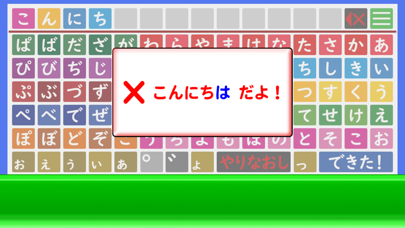
When you line up the hiragana character blocks and tap them, a sound will play. (When you tap "a", it will make an "a" sound.
When you tap the “できた!” button, the blocks you've arranged will be read out loud.
Up to 13 characters can be arranged.
For characters that do not have a voiced consonant, "゛", or semi-voiced consonant, "゜", the message "× That can't be used" will be displayed to let you know.
For characters that do not have a lowercase "ya", "yu", or "yo", the message "× That can't be used" will be displayed to let you know.
For characters that are not suitable as the first character, such as "wo", "n", "-", or lowercase "aiueo, yayuyo, tsu", the message "× That can't be used" will be displayed to let you know.
For "konnichiwa" and "konbanwa", an error message will be displayed saying it is "ha".
If you want to erase one character, tap the × button in the upper right and it will erase that character.
If you want to erase all of them, tap the “やりなおし” button in the lower left and they will all erase.
※Sound source used with permission from Amitalo's Voice Material Studio.