

Ho-Chunk Dictionary
Ho-Chunk Dictionary is made and published by The Language Conservancy, Inc. AppBrain is an independent app data site and isn't affiliated with The Language Conservancy, Inc. The app name, icon, screenshots and description belong to The Language Conservancy, Inc. and are shown as published on the App Store.
AppBrain's verdict
- Rating on App Store
- 4.82
- 11 ratings
- Last updated
- January 25, 2026
It doesn't have enough ratings yet to judge what users think.
Rankings
App Store top chartsApp Store Rankings for Ho-Chunk Dictionary
Competitors
Similar apps and more from The Language Conservancy, Inc.Alternatives to Ho-Chunk Dictionary





More from The Language Conservancy, Inc.







Also available on Google Play

Releases
Updates seen on the App Store- Version
- 2.1.1
- Launched
- July 2022
No changelog data
User feedback
Ratings and reviews on the App StoreComments on Ho-Chunk Dictionary for iOS
We don't have enough comments to show example comments. Please check back later.
Technology
Found in the app by AppBrain- Price
- Free
- App size
- 898.4 MB
- Content rating
- Everyone
Technologies used by Ho-Chunk Dictionary
About the app and developer
About Ho-Chunk Dictionary
Ho-Chunk Dictionary is an education app developed by The Language Conservancy, Inc.
User Ratings
Ho-Chunk Dictionary is rated 4.82 out of 5 stars. The rating is based on 11 ratings.
App Information
Ho-Chunk Dictionary is freely available from the App Store. The app size is 898.41 MB. The latest version available is 2.1.1. The last update was on January 25, 2026.
Technical Requirements
The app has a content rating of Everyone. The app has been available on the App Store since July 2022.
Developer information for The Language Conservancy, Inc.
The Language Conservancy, Inc.
Address:
Frequently asked questions about Ho-Chunk Dictionary
Is Ho-Chunk Dictionary free?
Yes. Ho-Chunk Dictionary is free on the App Store.
Is Ho-Chunk Dictionary still available?
Yes. Ho-Chunk Dictionary is on the App Store, and the last update we saw was on January 25, 2026.
How large is Ho-Chunk Dictionary?
Ho-Chunk Dictionary is 898.41 MB.
Is Ho-Chunk Dictionary suitable for children?
App Store rates the content of Ho-Chunk Dictionary as suitable for everyone.
How do people rate Ho-Chunk Dictionary?
Ho-Chunk Dictionary scores 4.82 out of 5 stars, from 11 ratings on the App Store.
Who made Ho-Chunk Dictionary?
Ho-Chunk Dictionary was developed by The Language Conservancy, Inc. It is listed in the education category on the App Store.
What are the best alternatives to Ho-Chunk Dictionary?
People looking at Ho-Chunk Dictionary also look at these education apps: Dakhód Iápi Wičhóie Wówapi, NATIONS WIC for Participants, Winnebago Public Schools, NE, Dakhóta Keyboard, Ponca.
Store listing
By The Language Conservancy, Inc., from the App Store




Description by The Language Conservancy, Inc. Written by the developer, not by AppBrain. Click to read.
• 11961 Ho-Chunk Entries
• 9195 English Reversal Entries
• 8969 Example Sentences
• 9611 Inflected Forms
• 27630 Audios
• Male and female voices for audio
• Consistent spelling
• Superior cross-referencing capabilities
• Fast and responsive
• Works offline, without active data connection
• Built-In advanced search engine finds conjugated verbs, word forms, and corrects spelling mistakes
• Over 20 native speakers contributed to its development and review
• Regularly updated
• Accurate and reliable
• Fun to use and explore
• An excellent self-study tool
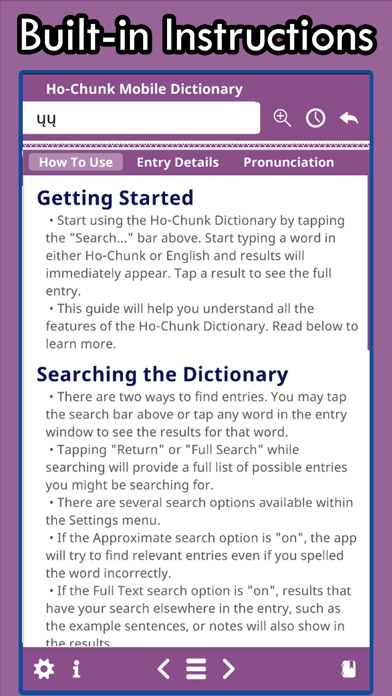
Searching the Dictionary
• There are two ways to find entries. You may tap the search bar above or tap any word in the entry window to see the results for that word
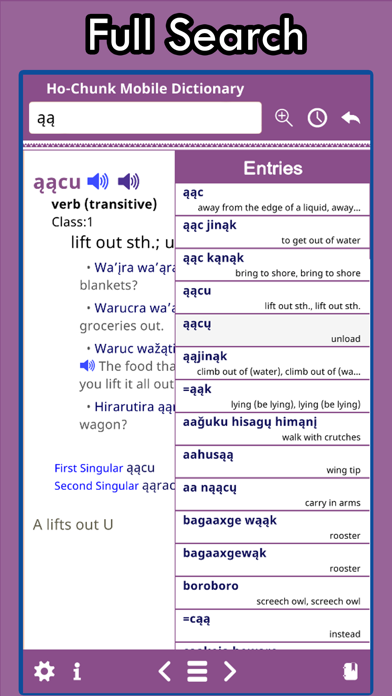
• Tapping "Return" or "Full Search" will provide a full list of possible entries for the word you have entered
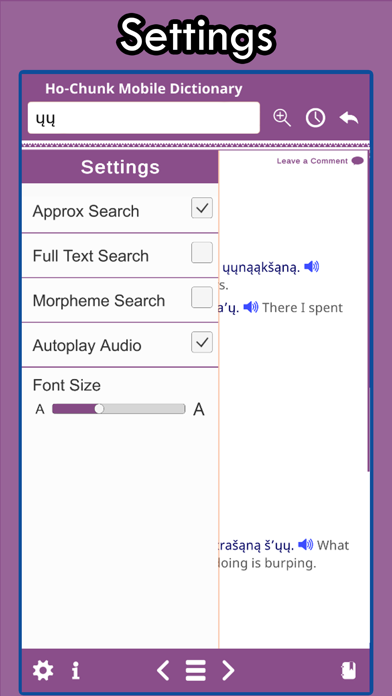
• There are several search options available within the Settings menu
• If the Approximate search option is "on", the app will try to find relevant entries even if you spelled the word incorrectly.
• If the Full Text search option is "on", results that have your search elsewhere in the entry (example sentences or notes) will also show in the results.
Buttons
• The Ho-Chunk Mobile Dictionary uses a simple tap and go interface
• You are currently reading the information section. Select a tab from the sliding bar above to learn more about "How To Use" the dictionary, "Entry Details", and "Pronunciation."
• The Settings menu allows you to refine how the search works, change the font size, and turn “AutoPlay Audio” on or off. See the “Searching the Dictionary” section for more details on the search settings
• Tapping the Zoom button increases the entry font size until it resets back to the smallest size again
• The History Panel shows you your recent entry history. Any entry you view is logged here for a short period of time so that you may go back and review
• The Back button quickly takes you back to the previous entry in your History with a single tap
• There are two sides to the Ho-Chunk Mobile Dictionary. If you are currently viewing a Ho-Chunk word, you are on the “Ho-Chunk” side. The left and right buttons will take you to the next or previous Ho-Chunk word in alphabetical order. Tapping the Hamburger button will provide you with a list of the nearest alphabetical words to the entry you are currently looking at
• The Favorites panel allows you to save your favorite words like a bookmark. From this panel, you can create new lists, add words to specific lists for later review, and better organize using the Ho-Chunk Mobile Dictionary as YOUR Ho-Chunk language learning tool
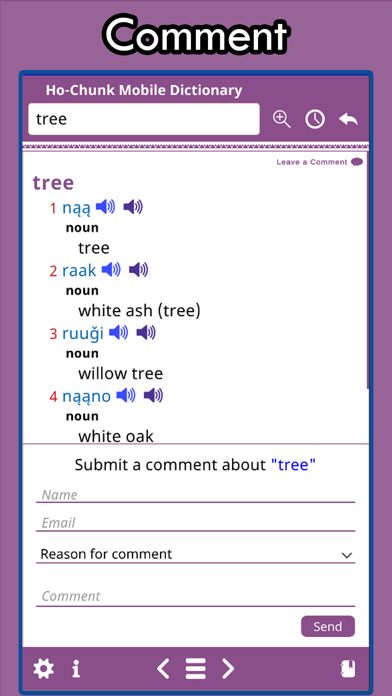
• The comment button at the bottom of every entry allows you to send feedback to us so that we can make improvements to future versions of the dictionary