AppBrain
AppBrain
  • Apps
  • Apps being viewed right now Trending apps today Most popular apps All-time most installed apps Top rated apps iPhone and iPad apps
  • Intelligence ▾
    Intelligence overview → Track any Android app or your whole market
    Track & analyze
    Keyword Tracker & OptimizerTrack & improve Play rankings App Performance ReportOne-off PDF for any app StatisticsFree Android & Play market stats
    Promote your app
    Featured Apps App Links
  • Intelligence
  • Pricing
  • Dashboard
  • Sign up
  • Log in
App Store Apps > Productivity > Holdback: App Blocker & Steps
Holdback: App Blocker & Steps icon

Holdback: App Blocker & Steps

1.1
Raman Pazdniakou
5.00
1 reviews
Free

Holdback: App Blocker & Steps Screenshot 1 of 7
Holdback: App Blocker & Steps Screenshot 2 of 7
Holdback: App Blocker & Steps Screenshot 3 of 7
Holdback: App Blocker & Steps Screenshot 4 of 7
Holdback: App Blocker & Steps Screenshot 5 of 7
Holdback: App Blocker & Steps Screenshot 6 of 7
Holdback: App Blocker & Steps Screenshot 7 of 7
Screenshots by Raman Pazdniakou, from the the App Store listing
View on the App Store

AppBrain's verdict

Rating on App Store
5.00
1 ratings
Last updated
September 7, 2026
Size
261.6 MB

It doesn't have enough ratings yet to judge what users think.

Official page on the App Store

User feedback

Ratings and reviews on the App Store

Comments on Holdback: App Blocker & Steps for iOS

We don't have enough comments to show example comments. Please check back later.

Store listing

By Raman Pazdniakou, from the App Store
Description by Raman Pazdniakou Written by the developer, not by AppBrain. Click to read.
Holdback locks the apps that eat your day until you've walked your step goal — or on a schedule, or on a daily limit. Steps come from Apple Health

FOUR WAYS TO LOCK
• Step goal — your apps stay locked until you've walked your goal for the day.
• Schedule — pick the hours your apps stay shut. Nights, work blocks, early mornings.
• Daily limit — give an app twenty minutes. When they're gone, they're gone.
• Never Allowed — apps you are done with, blocked around the clock, with no unlock at all.

All four apply only to the apps, websites and categories you choose. Nothing else on your phone is touched. When you want the whole phone shut for an hour, that's a focus session.

WALK TO UNLOCK
Set a step goal. Until you reach it, the apps you picked won't open. Steps are read from Apple Health, so there is nothing to fake — no taps to farm, no coins to earn, no minutes to buy back.

Open Hours keep your morning usable. Pick the window where your apps stay open even if the goal isn't done — or switch it off and the lock runs around the clock. Reach the goal, and everything opens for the rest of the day.

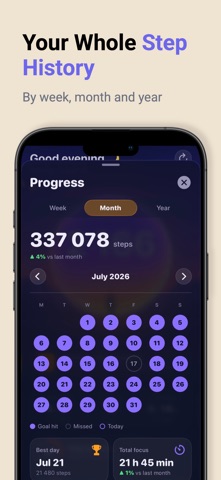
YOUR STEPS, IN ONE PLACE
Week, month and year of walking, drawn out day by day. Days on goal, longest streak, best day, averages. The record starts the day you install Holdback and keeps going.

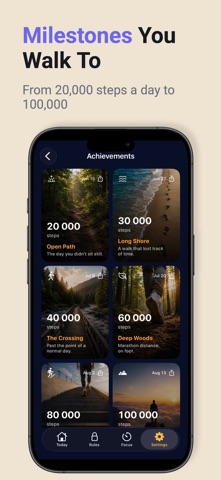
Six milestones sit on top of it, from 20 000 steps in a day up to 100 000.

FOCUS SESSIONS
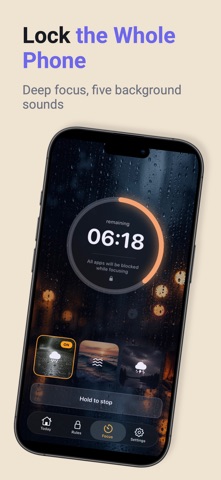
The four rules above run on their own, all day. A focus session is the one you start by hand — and while it runs, every app on your phone is locked, not just the ones you picked.

Set a timer, or run an open-ended stopwatch and stop when the work is done. Rain, waves, thunder, fire or birdsong in the background.

HOW IT WORKS
1. Choose the apps you want under control.
2. Pick how they unlock — a schedule, a limit, steps, or not at all.
3. Get on with your day.

HARD MODE
Switch it on and your settings lock along with your apps. You can raise a goal at any time, but lowering it, changing the days, or swapping the apps waits until that day's steps are done.

It closes the loophole most blockers leave open — editing your way out instead of walking.

You can remove every restriction at any time by deleting Holdback. Calls, messages and emergency services are never affected.

YOUR DATA STAYS YOURS
Holdback cannot see which apps you block. Apple's Screen Time framework hands the app anonymous tokens, not app names. Your step data is read from Apple Health and never leaves your device. No account, no sign-up, no ads, no data sold.

Terms of Use: https://holdbackapp.github.io/legal/terms-of-service.html
Privacy Policy: https://holdbackapp.github.io/legal/privacy-policy.html

Safety and technology

Found in the app by AppBrain
Price
Free
App size
261.6 MB
Content rating
Everyone

Technologies used by Holdback: App Blocker & Steps

Releases

Updates seen on the App Store
Version
1.1
Launched
August 2026

No changelog data

Alternatives

Similar apps and more from Raman Pazdniakou

Alternatives to Holdback: App Blocker & Steps

Scrolloc: Screen Time Control icon Scrolloc: Screen Time Control
Mindful Software Studio LLC
5.0
Free
1 ratings
Capsla: Pomodoro & App Blocker icon Capsla: Pomodoro & App Blocker
Ramiz Kichibekov
0.0
Free
Signature Maker: eSign AI icon Signature Maker: eSign AI
Umut Bozdag
4.8
Free
5 ratings
Live Club by Verticality icon Live Club by Verticality
Yury Ulyanin
0.0
Free
WalkBlock: Screen Time Control icon WalkBlock: Screen Time Control
Esnap Labs LLC
4.8
Free
37 ratings
Inku: Smart AI Calendar icon Inku: Smart AI Calendar
Inkboard, Inc.
4.6
Free
168 ratings
StepBloc: Screen Time Blocker icon StepBloc: Screen Time Blocker
Hamsters Technology
4.5
Free
499 ratings
Screen Time Control - HeadUp icon Screen Time Control - HeadUp
MIRRORHUB MCHJ
5.0
Free
2 ratings

More from Raman Pazdniakou

AI Dream Journal – Drevia icon AI Dream Journal – Drevia
Raman Pazdniakou
5.0
Free
1 ratings
DateLog icon DateLog
Raman Pazdniakou
0.0
Free

Rankings

App Store top charts

App Store Rankings for Holdback: App Blocker & Steps

This app is not ranked

About the app and developer

About Holdback: App Blocker & Steps

Holdback: App Blocker & Steps is a productivity app developed by Raman Pazdniakou.

What is the rating of Holdback: App Blocker & Steps?

Holdback: App Blocker & Steps is rated 5.00 out of 5 stars, based on one rating ratings.

Is Holdback: App Blocker & Steps free?

Holdback: App Blocker & Steps is free. The app size is 261.63 MB. The latest version available is 1.1. The last update was on September 7, 2026.

What are the requirements for Holdback: App Blocker & Steps?

The app has a content rating of Everyone. The app has been available on the App Store since August 2026.

Holdback: App Blocker & Steps is made and published by Raman Pazdniakou. AppBrain is an independent app data site and isn't affiliated with Raman Pazdniakou. The app name, icon, screenshots and description belong to Raman Pazdniakou and are shown as published on the App Store.

Developer information for Raman Pazdniakou

Raman Pazdniakou

Address:

Share Holdback: App Blocker & Steps

Today's trending apps Popular Productivity Apps Top new apps Price drops on Google Play Apps other people are watching
Scrolloc: Screen Time Control icon Scrolloc: Screen Time Control
Capsla: Pomodoro & App Blocker icon Capsla: Pomodoro & App Blocker
Signature Maker: eSign AI icon Signature Maker: eSign AI
Live Club by Verticality icon Live Club by Verticality
WalkBlock: Screen Time Control icon WalkBlock: Screen Time Control
Inku: Smart AI Calendar icon Inku: Smart AI Calendar
StepBloc: Screen Time Blocker icon StepBloc: Screen Time Blocker
Screen Time Control - HeadUp icon Screen Time Control - HeadUp
Overview Alternatives Reviews Rankings Technology
AppBrain Intelligence premium content

Subscribe now to get full and unlimited access to AppBrain Intelligence. You'll have access to:

  • App Intelligence dashboard (performance timeline, competitor comparison, country rankings, insight cards)
  • Detailed ranking data per app
  • Full timeline per developer
  • Device market shares data per country
  • Unlimited keyword tracking
  • AI assistant access via MCP (Claude, Cursor or any MCP client)
1 Month

$75/mo
(billed every month)

SAVE 0%
Subscribe
3 Months

$65/mo
($195 billed every 3 months)

SAVE 13%
Subscribe
1 Year

$57.50/mo
($690 billed every year)

SAVE 23%
Subscribe
Each subscription will automatically renew 3 days before the expiration date for the same time period. Subscriptions can be cancelled at any time before the renewal.

AppBrain is an app data site, we track rankings, ratings, installs for all apps and games on Google Play and the App Store. AppBrain doesn't host app files or APKs, all install links go directly to the official store. All trademarks are owned by their respective owners.

More apps

  • Top Android apps being viewed
  • LG TV Remote
  • Rate My Physique: Body Scans
  • TTStickers: Animated WASticker

App statistics

  • Android statistics
  • Google Play Developer stats
  • Trending Android Apps
  • Trending iOS apps
  • Top popular Apps
  • Buy the best Android phone
  • Buy & sell app businesses

About AppBrain

  • Contact
  • Privacy
  • Documentation
  • DMCA takedowns
  • Blog
  • Tips to improve your Android promotional campaign
© 2010-2026 - AppBrain