Hole Pattern Programming App is an overall app developed by Shekhar Aggarwal.
How many times has Hole Pattern Programming App been downloaded?
What is the rating of Hole Pattern Programming App?
Hole Pattern Programming App has no ratings yet.
Is Hole Pattern Programming App free?
Hole Pattern Programming App is free to download. The APK download size is 22.00 MB. The latest version available is 1.0.2. The last update was on February 4, 2026.
What are the requirements for Hole Pattern Programming App?
The app has a content rating of Low Maturity. The app has been available on Google Play January 2026.
Description
Hole Pattern Programming App is a powerful, professional, and easy-to-use app designed for engineers, machinists, VMC programmers, VMC operators, CAD designers, fabrication professionals, and students who require accurate, error-free hole layout calculations and VMC programming support.
The app supports virtually every type of hole arrangement — from simple linear rows to advanced multi-PCD mesh structures. Whether you are working on flanges, plates, jigs, fixtures, decorative panels, or precision mechanical parts, this tool simplifies even the most complex drilling and tapping calculations.
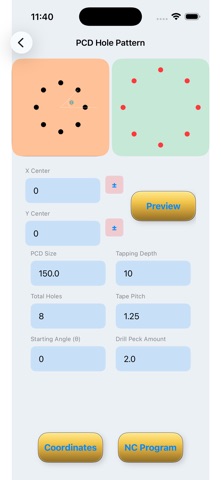
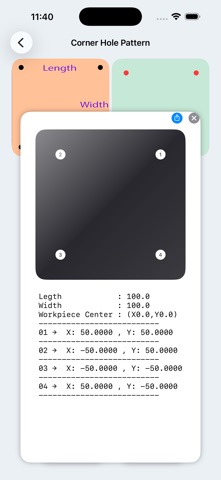
Simply enter a few key dimensions and the app instantly generates: • Exact X–Y coordinates • Visual preview of the hole layout • Hole sequence numbering • Optional VMC drilling and tapping programs
Even if your hole center is not at X0, Y0, you can change the origin and the app will automatically recalculate all coordinates accurately.
Supported Hole Patterns
• Single and Multiple PCD (Pitch Circle Diameter) • Full circle or limited angular span PCD • Linear patterns (horizontal, vertical, or angled) • Circular bolt circle layouts • Rectangular grids • Border-only hole layouts • Angular linear patterns • Mesh / lattice structures using multiple PCDs
Key Features
PCD Hole Patterns Create full or partial angular span hole arrangements on single or multiple PCDs.
Linear Hole Patterns Generate straight or angled rows of holes at any custom angle.
Rectangular Patterns Fill complete rectangular areas or generate holes only along borders.
Mesh / Lattice Structures Create complex multi-PCD patterns for structural and decorative designs.
Custom Center Adjustment Change origin (X0, Y0) and automatically recalculate all coordinates.
Coordinates & Visual Preview Get precise X-Y coordinates with a visual layout of every hole.
Hole Sequence Numbering Automatic numbering from 1 to total holes for easy reference.
VMC Programming Support Generate ready-to-use drilling, center drilling, and tapping programs.
Editable Drill & Tap Parameters Customize drill depth, tap depth, pitch, and sequence.
Flexible Output Options Copy coordinates, copy full VMC program, or share using the Share button.
Automatic Error Handling If required inputs are missing, the app shows clear messages instead of crashing.
Metric & Imperial Units Work seamlessly in millimeters (mm) or inches.
User-Friendly Interface Designed for fast use in workshop, field, or office environments.
Practical Use Cases
Flange & Bolt Circle Layouts – Design precise PCD holes with full or partial spans. Linear Hole Rows – Create straight or angled hole rows on plates and sheets. Rectangular Plates – Fill areas or generate border-only patterns. Mesh / Lattice Designs – Complex structural or decorative layouts. Custom Center Workflows – Adjust coordinates to match machine zero or fixture setup. Workshop & CAD Planning – Use coordinates for manual drilling or CAD input. VMC / CNC Programming – Instantly generate editable drilling and tapping programs.
Why Choose Hole Pattern Programming App?
Supports all major hole layout types – linear, circular, rectangular, border-only, angular, multi-PCD, and mesh. Ensures error-free and reliable calculations. Saves time compared to manual methods or spreadsheets. Provides coordinates + visual preview for complete clarity. Generates CNC-ready VMC programs. Fully customizable and easy to share. Stable and safe – guides users instead of crashing.
Use Hole Pattern Programming App today and simplify your machining and hole layout workflow. From single PCD to complex multi-pattern designs, from coordinates to CNC programs — everything you need is now available in one powerful professional tool.
Each subscription will automatically renew 3 days before the expiration date for
the same time period. Subscriptions can be cancelled at any time before the renewal.