

Home Inventory: Whateren
Home Inventory: Whateren is made and published by Lucio Duran. AppBrain is an independent app data site and isn't affiliated with Lucio Duran. The app name, icon, screenshots and description belong to Lucio Duran and are shown as published on the App Store.
AppBrain's verdict
- Best rank
- #13
- Top Paid, Denmark
- Rating on App Store
- 5.00
- 1 ratings
- Last updated
- October 22, 2026
It doesn't have enough ratings yet to judge what users think. Its best ranking is #13 in Top Paid, Productivity in Denmark.
Rankings
App Store top charts- Highest rank
- #13
- Chart
- Top Paid
- Productivity
- Country
- Denmark
Releases
Updates seen on the App Store- Version
- 2.20
- Launched
- February 2026
No changelog data
User feedback
Ratings and reviews on the App StoreComments on Home Inventory: Whateren for iOS
We don't have enough comments to show example comments. Please check back later.
Technology
Found in the app by AppBrain- Price
- $4.99
- App size
- 24.2 MB
- Content rating
- Everyone
Technologies used by Home Inventory: Whateren
About the app and developer
About Home Inventory: Whateren
Home Inventory: Whateren is a productivity app developed by Lucio Duran.
What is the rating of Home Inventory: Whateren?
Home Inventory: Whateren is rated 5.00 out of 5 stars, based on one rating ratings.
Is Home Inventory: Whateren free?
Home Inventory: Whateren costs $4.99. The app size is 24.24 MB. The latest version available is 2.20. The last update was on October 22, 2026.
What are the requirements for Home Inventory: Whateren?
The app has a content rating of Everyone. The app has been available on the App Store since February 2026.
Developer information for Lucio Duran
Address:
Frequently asked questions about Home Inventory: Whateren
Is Home Inventory: Whateren free?
No. Home Inventory: Whateren costs $4.99 on the App Store.
Is Home Inventory: Whateren still available?
Yes. Home Inventory: Whateren is on the App Store, and the last update we saw was on October 22, 2026.
How large is Home Inventory: Whateren?
Home Inventory: Whateren is 24.24 MB.
Is Home Inventory: Whateren suitable for children?
App Store rates the content of Home Inventory: Whateren as suitable for everyone.
How do people rate Home Inventory: Whateren?
Home Inventory: Whateren has one rating of 5.00 stars on the App Store.
Who made Home Inventory: Whateren?
Home Inventory: Whateren was developed by Lucio Duran. It is listed in the productivity category on the App Store.
Store listing
By Lucio Duran, from the App Store




Description by Lucio Duran Written by the developer, not by AppBrain. Click to read.
Preparing for a move, documenting your belongings for insurance, or just tired of asking "where did I put that?": Whateren catalogs every item, room and piece of furniture in your home.
WHAT · WHERE · WHEN
• What: every item you own, searchable and filterable
• Where: your properties, rooms, furniture and boxes, organized in a hierarchy
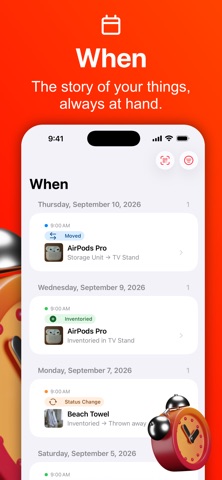
• When: a timeline of additions, moves, removals and status changes
QR LABELS FOR BOXES AND ROOMS
Print a label for any box, drawer or room, or label a whole home in one PDF, on plain paper or on Avery sheets. Scan a label with the iPhone's own Camera and that place opens in the app. The larger labels can list what is inside, and the code itself carries nothing but an anonymous identifier.
PHOTOS THAT STAY WITH YOU
Take a photo of any item as you add it. Images are optimized on your device to keep storage small. Press and hold a photo to remove its background, on your device, offline, at no cost.
AI IDENTIFICATION (OPTIONAL)
Add photos without AI and enter details yourself, or choose optional Premium AI (Anthropic Claude) to suggest names, descriptions, categories, brands and models. Premium uses credit packs with no subscription, or your own Anthropic API key with provider charges. Your choice is remembered.
ADDITIONAL DETAILS
Pick a template for an item (a book, a phone, furniture and more) and record its brand, model, dimensions and material. Enhance (Premium) can fill them in from your photos.
BARCODE SCANNING
Scan a book, food item, or tagged product to auto-fill its details from public catalogs.
RECEIPTS AND DOCUMENTS
Photograph a purchase receipt and Premium AI reads every product on it: name, price, quantity, category, and the serial number or warranty when the receipt prints them. Choose where the items go and each one lands in your Inbox waiting for its own photo, with the receipt attached to it as a document. One credit reads a receipt and covers the first item you import; each further item costs one. You can also attach a receipt, an invoice or a manual yourself.
INSURANCE REPORTS AND INVENTORY LISTS
Turn any room, property, or box into a PDF report for your insurer: everything inside it and its sub-places, with photos, serial numbers, and prices. Or choose a plain inventory list, with the statuses you pick and none of the insurance details.
LENDING & WARRANTIES
Lend an item and note who has it and when it is due back, then get a reminder. Every item keeps its loan history and its warranty date.
FIND IT FROM ANYWHERE
A Search tab answers one query across items and places at once: names, serial numbers, barcodes, categories, even the title of an attached document. Search from the Home Screen with Spotlight too, or ask Siri to add an item or find where something is, in your own language. Open an item on one device and it waits for you on the other, in the Dock and the app switcher.
iCLOUD SYNC & SHARING (OPTIONAL)
Turn on iCloud sync to keep your inventory across your Apple devices. If iCloud already holds something, you choose which side to keep, and the app says what each choice costs before you make it. Share a property with family, choosing view-only or full-edit access.
TEAM CAPTURE
Everyone you share a property with can help capture it: each photo is saved instantly as a draft, Premium AI identifies it as it arrives if you have it on, and everything lands in the Inbox to review and confirm.
YOUR DATA STAYS YOURS
Export to CSV or JSON. Full backups, including photos, ask for your device passcode, Face ID or Touch ID when a location is locked.
PRIVATE BY DESIGN
Whateren has no account, no ads, no analytics, and no tracking. Every network request it makes is named in our privacy policy.
Privacy Policy: https://www.whateren.com/privacy