



AppBrain's verdict
Established- Rating on App Store
- 4.47
- 53 ratings
- Last updated
- April 4, 2021
- Size
- 38.1 MB
It doesn't have enough ratings yet to judge what users think.
User feedback
Ratings and reviews on the App StoreComments on Home Screen Widgets Widgetizer for iOS
We don't have enough comments to show example comments. Please check back later.
Store listing
By Uladzislau Yanushka, from the App StoreDescription by Uladzislau Yanushka Written by the developer, not by AppBrain. Click to read.
Main Widgetizer App Features:
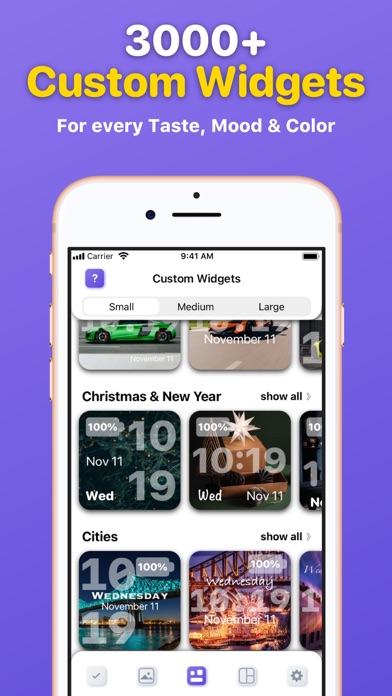
■ Custom Widgets Gallery – choose, edit and activate custom widgets you like from the biggest, colorful collection to add them to your Home Screen.
■ Widget Preview – see how the selected widget will look before activating and adding it to your Home Screen;
■ Widget Editor – edit custom widgets as you like. Customize Font, Color, Style, Display (Date, Time, Day, Battery).
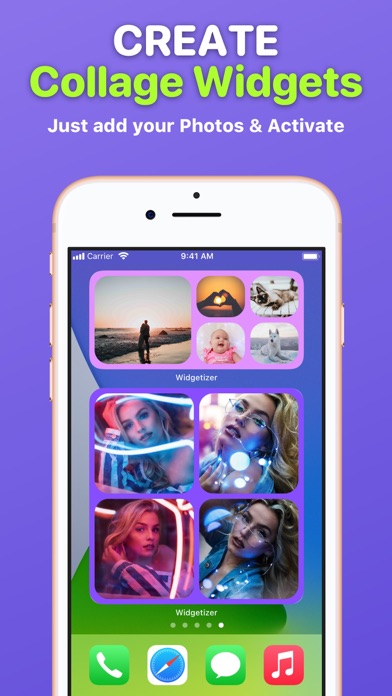
■ Collage Widgets – create beautiful collage widgets from your Photos. Pick Color and Layout that suit your collage and widget size. Activate to add to your Home Screen;
■ Active Widgets – here are all your activated custom and collage widgets that you can add to your Home Screen;
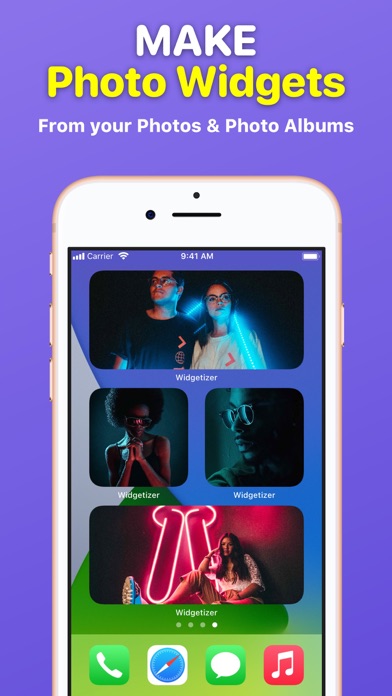
■ Photo Widgets – make your own Photo and Photo Album widgets;
Widgetizer App Also Includes Content:
– 30 categories of custom widgets, such as: Animals, Landscapes, etc.
– 3000+ custom widgets with daily updates;
– 3 custom widgets in each category for free (90 custom widgets in each widget sizes for free in total);
– No ads!
How to add widgets to your Home Screen?
1. From the Home Screen, touch and hold a widget or an empty area until the apps jiggle.
2. Tap the “Add” button (+) in the upper-left corner.
3. Search for ”Widgetizer” or scroll down until you find the app.
4. Select a widget type, choose from three widget sizes, then tap ”Add Widget”.
5. Tap ”Done” and enjoy the widget!
How to edit widgets?
1. Touch and hold a widget to open the quick actions menu.
2. Tap ”Edit Widget”.
3. Make your changes, then tap outside of the widget to exit.
Unclear? Do not worry! You can find a more detailed guide with pictures inside the app by clicking on the (?) button.
Note: Free version of the app is limited to:
– 90 custom widgets in each widget sizes;
– 1 active custom and collage widget in each widget sizes;
– 3 collage widget layouts in each widget sizes.
To use the app without limits, an auto-renewable subscription ”Widgetizer Pro” is available.
Auto-renewable Subscription ”Widgetizer Pro” Includes:
– Unlock all widgets;
– Get daily new widgets;
– Unlimited active widgets;
– Unlock widget editor;
– All collage widget layouts.
Auto-renewable Subscription ”Widgetizer Pro” Info:
By subscribing you get premium (full, unlimited) access to all the features and content offered by ”Widgetizer” app.
The app contains the following auto-renewable subscription called ”Widgetizer Pro”:
– Weekly (0,99 US$) with a 3-days for free period
* Subscription price may vary depending on your location.
* Payment will be charged to iTunes Account at confirmation of purchase;
* Subscription automatically renews unless auto-renew is turned off at least 24-hours before the end of the current period;
* Account will be charged for renewal within 24-hours prior to the end of the current period, and identify the cost of the renewal;
* Subscriptions may be managed by the user and auto-renewal may be turned off by going to the user's Account;
* Any unused portion of a free trial period, if offered, will be forfeited when the user purchases a subscription to that publication, where applicable.
Privacy Policy: https://widgetizer-privacy.nethouse.ru
Terms of Use: https://widgetizer-terms.nethouse.ru
Safety and technology
Found in the app by AppBrain- Price
- Free
- App size
- 38.1 MB
- Content rating
- Everyone
Technologies used by Home Screen Widgets Widgetizer
Releases
Updates seen on the App Store- Version
- 1.1
- Launched
- December 2020
No changelog data
Alternatives
Similar apps and more from Uladzislau YanushkaAlternatives to Home Screen Widgets Widgetizer


More from Uladzislau Yanushka





Rankings
App Store top chartsApp Store Rankings for Home Screen Widgets Widgetizer
About the app and developer
About Home Screen Widgets Widgetizer
Home Screen Widgets Widgetizer is a graphics & design app developed by Uladzislau Yanushka.
What is the rating of Home Screen Widgets Widgetizer?
Home Screen Widgets Widgetizer is rated 4.47 out of 5 stars, based on 53 ratings.
Is Home Screen Widgets Widgetizer free?
Home Screen Widgets Widgetizer is free. The app size is 38.09 MB. The latest version available is 1.1. The last update was on April 4, 2021.
What are the requirements for Home Screen Widgets Widgetizer?
The app has a content rating of Everyone. The app has been available on the App Store since December 2020.
Home Screen Widgets Widgetizer is made and published by Uladzislau Yanushka. AppBrain is an independent app data site and isn't affiliated with Uladzislau Yanushka. The app name, icon, screenshots and description belong to Uladzislau Yanushka and are shown as published on the App Store.
Developer information for Uladzislau Yanushka
Address: