

Home Video Player
Home Video Player is made and published by Kirill Ustiuzhanin. AppBrain is an independent app data site and isn't affiliated with Kirill Ustiuzhanin. The app name, icon, screenshots and description belong to Kirill Ustiuzhanin and are shown as published on the App Store.
AppBrain's verdict
- Last updated
- September 28, 2026
Rankings
App Store top chartsApp Store Rankings for Home Video Player
Competitors
Similar apps and more from Kirill UstiuzhaninAlternatives to Home Video Player


Releases
Updates seen on the App Store- Version
- 2.3.0
- Launched
- April 2026
No changelog data
User feedback
Ratings and reviews on the App StoreComments on Home Video Player for iOS
We don't have enough comments to show example comments. Please check back later.
Technology
Found in the app by AppBrain- Price
- Free
- App size
- 36.3 MB
- Content rating
- Everyone
Technologies used by Home Video Player
About the app and developer
About Home Video Player
Home Video Player is a photo & video app developed by Kirill Ustiuzhanin.
User Ratings
The app has no ratings yet.
App Information
Home Video Player is freely available from the App Store. The app size is 36.31 MB. The latest version available is 2.3.0. The last update was on September 28, 2026.
Technical Requirements
The app has a content rating of Everyone. The app has been available on the App Store since April 2026.
Developer information for Kirill Ustiuzhanin
Address:
Frequently asked questions about Home Video Player
Is Home Video Player free?
Yes. Home Video Player is free on the App Store.
Is Home Video Player still available?
Yes. Home Video Player is on the App Store, and the last update we saw was on September 28, 2026.
How large is Home Video Player?
Home Video Player is 36.31 MB.
Is Home Video Player suitable for children?
App Store rates the content of Home Video Player as suitable for everyone.
Who made Home Video Player?
Home Video Player was developed by Kirill Ustiuzhanin. It is listed in the photo & video category on the App Store.
What are the best alternatives to Home Video Player?
People looking at Home Video Player also look at these photo & video apps: Video Player and IPTV, Video Player Pro - All Formats, Vivid - 動画プレイヤー, nostalgie VID, ABL Video Player.
Store listing
By Kirill Ustiuzhanin, from the App Store
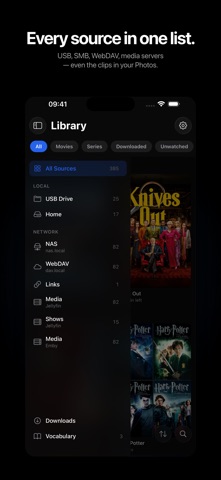
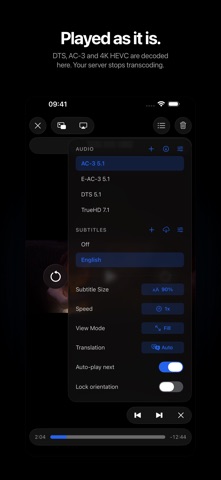
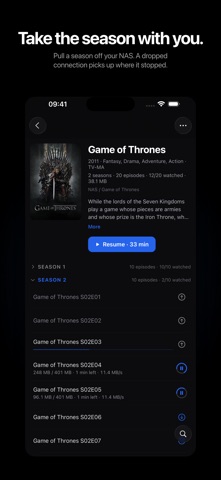
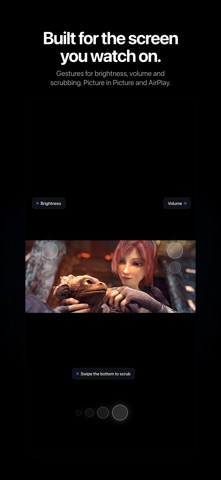


Description by Kirill Ustiuzhanin Written by the developer, not by AppBrain. Click to read.
YOUR SERVER STOPS TRANSCODING
Connect Jellyfin, Emby, SMB or WebDAV and play straight from the file. VC-1, MPEG-2, XviD, VP9, DTS, TrueHD — the formats that make a server fire up its CPU are decoded here, on your device. Nothing is re-encoded, so nothing is lost.
PLUG IN A DRIVE
Plug in a USB drive or external SSD, browse it, and play instantly — no import, no iTunes sync, no cloud upload.
THE VIDEOS YOU SHOT YOURSELF
Add your photo library and everything you filmed — or saved from a messenger — opens with the same player: gestures, speed, Picture in Picture, AirPlay. Nothing is copied and nothing is uploaded: the originals stay in Photos, and clips kept in iCloud are fetched only when you press play.
A LIBRARY THAT SORTS ITSELF
Seasons and episodes are detected automatically and stay in the right order. Cover art and metadata for movies and shows. Continue Watching gathers every source into one shelf — finish an episode and the next one takes its place.
DOWNLOAD FOR THE FLIGHT
Take a season from your NAS or server into your pocket. A dropped connection resumes from the last byte, and a download never slows down what you're watching.
TAP TO TRANSLATE
Tap any word in the subtitles for an instant translation. Apple's on-device translator works offline; turn on online AI for context-aware quality. A whole subtitle track can be translated into a language the file doesn't have.
VOCABULARY JOURNAL
Every word you tap is saved with its full sentence, episode and exact moment. Search it, review it, export to CSV.
EVERY DEVICE IN SYNC
Watch history, settings and your servers travel through your own private iCloud — start on iPad, finish on iPhone. Passwords never leave your Keychain.
ALL THE FORMATS
MKV, MP4, AVI, TS, M2TS, WebM, MPEG, WMV, FLV. 4K HEVC and H.264, multiple audio tracks, embedded subtitles, speed 0.5x–2x, Picture in Picture and AirPlay. An audio track lying beside the movie as a separate file is picked up too: choose it in the menu, nudge its delay by ear. And when a file can't play, the app tells you why instead of guessing.
YOUR FILES STAY YOURS
No account, no analytics, no profile of you anywhere. Your files stay on your devices and in your own iCloud — nothing is uploaded to us.
AI SERVICES
Translate a whole subtitle track into a language the file never had. Turn messy release names into clean titles. Translation on your device works offline; switch the online AI on when you want context and quality.
---
Questions or feedback? support@homevideoplayer.app
Privacy: https://homevideoplayer.app/privacy/en