HomeGlance Cam is an utilities app developed by 阳 曹.
User Ratings
The app has no ratings yet.
App Information
HomeGlance Cam is FREE to download. The download size is 24.06 MB. The latest version available is 1.0. The last update was on September 21, 2026.
Technical Requirements
The app has a content rating of Everyone. The app has been available on the App Store since September 2026.
Description
HomeGlance turns a spare phone into a home presence camera, and your everyday phone into the screen you watch it on. A single app holds both roles: Camera mode runs on the old phone at home, Viewer mode on the phone in your pocket. Video, audio and recordings travel only between your own devices over an end-to-end encrypted, device-to-device connection, and never pass through our servers.
How it works
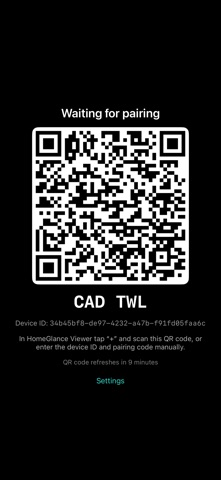
1. Install HomeGlance on both phones and choose a mode on each. 2. Camera mode shows a pairing QR code; scan it in Viewer mode to link the two. 3. Place the old phone and plug it in. The screen turns black and the camera keeps running. 4. Watch live, receive alerts and browse clips from anywhere.
Camera mode
• Person detection runs on the device with Apple Vision. It answers only whether someone is in view: no face recognition, no identification, no cloud AI. • The screen stays black while the camera runs, so the phone draws little attention. Tap it to open settings, which close again after a short pause. • Clips are recorded automatically when a person is detected, including a few seconds of pre-roll from before the event. Files stay on the camera phone and are pruned against a storage quota. • A presence timeline records when someone was in view, day by day. • In dim light the torch can briefly assist detection. Duration and conditions are configurable, and the feature can be switched off. • Two-way talk with echo cancellation, or listening only.
Viewer mode
• Pair a camera by scanning the QR code it displays. • Live 720p video from anywhere, direct between the two devices when a direct path exists and relayed when it does not. Encrypted either way. • Push notifications with a thumbnail when a person appears, when a person leaves, and when a camera goes offline. Each alert can be switched per camera. • Browse the timeline day by day, then play, delete or share that day's clips. • Several viewers on one account can watch the same camera. • Sign in with Apple, and delete your account from inside the app.
Privacy
Video, audio, recordings, snapshots and the timeline never reach our servers; they exist only on your own devices. Person detection runs entirely on the camera phone. Our servers handle your account, pairing, online status and push notifications, including event thumbnails, which are kept for seven days. There are no ads, no analytics and no tracking.
Requirements: Camera mode needs an iPhone 6s or later running iOS 15 or later. Viewer mode needs iOS 17 or later. Both devices need internet access, but they do not have to be on the same network.
Please note: Viewer mode needs a second phone running HomeGlance in Camera mode. The app does not connect to any other camera or service.
HomeGlance Pro
The free plan includes one camera and 60 minutes of live view per month. HomeGlance Pro adds unlimited cameras and live view, clips and the timeline, and saving snapshots to Photos.
Available as HomeGlance Pro Monthly (1-month auto-renewable subscription), HomeGlance Pro Yearly (1-year auto-renewable subscription with a 14-day free trial for eligible new subscribers), or a one-time Lifetime purchase. Prices for your region are shown in the app before you buy.
Terms of Use (EULA): https://www.apple.com/legal/internet-services/itunes/dev/stdeula/ Privacy Policy: https://cycorey.github.io/homeglance/en/privacy.html
Subscribe to see full ranking history in this country
AppBrain offers valuable information about your app and those of your competitors. Join AppBrain for free and claim this app to view more ranking data, view history etc.
Each subscription will automatically renew 3 days before the expiration date for
the same time period. Subscriptions can be cancelled at any time before the renewal.