

HomeTab is made and published by HsuanCheng Lai. AppBrain is an independent app data site and isn't affiliated with HsuanCheng Lai. The app name, icon, screenshots and description belong to HsuanCheng Lai and are shown as published on the App Store.
AppBrain's verdict
- Last updated
- February 3, 2026
Rankings
App Store top chartsApp Store Rankings for HomeTab
Competitors
Similar apps and more from HsuanCheng LaiMore from HsuanCheng Lai



Releases
Updates seen on the App Store- Version
- 1.0.0
- Launched
- February 2026
No changelog data
User feedback
Ratings and reviews on the App StoreComments on HomeTab for iOS
We don't have enough comments to show example comments. Please check back later.
Technology
Found in the app by AppBrain- Price
- Free
- App size
- 9.94 MB
- Content rating
- Everyone
Technologies used by HomeTab
About the app and developer
About HomeTab
HomeTab is an utilities app developed by HsuanCheng Lai.
User Ratings
The app has no ratings yet.
App Information
HomeTab is freely available from the App Store. The app size is 9.94 MB. The latest version available is 1.0.0. The last update was on February 3, 2026.
Technical Requirements
The app has a content rating of Everyone. The app has been available on the App Store since February 2026.
Developer information for HsuanCheng Lai
Address:
Frequently asked questions about HomeTab
Is HomeTab free?
Yes. HomeTab is free on the App Store.
Is HomeTab still available?
Yes. HomeTab is on the App Store, and the last update we saw was on February 3, 2026.
How large is HomeTab?
HomeTab is 9.94 MB.
Is HomeTab suitable for children?
App Store rates the content of HomeTab as suitable for everyone.
Who made HomeTab?
HomeTab was developed by HsuanCheng Lai. It is listed in the utilities category on the App Store.
Store listing
By HsuanCheng Lai, from the App Store


Description by HsuanCheng Lai Written by the developer, not by AppBrain. Click to read.
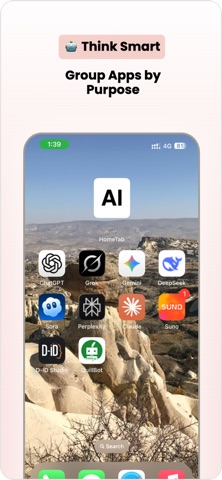
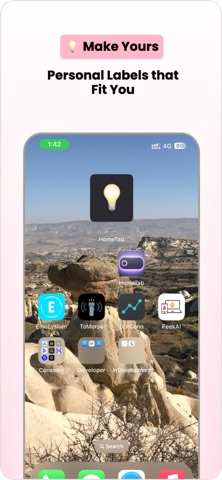
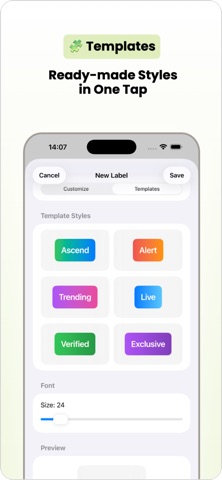
Start from professionally designed label templates, or create your own from scratch. Customize text, fonts, sizes, colors, and backgrounds, then select your label directly from the widget editor.
Whether you use labels to mark sections, highlight focus areas, or display short notes, HomeTab keeps your Home Screen clean, organized, and personal.
Features:
• Ready-made label style templates
• Unlimited custom labels
• Custom fonts, sizes, and colors
• Background color and style control
• Live preview while designing
• Instantly switch labels from the widget editor
• Optimized for small and medium widgets
• Privacy-friendly, no tracking
Perfect for:
• Home Screen organization
• Focus and productivity
• Aesthetic customization
• Minimalist layouts
• Widget-based workflows
More widget modes are coming soon.
Your Home Screen, your language.