

HomeVision - Shape Your Vision
HomeVision - Shape Your Vision is made and published by Matas Barcius. AppBrain is an independent app data site and isn't affiliated with Matas Barcius. The app name, icon, screenshots and description belong to Matas Barcius and are shown as published on the App Store.
AppBrain's verdict
- Last updated
- May 22, 2026
Rankings
App Store top chartsApp Store Rankings for HomeVision - Shape Your Vision
Competitors
Similar apps and more from Matas BarciusAlso available on Google Play

Releases
Updates seen on the App Store- Version
- 1.1.0
- Launched
- April 2026
No changelog data
User feedback
Ratings and reviews on the App StoreComments on HomeVision - Shape Your Vision for iOS
We don't have enough comments to show example comments. Please check back later.
Technology
Found in the app by AppBrain- Price
- Free
- App size
- 97.7 MB
- Content rating
- Everyone
Technologies used by HomeVision - Shape Your Vision
About the app and developer
About HomeVision - Shape Your Vision
HomeVision - Shape Your Vision is a lifestyle app developed by Matas Barcius.
User Ratings
The app has no ratings yet.
App Information
HomeVision - Shape Your Vision is freely available from the App Store. The app size is 97.67 MB. The latest version available is 1.1.0. The last update was on May 22, 2026.
Technical Requirements
The app has a content rating of Everyone. The app has been available on the App Store since April 2026.
Developer information for Matas Barcius
Address:
Store listing
By Matas Barcius, from the App Store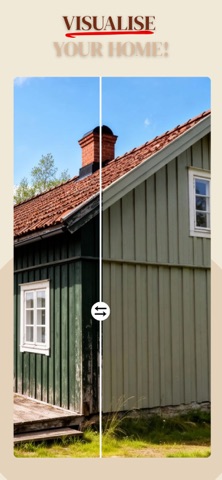


Description by Matas Barcius Written by the developer, not by AppBrain. Click to read.
HomeVision makes it easy to explore new ideas for your home before you commit.
Test colours, furniture, and renovations instantly — and find the perfect look with confidence.
What you can do:
- Try colors instantly:
See how different wall colors look in your actual space.
- Change furniture & style:
Experiment with layouts, styles, and design ideas in seconds.
- Visualize renovations:
Get a clear preview before you start building or redecorating.
- Explore multiple options:
Compare different versions and find what feels right.
Why HomeVision?
Stop guessing and avoid costly mistakes.
HomeVision helps you make better decisions by showing you the result before you begin.
Whether you're renovating, redecorating, or just exploring ideas — this is the easiest way to see what works.
Simple to use:
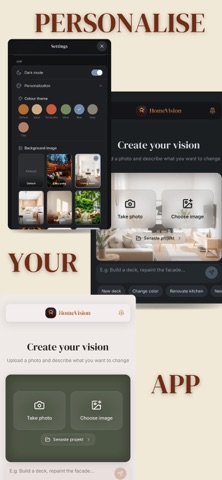
1. Upload a photo of your space
2. Describe what you want to change
3. See the result instantly
Designed for everyone
No design experience needed.
Just your ideas — and your home.
Upgrade to HomeVision Pro:
- Generate up to 100 images per month
- Create unlimited projects
- Explore more variations and ideas
Need more? You can always add extra image generations whenever you want.
Terms of Use: https://www.apple.com/legal/internet-services/itunes/dev/stdeula/