

Hours Tracker: Time Tracking
Hours Tracker: Time Tracking is made and published by Cribasoft, LLC. AppBrain is an independent app data site and isn't affiliated with Cribasoft, LLC. The app name, icon, screenshots and description belong to Cribasoft, LLC and are shown as published on the App Store.
AppBrain's verdict
EstablishedLoved by users- Best rank
- #37
- Top Grossing, Sweden
- Rating on App Store
- 4.77
- 56,285 ratings
- Last updated
- October 9, 2026
Users love it: 4.8 stars from 56,285 ratings. Its best ranking is #37 in Top Grossing, Business in Sweden.
Rankings
App Store top charts- Highest rank
- #37
- Chart
- Top Grossing
- Business
- Country
- Sweden
Competitors
Similar apps and more from Cribasoft, LLCAlternatives to Hours Tracker: Time Tracking




Releases
Updates seen on the App Store- Version
- 8.3.2
- Launched
- before 2010
No changelog data
User feedback
Ratings and reviews on the App StoreComments on Hours Tracker: Time Tracking for iOS
We don't have enough comments to show example comments. Please check back later.
Technology
Found in the app by AppBrain- Price
- Free
- App size
- 54.8 MB
- Content rating
- Everyone
Technologies used by Hours Tracker: Time Tracking
About the app and developer
About Hours Tracker: Time Tracking
Hours Tracker: Time Tracking is a business app developed by Cribasoft, LLC.
User Ratings
Hours Tracker: Time Tracking is rated 4.77 out of 5 stars. The rating is based on 56 thousand ratings.
App Information
Hours Tracker: Time Tracking is freely available from the App Store. The app size is 54.80 MB. The latest version available is 8.3.2. The last update was on October 9, 2026.
Technical Requirements
The app has a content rating of Everyone. The app has been available on the App Store since before 2010.
Developer information for Cribasoft, LLC
Address:
Frequently asked questions about Hours Tracker: Time Tracking
Is Hours Tracker: Time Tracking free?
Yes. Hours Tracker: Time Tracking is free on the App Store.
Is Hours Tracker: Time Tracking still available?
Yes. Hours Tracker: Time Tracking is on the App Store, and the last update we saw was on October 9, 2026.
How large is Hours Tracker: Time Tracking?
Hours Tracker: Time Tracking is 54.80 MB.
Is Hours Tracker: Time Tracking suitable for children?
App Store rates the content of Hours Tracker: Time Tracking as suitable for everyone.
How do people rate Hours Tracker: Time Tracking?
Hours Tracker: Time Tracking scores 4.77 out of 5 stars, from 56,285 ratings on the App Store.
Who made Hours Tracker: Time Tracking?
Hours Tracker: Time Tracking was developed by Cribasoft, LLC. It is listed in the business category on the App Store.
What are the best alternatives to Hours Tracker: Time Tracking?
People looking at Hours Tracker: Time Tracking also look at these business apps: Work Hours & Pay Calculator, Hours - Tracker & Time Clock, Atto: Time Tracking & Shifts, Clocket: Time Clock Work Hours, Clockify Time Tracker.
Store listing
By Cribasoft, LLC, from the App Store



Description by Cribasoft, LLC Written by the developer, not by AppBrain. Click to read.
• Record time using timers, complete with support for Breaks and Pauses, including automatic breaks
• Track your pay, including Tips, Mileage, and flexible ± time and earnings adjustments
• Pick any time to start, stop, break or pause the timer (7 minutes ago, 10 minutes from now, whatever you need)
• Set job locations to get clock in and out reminders when you arrive or leave or fully automate your time tracking (geofencing)
• Manually enter time entries with minimal effort thanks to smart, adaptive defaults
• Enter comments of any length with your time entries and optionally include them in your exports
• Control timers, dictate comments, and apply tags using your Apple Watch
ADVANCED FEATURES and customization set HoursTracker above the rest
• Automatic daily and weekly overtime earnings calculations
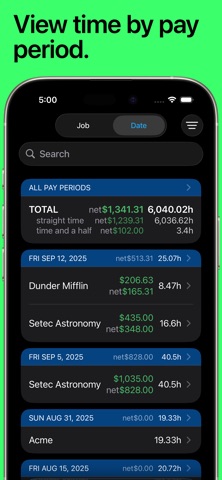
• Built-in reports by Day, Week, and Month and support for most common pay period schedules
• Robust tagging and filtering allow you to build your own custom views
• Reminders when you've worked your target number of hours per day (even takes time rounding into account)
• Automatic time rounding: up, down, or to nearest (including 6 min)
• Easily copy an existing job or time entry to save time and effort
• Reminders you to clock in on your selected work days
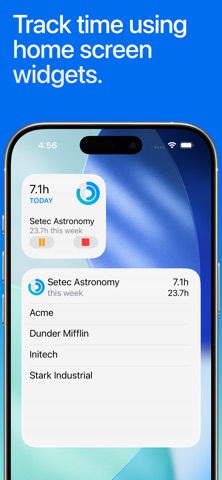
• Today Widget for at a glance time and pay monitoring
• CSV and formatted text export via e-mail or the iOS Share Sheet
• Passcode lock (with Touch ID & Face ID support) helps keep your HoursTracker data private
• Cloud-based backup/restore with one re-usable backup slot included free (free account sign up is required)
• Web-based reporting access, including charts, graphs, desktop exports, and rolling backups available with optional subscription
• Customize your HoursTracker experience in the Preferences section under the More tab. Choose only one or many jobs clocked in at a time, opt-into prompts for comments, choose an elapsed time format (hours:minutes, or decimal hours), and more
"Free Edition" stores up to 3 jobs and 21 days of entries. For unlimited entries, subscribe to "Premium" (up to 5 jobs) or "Unlimited" (unlimited jobs). Or, erase older data and continue to use the "Free Edition" until you're ready to buy.
Visit our website at http://www.hourstrackerapp.com to learn more, and follow @HoursTracker on Twitter or facebook.com/HoursTracker to hear about upcoming features first.
hourstrackerapp.com/privacy
hourstrackerapp.com/terms
www.apple.com/legal/internet-services/itunes/dev/stdeula