

HouseSense: Home Scanner
HouseSense: Home Scanner is made and published by Lars Sommer. AppBrain is an independent app data site and isn't affiliated with Lars Sommer. The app name, icon, screenshots and description belong to Lars Sommer and are shown as published on the App Store.
AppBrain's verdict
- Last updated
- October 10, 2026
- Size
- 15.6 MB
User feedback
Ratings and reviews on the App StoreComments on HouseSense: Home Scanner for iOS
We don't have enough comments to show example comments. Please check back later.
Store listing
By Lars Sommer, from the App Store


Description by Lars Sommer Written by the developer, not by AppBrain. Click to read.
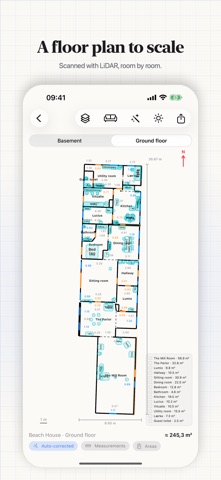
Draw the home with a finger, or scan it with your iPhone's LiDAR. Either way: a measured floor plan, areas for contractor quotes, a room-by-room budget — and a 3D model you can walk into. Everything stays in your own iCloud: no account, no server, no tracking.
DRAW IT OR SCAN IT
1. Draw or scan. No Pro phone? Drag rectangles across the graph paper and you have rooms. Or walk through the home with LiDAR: HouseSense tracks where you are, so the rooms sit correctly — and exterior walls are recognized.
2. Get the measurements right. Whole centimeters, inside measurements — and neighboring rooms share the wall between them, so no square meter is counted twice. Doors and windows go on with the pencil: centered, evenly spaced, or at a measurement from the corner.
3. Build the home. The drawing becomes a real home — floor plan, areas, 3D at 1:1, reports and sharing. A drawing holds your own measurements, not a survey: measure on site before you order.
FEATURES
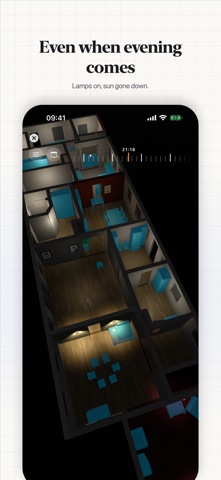
• Step inside: first person through every floor — change floor through floating portals. Real sunlight, day and night, the moon, and lamps you switch on and off.
• The whole home in 3D: orbit the house, every floor at once, under the real sun — equinox, solstice or any date, hour by hour. Switch layers off, floor by floor.
• Furniture, decor and pictures: a catalog of furniture, plants and lamps with real light — they snap to the walls. Hang photos or your own artwork, behind glass.
• Floor plan with real measurements: walls, doors, windows and areas — as a PDF for the bank or your building adviser. Tape measure that snaps to corners and walls.
• Areas for any quote: tap a room and get floor, ceiling, wall (gross and net) and skirting — the numbers a tradesperson asks for. Every window and door lands in one schedule, PDF or CSV.
• Budget, room by room: price the measured areas — per m² or per pack with the trade's waste factor. Chain one floor covering across rooms and export a shopping list.
• Daylight and surroundings: how much of the room is window, and its hours of sun today and across the year — plus roads, greenery, water, shops, schools and chargers, and the quietest room.
• Compare homes, and move in before you move: 2–3 houses side by side at the same scale — with the furniture from your own scanned home along on the hunt.
• Colors, surfaces and elevations: paint the walls, give the facade a surface and color — it carries into 3D. A long press shows the wall head-on with measurements.
• Web sharing for the sale (Estate): create a code, and the buyer or agent opens the home in a browser — plan, areas and 3D. No app, no account.
• Fix the scan or the drawing: remove a wall that isn't there, fit the door the scanner missed — everything can be undone.
• Design with external AI: the app packs the room's real measurements and your wishes for ChatGPT or Copilot, and collects the answers.
EXPORT — THE FILES ARE YOURS
• Floor plan as DXF, layered, in meters, with words or ISO 13567 codes — opens in AutoCAD, Revit, ArchiCAD and SketchUp.
• 3D model as OBJ, STL, PLY, glTF, GLB, DAE or USDZ — for Blender, 3D printing and AR.
• Measured points as a point cloud: PLY, XYZ, PTS or LAS.
• PDFs in the reader's language: plan, areas, budget, report and the window and door schedule — each in 13 languages. For the Polish contractor, in Polish.
• Every export comes with a note: what each file is.
PRICE
One home at a time is free — with everything: floor plan, 3D, sun, Step inside, export and AI. Delete it and make a new one as often as you like. Several homes at once requires a subscription that renews automatically until cancelled. Web sharing is part of Estate.
REQUIREMENTS
Drawing works on any iPhone and iPad. Scanning needs an iPhone Pro or iPad Pro with LiDAR. Shared homes open without LiDAR.
Privacy policy: https://housesense.jegerlars.dk/privacy.html
Terms of Use (EULA): https://housesense.jegerlars.dk/terms.html
Safety and technology
Found in the app by AppBrain- Price
- Free
- App size
- 15.6 MB
- Content rating
- Everyone
Technologies used by HouseSense: Home Scanner
Releases
Updates seen on the App Store- Version
- 2.0
- Launched
- July 2026
No changelog data
Alternatives
Similar apps and more from Lars SommerMore from Lars Sommer

Rankings
App Store top chartsApp Store Rankings for HouseSense: Home Scanner
About the app and developer
About HouseSense: Home Scanner
HouseSense: Home Scanner is a productivity app developed by Lars Sommer.
User Ratings
The app has no ratings yet.
App Information
HouseSense: Home Scanner is freely available from the App Store. The app size is 15.62 MB. The latest version available is 2.0. The last update was on October 10, 2026.
Technical Requirements
The app has a content rating of Everyone. The app has been available on the App Store since July 2026.
Developer information for Lars Sommer
Address: