

HTML Viewer : Editor & Creator
HTML Viewer : Editor & Creator is made and published by Hardik Khanesa. AppBrain is an independent app data site and isn't affiliated with Hardik Khanesa. The app name, icon, screenshots and description belong to Hardik Khanesa and are shown as published on the App Store.
AppBrain's verdict
Well rated- Rating on App Store
- 4.46
- 100 ratings
- Last updated
- October 6, 2026
Users rate it well: 4.5 stars from 100 ratings.
Rankings
App Store top chartsApp Store Rankings for HTML Viewer : Editor & Creator
Competitors
Similar apps and more from Hardik KhanesaAlternatives to HTML Viewer : Editor & Creator


More from Hardik Khanesa


Releases
Updates seen on the App Store- Version
- 2.0.1
- Launched
- February 2026
No changelog data
User feedback
Ratings and reviews on the App StoreComments on HTML Viewer : Editor & Creator for iOS
We don't have enough comments to show example comments. Please check back later.
Technology
Found in the app by AppBrain- Price
- Free
- App size
- 108.4 MB
- Content rating
- High
Technologies used by HTML Viewer : Editor & Creator
About the app and developer
About HTML Viewer : Editor & Creator
HTML Viewer : Editor & Creator is an overall app developed by Hardik Khanesa.
What is the rating of HTML Viewer : Editor & Creator?
HTML Viewer : Editor & Creator is rated 4.46 out of 5 stars, based on 100 ratings.
Is HTML Viewer : Editor & Creator free?
HTML Viewer : Editor & Creator is free. The app size is 108.41 MB. The latest version available is 2.0.1. The last update was on October 6, 2026.
What are the requirements for HTML Viewer : Editor & Creator?
The app has a content rating of High Maturity. The app has been available on the App Store since February 2026.
Developer information for Hardik Khanesa
Address:
Frequently asked questions about HTML Viewer : Editor & Creator
Is HTML Viewer : Editor & Creator free?
Yes. HTML Viewer : Editor & Creator is free on the App Store.
Is HTML Viewer : Editor & Creator still available?
Yes. HTML Viewer : Editor & Creator is on the App Store, and the last update we saw was on October 6, 2026.
How large is HTML Viewer : Editor & Creator?
HTML Viewer : Editor & Creator is 108.41 MB.
Is HTML Viewer : Editor & Creator suitable for children?
App Store gives HTML Viewer : Editor & Creator a high maturity rating. It is meant for adults.
How do people rate HTML Viewer : Editor & Creator?
HTML Viewer : Editor & Creator scores 4.46 out of 5 stars, from 100 ratings on the App Store.
Who made HTML Viewer : Editor & Creator?
HTML Viewer : Editor & Creator was developed by Hardik Khanesa. It is listed in the overall category on the App Store.
What are the best alternatives to HTML Viewer : Editor & Creator?
People looking at HTML Viewer : Editor & Creator also look at these overall apps: Web DevTools+, View Source Vibe, HTML Editor®, Smart JSON & XML Editor, Happier - Remote Claude, Codex.
Store listing
By Hardik Khanesa, from the App Store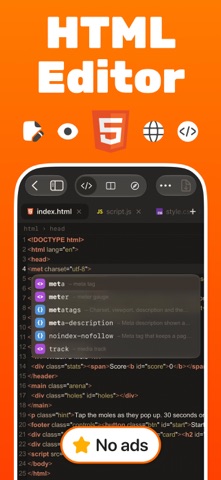


Description by Hardik Khanesa Written by the developer, not by AppBrain. Click to read.
See your page update live as you type, test it on phone and tablet sizes, then fix problems with built-in DevTools and one-tap tools. No computer needed.
FREE FOR EVERYONE
• Code editor with syntax highlighting, line numbers, find & replace and auto indent
• Live preview of your page
• 3 projects, plus any file you open from Files or share from another app
• 6 editor themes (light and dark) and 10 fonts
• 20+ everyday tools: format code, find syntax problems, color picker, contrast checker, QR codes, regex tester and more
• Starter templates to begin from
• Learn: a free step-by-step HTML, CSS and JavaScript course with quizzes, practice and a certificate
• No ads
GO PRO FOR THE FULL TOOLKIT
• Unlimited projects and unlimited open tabs
• Split view: code and preview side by side
• Device frames: iPhone, iPad and desktop sizes with a live status bar
• Smarter autocomplete for tags, classes, CSS properties and file paths, plus the full symbol row
• 50+ tools: SEO, accessibility and performance audits with one-tap fixes, Color Studio, Image Studio with background removal
• Export as ZIP, PDF or a single file, and share your projects
• 80+ ready-made templates, all with light and dark themes
• Open on another device over Wi-Fi with a QR code
• All themes and fonts, and alternate app icons
BUILT FOR REAL WORK
• Console, Network, Elements and Storage inspector for your page or any live website
• Open URL: load any website, view its source and save it as a project
• Connect to a server over SFTP or FTP and edit files directly
• Preview Markdown and JSON as well as HTML
• Home Screen widgets and Siri shortcuts
• Archive keeps deleted files for 30 days
• Available in 32 languages
WHO IT'S FOR
Students learning to code, web designers, and developers who want to fix a page away from their desk.
PRO PLANS
Choose monthly, yearly or a one-time lifetime purchase. A free trial may be available on subscriptions for new subscribers. Subscriptions renew automatically unless cancelled at least 24 hours before the end of the current period. Manage or cancel anytime in your Apple ID settings. Payment is charged to your Apple ID at confirmation of purchase. Lifetime is a single payment with no renewal.
Terms of Use: https://www.apple.com/legal/internet-services/itunes/dev/stdeula/
Privacy Policy: https://attractive-basket-ce6.notion.site/Privacy-Policy-Html-Editor-30d5cd442d3280b49b72e9a2436c853e