

Husk: Screenshot Cleanup
Husk: Screenshot Cleanup is made and published by Juyeon Yu. AppBrain is an independent app data site and isn't affiliated with Juyeon Yu. The app name, icon, screenshots and description belong to Juyeon Yu and are shown as published on the App Store.
AppBrain's verdict
- Last updated
- September 26, 2026
Rankings
App Store top chartsApp Store Rankings for Husk: Screenshot Cleanup
Competitors
Similar apps and more from Juyeon YuAlternatives to Husk: Screenshot Cleanup


Releases
Updates seen on the App Store- Version
- 1.1
- Launched
- September 2026
No changelog data
User feedback
Ratings and reviews on the App StoreComments on Husk: Screenshot Cleanup for iOS
We don't have enough comments to show example comments. Please check back later.
Technology
Found in the app by AppBrain- Price
- Free
- App size
- 85.6 MB
- Content rating
- Everyone
Technologies used by Husk: Screenshot Cleanup
About the app and developer
About Husk: Screenshot Cleanup
Husk: Screenshot Cleanup is a productivity app developed by Juyeon Yu.
What is the rating of Husk: Screenshot Cleanup?
Husk: Screenshot Cleanup has no ratings yet.
Is Husk: Screenshot Cleanup free?
Husk: Screenshot Cleanup is free. The app size is 85.55 MB. The latest version available is 1.1. The last update was on September 26, 2026.
What are the requirements for Husk: Screenshot Cleanup?
The app has a content rating of Everyone. The app has been available on the App Store since September 2026.
Developer information for Juyeon Yu
Address:
Frequently asked questions about Husk: Screenshot Cleanup
Is Husk: Screenshot Cleanup free?
Yes. Husk: Screenshot Cleanup is free on the App Store.
Is Husk: Screenshot Cleanup still available?
Yes. Husk: Screenshot Cleanup is on the App Store, and the last update we saw was on September 26, 2026.
How large is Husk: Screenshot Cleanup?
Husk: Screenshot Cleanup is 85.55 MB.
Is Husk: Screenshot Cleanup suitable for children?
App Store rates the content of Husk: Screenshot Cleanup as suitable for everyone.
Who made Husk: Screenshot Cleanup?
Husk: Screenshot Cleanup was developed by Juyeon Yu. It is listed in the productivity category on the App Store.
What are the best alternatives to Husk: Screenshot Cleanup?
People looking at Husk: Screenshot Cleanup also look at these productivity apps: 미팅노트 - AI note 회의록 요약, PomoPop, 휴램 - 각종 인사/노무 관리를 한번에!, kip!, eSign – Sign PDF.
Store listing
By Juyeon Yu, from the App Store


Description by Juyeon Yu Written by the developer, not by AppBrain. Click to read.
You take a screenshot to deal with it later. You send yourself a link to read later. Later rarely comes, and the pile keeps growing.
Husk brings those things back and asks one small question about each one: still need it?
ONE CARD AT A TIME
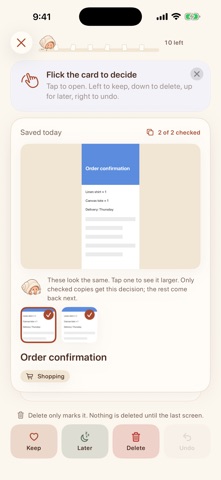
• Delete it, keep it, archive it, or leave it for later
• Swipe left to keep, down to delete, up for later, or just tap a button
• Near-identical screenshots arrive together as one card
• When you finish, deleted screenshots leave your Photos library too, after one confirmation, and Husk shows how much space you got back
NOTHING TO SET UP
• Screenshots come in on their own. Keep taking them the way you already do.
• Links, text and images come in from the share sheet, Shortcuts or Siri
• Anything you saved in the last two days comes first, so new things never get buried
IT BRINGS BACK WHAT YOU FORGOT
• A daily reminder when things are waiting, and another when something has sat untouched for a month
• Every so often, something from long ago comes back: "Remember this?"
• A home screen widget shows one forgotten thing at a time
FINISH IT, THEN LET IT GO
• Tap an address, phone number or link inside a screenshot with Live Text
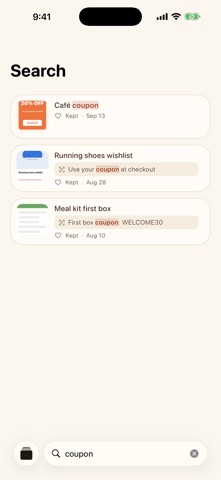
• Coupons and events with a date suggest coming back before they expire
• What you keep is sorted into categories for you, and you can search it
STAYS ON YOUR IPHONE
• Your screenshots never leave your iPhone. Reading the text in them and sorting them happens on device.
• No account. No ads. No tracking.
Every feature is free. An optional Theme Pack changes how Husk looks, and tips help support the app.