Download Android Apps and Games
AppBrain
  • Apps
  • Apps being viewed right now Trending apps today Most popular apps All-time most downloaded apps Top rated apps
  • Intelligence ▾
    Intelligence overview → Track any Android app or your whole market
    Track & analyze
    Keyword Tracker & OptimizerTrack & improve Play rankings App Performance ReportOne-off PDF for any app StatisticsFree Android & Play market stats
    Promote your app
    Featured Apps App Links
  • Intelligence
  • Pricing
  • Dashboard
  • Sign up
  • Log in
Last updated on: 2026-06-27
App Store Apps > Education > hyFee Drive - Share feedback
hyFee Drive - Share feedback icon

hyFee Drive - Share feedback

4.8.3
Christian Mayr
0.00
0 reviews
$4.99

hyFee Drive - Share feedback Screenshot 1 of 6
hyFee Drive - Share feedback Screenshot 2 of 6
hyFee Drive - Share feedback Screenshot 3 of 6
hyFee Drive - Share feedback Screenshot 4 of 6
hyFee Drive - Share feedback Screenshot 5 of 6
hyFee Drive - Share feedback Screenshot 6 of 6
Download from the App Store

About hyFee Drive - Share feedback

hyFee Drive - Share feedback is an overall app developed by Christian Mayr.

Download Statistics

User Ratings

The app has no ratings yet.

App Information

hyFee Drive - Share feedback costs $4.99 to download. The APK download size is 79.86 MB. The latest version available is 4.8.3. The last update was on September 14, 2024.

Technical Requirements

The app has a content rating of Everyone. The app has been available on Google Play May 2021.

Description
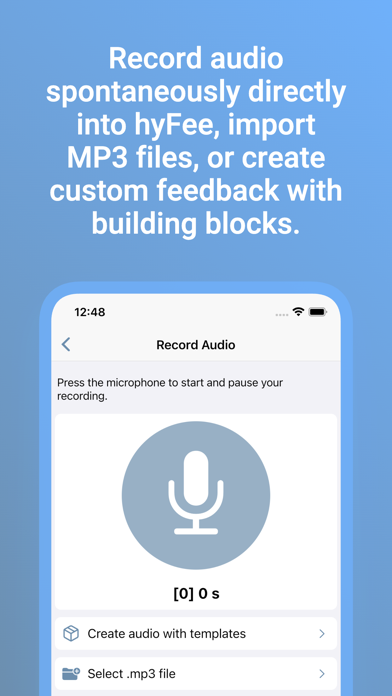
With hyfee, you can focus on what really matters - providing valuable feedback to your students. Whether you want to record feedback directly into hyfee, capture an image or video, or provide a PDF file, hyfee makes the process easy for you.

> Capture: Record audio, images or videos directly into hyfee or select existing media from the photo library. If necessary, simply combine any feedback types into one package.
> Upload: When you are done, upload the feedback for the student* with one tap. Hyfee takes care of placing the files, so you don't have to worry about folders and file formats yourself.
> Share: After uploading, you can save and print an automatically generated QR code to stick on the student's work. If you're communicating with the student via school messenger or an LMS, simply send the text link to the feedback.


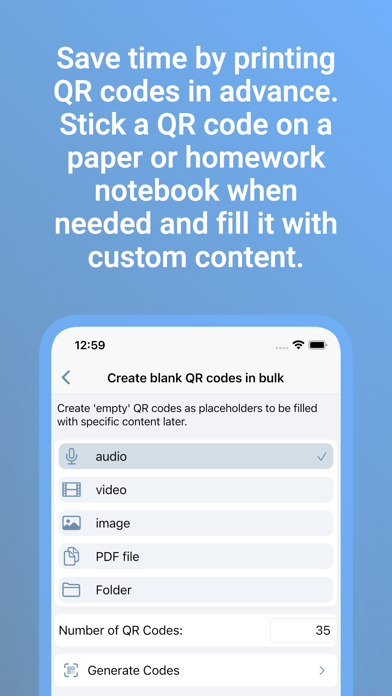
Work even faster with placeholder codes
==============================
You can create up to 35 placeholder QR codes at once for all possible feedback types directly in hyfee and save them in a PDF file. This allows you to print the codes collected on one page, cut them out and keep them in stock.

When you capture feedback, you simply pick a matching QR code from the stack. Then continue in the usual convenient way.


hyFee Drive: Use OneDrive, Google Drive, Dropbox, NextCloud, ownCloud or IServ
================================================
With hyfee Drive you can use your own or school's oneDrive or Google Drive to store and share your data securely! With hyfee Drive you will not incur any additional monthly costs, you can use your feedback files as you wish and your students will only access your infrastructure when retrieving feedback. Alternatively, you can store your data in your private Dropbox account.


By storing the feedback in your own cloud account, hyFee does not incur any additional costs.


hyFee Drive at a glance
=================
- Direct recording of audio feedback without separate apps
- Upload and record images
- Upload and record videos
- Upload PDF files
- Saving text as a PDF document
- Translate text before uploading
- Convert text to natural-sounding audio in multiple languages*.
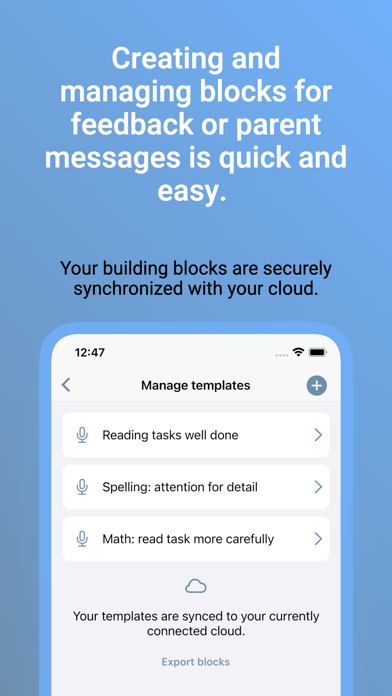
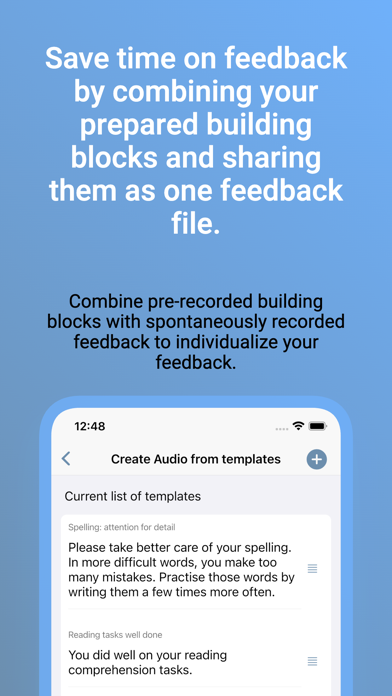
- Combine building blocks to create customized feedback in less time
- Combine different feedback types into one feedback package
- Full control over data by using Dropbox, OneDrive, NextCloud, ownCloud, IServ cloud or Google Drive
- Unlimited number and storage of feedbacks (depending on your Drive storage space)
- Upload and deploy QR codes and links in just one step
- Start from scratch or prepare QR codes to populate with real content later on
- Overwrite and repopulate existing content
- Optimal display on smartphones and tablets

* these features require a monthly hyFee Drive Pro subscription.

Terms of service: https://hyfee.de/nutzungsbedingungen/
Show more Show less

More data about hyFee Drive - Share feedback

Price $4.99
Rating No ratings
Ranking Not ranked
Version 4.8.3
App download size 79.9 MB
Suitable for Everyone

Alternative downloads for the hyFee Drive - Share feedback app

Malrechnen icon Malrechnen
Christian Urff
0.0
$1.99
Zahlen und Stellenwerte icon Zahlen und Stellenwerte
Christian Urff
0.0
$1.99
Zahlenfeld icon Zahlenfeld
Christian Urff
0.0
$0.99
Augmelity Education icon Augmelity Education
Millennium Technology GmbH
0.0
Free
one plus one automation icon one plus one automation
Christian Urff
0.0
$0.99
Sternenfänger icon Sternenfänger
Christian Urff
0.0
$2.99
Higher rated
Text Simplifier icon Text Simplifier
Christian Urff
5.0
$0.99
1 ratings
AR.X Optics icon AR.X Optics
Johannes Gutenberg-Universität Mainz
0.0
Free

More from Christian Mayr

Media Converter Flex icon Media Converter Flex
Christian Mayr
5.0
$1.99
2 ratings
Media Converter Flex Plus icon Media Converter Flex Plus
Christian Mayr
1.0
$6.99
1 ratings
Porta LMS icon Porta LMS
Christian Mayr
0.0
$0.99
BayGUS icon BayGUS
Christian Mayr
0.0
Free
LetUsListen icon LetUsListen
Christian Mayr
0.0
$0.99
hyFee Cloud icon hyFee Cloud
Christian Mayr
0.0
Free
aidio icon aidio
Christian Mayr
0.0
$4.99
hyFee NC icon hyFee NC
Christian Mayr
0.0
$4.99

Changelog of hyFee Drive - Share feedback

No changelog data

Developer information for Christian Mayr

Christian Mayr

Address:

Share hyFee Drive - Share feedback

Comments on hyFee Drive - Share feedback for iOS

We don't have enough comments to show example comments. Please check back later.

App Store Rankings for hyFee Drive - Share feedback

This app is not ranked

Technologies used by hyFee Drive - Share feedback

Malrechnen icon Malrechnen
Zahlen und Stellenwerte icon Zahlen und Stellenwerte
Zahlenfeld icon Zahlenfeld
Augmelity Education icon Augmelity Education
one plus one automation icon one plus one automation
Sternenfänger icon Sternenfänger
Text Simplifier icon Text Simplifier
AR.X Optics icon AR.X Optics

Back to top
AppBrain Intelligence premium content

Subscribe now to get full and unlimited access to AppBrain Intelligence. You'll have access to:

  • App Intelligence dashboard (performance timeline, competitor comparison, country rankings, insight cards)
  • Detailed ranking data per app
  • Full timeline per developer
  • Device market shares data per country
1 Month

$75/mo
(billed every month)

SAVE 0%
Subscribe
3 Months

$65/mo
($195 billed every 3 months)

SAVE 13%
Subscribe
1 Year

$57.50/mo
($690 billed every year)

SAVE 23%
Subscribe
Each subscription will automatically renew 3 days before the expiration date for the same time period. Subscriptions can be cancelled at any time before the renewal.

AppBrain is a directory focused on discovering great apps and games. We give statistics, rankings and search options that Google Play and the App Store don't have. All trademarks are owned by their respective owners. AppBrain doesn't offer APKs or binaries, and always lets users install the official version from Google Play or the App Store.

More apps

  • Top Android apps being viewed
  • Cars Mod For Minecraft
  • Sedora - AI Video Experiences
  • HealthSphere by Medista

Android Statistics

  • Android statistics
  • Google Play Developer stats
  • Trending Android Apps
  • Top popular Apps
  • Buy the best Android phone

About AppBrain

  • Contact
  • Privacy
  • Documentation
  • DMCA takedowns
  • Articles
  • Blog
  • The AppBrain advertising system
© 2010-2026 - AppBrain