

HyperCube: Timetable & Tasks
HyperCube: Timetable & Tasks is made and published by Amro Alghamdi. AppBrain is an independent app data site and isn't affiliated with Amro Alghamdi. The app name, icon, screenshots and description belong to Amro Alghamdi and are shown as published on the App Store.
AppBrain's verdict
- Rating on App Store
- 5.00
- 2 ratings
- Last updated
- April 13, 2026
It doesn't have enough ratings yet to judge what users think.
Rankings
App Store top chartsApp Store Rankings for HyperCube: Timetable & Tasks
Competitors
Similar apps and more from Amro AlghamdiAlternatives to HyperCube: Timetable & Tasks




Releases
Updates seen on the App Store- Version
- 1.3
- Launched
- January 2026
No changelog data
User feedback
Ratings and reviews on the App StoreComments on HyperCube: Timetable & Tasks for iOS
We don't have enough comments to show example comments. Please check back later.
Technology
Found in the app by AppBrain- Price
- Free
- App size
- 60.6 MB
- Content rating
- Everyone
Technologies used by HyperCube: Timetable & Tasks
About the app and developer
About HyperCube: Timetable & Tasks
HyperCube: Timetable & Tasks is a productivity app developed by Amro Alghamdi.
User Ratings
HyperCube: Timetable & Tasks is rated 5.00 out of 5 stars. The rating is based on 2 ratings.
App Information
HyperCube: Timetable & Tasks is freely available from the App Store. The app size is 60.59 MB. The latest version available is 1.3. The last update was on April 13, 2026.
Technical Requirements
The app has a content rating of Everyone. The app has been available on the App Store since January 2026.
Developer information for Amro Alghamdi
Address:
Frequently asked questions about HyperCube: Timetable & Tasks
Is HyperCube: Timetable & Tasks free?
Yes. HyperCube: Timetable & Tasks is free on the App Store.
Is HyperCube: Timetable & Tasks still available?
Yes. HyperCube: Timetable & Tasks is on the App Store, and the last update we saw was on April 13, 2026.
How large is HyperCube: Timetable & Tasks?
HyperCube: Timetable & Tasks is 60.59 MB.
Is HyperCube: Timetable & Tasks suitable for children?
App Store rates the content of HyperCube: Timetable & Tasks as suitable for everyone.
How do people rate HyperCube: Timetable & Tasks?
HyperCube: Timetable & Tasks scores 5.00 out of 5 stars, from 2 ratings on the App Store.
Who made HyperCube: Timetable & Tasks?
HyperCube: Timetable & Tasks was developed by Amro Alghamdi. It is listed in the productivity category on the App Store.
What are the best alternatives to HyperCube: Timetable & Tasks?
People looking at HyperCube: Timetable & Tasks also look at these productivity apps: Easy Click Control, Pomodoro Timer!, EchoKeep: Smarter RSS Reader, Yao!, Pomo Easy - Pomodoro Timer.
Store listing
By Amro Alghamdi, from the App Store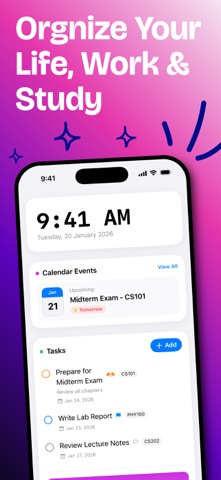


Description by Amro Alghamdi Written by the developer, not by AppBrain. Click to read.
HyperCube is not just a timetable; it is a dynamic life planner designed to adapt to YOU. While other apps force you into a rigid "student" or "teacher" mold, HyperCube transforms its entire interface to match your reality—whether you are managing university lectures, corporate meetings, or a personal fitness routine.
Why HyperCube is Superior:
1. FROM 10 MINUTES TO 30 SECONDS (AI SCAN) Competitors boast about setting up schedules in "less than 5 minutes." We do it in seconds.
Instant Import: Simply snap a photo of your class schedule, work roster, or gym plan.
Intelligent Parsing: Our AI automatically recognizes subject names, times, and room numbers. No tedious manual entry required.
2. THE ONLY APP THAT ADAPTS (ADAPTIVE MODES) A sleek interface that changes language based on your role:
Student Mode: Tracks Lectures, Labs, Assignments, and calculates GPA.
Employee Mode: Tracks Meetings, Projects, Shifts, and Deadlines.
General Mode: Perfect for daily habits, gym routines, and personal chores.
3. VISUALIZE YOUR WEEK
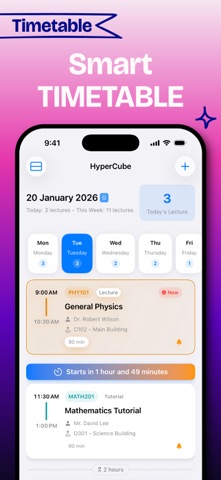
At a Glance: Rotate your device for a beautiful week-view (Landscape support).
Color Coded: Assign unique colors to subjects or project types for instant visual recognition.
Countdown: Know exactly how many minutes are left in your current class or meeting.
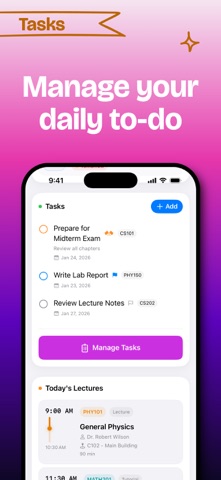
4. POWERFUL TASK MANAGEMENT Don't just track where you need to be, track what you need to do.
Integrated To-Dos: View your tasks alongside your calendar events.
Smart Context: Link tasks to specific subjects (e.g., "Homework" linked to "Math 101").
Priority Sorting: Organize by Urgent, High, or Low priority.
5. ACADEMIC & PROFESSIONAL ANALYTICS
GPA Calculator: (Student Mode) Automatically tracks your Semester and Cumulative GPA.
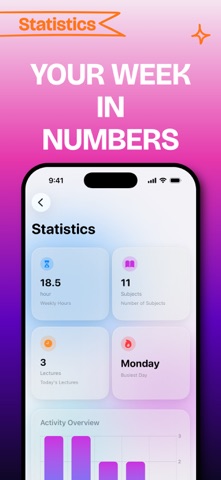
Time Insights: Visualize how you spend your week with intuitive charts.
6. SEAMLESS iOS INTEGRATION
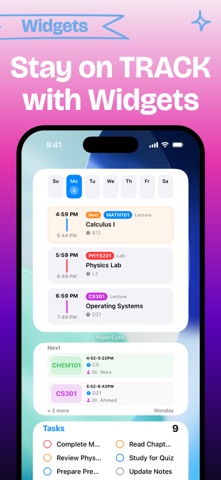
Home Screen Widgets: Check your next event without opening the app.
iCloud Sync: Start on iPhone, continue on iPad. Your data is always backed up and synced.
Dark Mode: Stunning true-black design that is easy on the eyes.
Download HyperCube today. Join the thousands who have upgraded from rigid paper planners to the flexibility of AI. Organize your life in 4D.
Terms of Use: https://hypercubeapp.notion.site/Terms-of-Use-for-HyperCube-2f249afb1e758016be75e088e20af6aa