hYYa Encrypted Folder came out 84 days ago. It doesn't have enough ratings yet to judge what users think.
hYYa Encrypted Folder is made and published by
Hassaan Abdeen.
AppBrain is an independent app data site and isn't affiliated with Hassaan Abdeen.
The app name, icon, screenshots and description belong to Hassaan Abdeen and are shown as
published on the App Store.
About hYYa Encrypted Folder
hYYa Encrypted Folder is an utilities app developed by Hassaan Abdeen.
What is the rating of hYYa Encrypted Folder?
hYYa Encrypted Folder is rated 5.00 out of 5 stars, based on one rating ratings.
Is hYYa Encrypted Folder free?
hYYa Encrypted Folder is free. The app size is 6.51 MB. The latest version available is 2.1.2. The last update was on September 27, 2026.
What are the requirements for hYYa Encrypted Folder?
The app has a content rating of Everyone. The app has been available on the App Store since July 2026.
Description by Hassaan Abdeen(from the App Store)
Encrypted by default. Beautiful by design.
hYYa Encrypted Folder keeps your files in private, AES-256 encrypted folders that unlock with Face ID or Touch ID.
No hYYa account. No hYYa server. Nothing of yours ever passes through us.
REAL ENCRYPTION, NOT A DISGUISE
• AES-256, using Apple's own encryption — not a hidden folder, not a passcode over plain files. The contents are genuinely encrypted on your device. • Your key is stored in your Keychain, and hYYa asks for Face ID, Touch ID or your passcode before it will use it. Only you can read it: not us, not Apple. • Files are encrypted the moment they go in. Add them in a few taps. • File names inside are encrypted too. The only name left visible is the folder's own.
NEW IN 2.1
• Google Drive sync — keep an encrypted folder in your own Google Drive and open it on your other devices. hYYa encrypts the folder on this device. Only encrypted files are uploaded. Google can see the folder's name, not what is inside. Entirely optional. • Recently Deleted for folders — a folder you delete can be recovered for 30 days. • One recovery key now covers all your folders.
PEACE OF MIND, BUILT IN
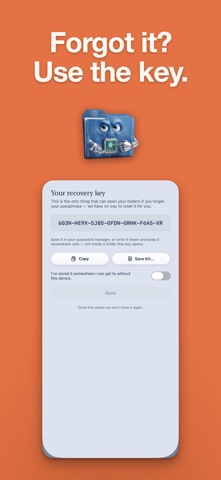
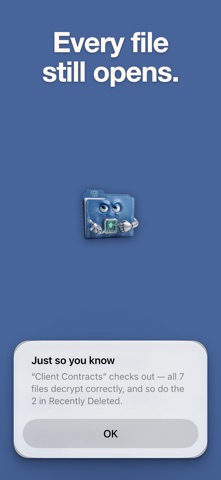
• Recovery Key — opens your folders if you forget your passphrase. We cannot reset it for you; this can. • Share to hYYa — send files straight into an encrypted folder from Photos, Files, Mail, or anywhere that shares. • Add from Photos — pick photos and videos with no re-compression, then remove the originals if you want to. • Scan Document — scan paper straight into an encrypted folder. • Recently Deleted — files you delete inside a folder can be recovered for 30 days. • Verify — checks that every file in a folder still opens. • Shortcuts and Siri — "Lock All Folders", ready for the Action button and your automations. • Family Sharing — one purchase covers your household.
UNLOCK WITH FACE ID OR TOUCH ID
• Open every folder with a single Face ID or Touch ID check. Your device passcode is always there as a fallback. • The app locks itself the moment you switch away, and hides your files from the app switcher. • Auto-Lock (Pro) locks everything again after a period of inactivity.
SYNC PRIVATELY — iCLOUD OR GOOGLE DRIVE
• Keep a folder in iCloud and it syncs across your iPhone, iPad and Mac, end-to-end encrypted the whole way. • Or keep it in your own Google Drive. Either way, hYYa encrypts the folder on this device. Only encrypted files are uploaded. • Enter your passphrase once on each device, then unlock with Face ID or Touch ID. • Works offline. Syncing is optional. No sign-up, no email, no tracking, ever.
FREE, WITH A ONE-TIME UPGRADE
• Free: up to two encrypted folders in total, plus Face ID / Touch ID unlock and private sync. Opening folders you already have is always free. • hYYa Encrypted Folder Pro (one payment, no subscription): unlimited folders and Auto-Lock.
ALSO ON MAC
The Mac version adds Folder Styler — give any everyday Finder folder a custom color and emblem.
PRIVACY YOU CAN VERIFY
We collect nothing. No analytics, no account system, and hYYa runs no server of its own. The encryption is Apple's own and standard. Your files, your key, your device.
hYYa Encrypted Folder is part of the hYYa family — a small studio building beautiful, private tools you can actually trust.
Each subscription will automatically renew 3 days before the expiration date for
the same time period. Subscriptions can be cancelled at any time before the renewal.