

I Need That Widget: Calendar
I Need That Widget: Calendar is made and published by Joohee Kim. AppBrain is an independent app data site and isn't affiliated with Joohee Kim. The app name, icon, screenshots and description belong to Joohee Kim and are shown as published on the App Store.
AppBrain's verdict
- Best rank
- #55
- Top Paid, France
- Rating on App Store
- 5.00
- 5 ratings
- Last updated
- August 30, 2026
It doesn't have enough ratings yet to judge what users think. Its best ranking is #55 in Top Paid, Productivity in France.
Rankings
App Store top charts- Highest rank
- #55
- Chart
- Top Paid
- Productivity
- Country
- France
App Store Rankings for I Need That Widget: Calendar
Top rankings
| Rank | Country | Category | List |
|---|---|---|---|
| 55 | France | Productivity | Top Paid |
Ranking history in France
Releases
Updates seen on the App Store- Version
- 1.6
- Launched
- October 2025
No changelog data
User feedback
Ratings and reviews on the App StoreComments on I Need That Widget: Calendar for iOS
We don't have enough comments to show example comments. Please check back later.
Technology
Found in the app by AppBrain- Price
- $2.49
- App size
- 9.37 MB
- Content rating
- Everyone
Technologies used by I Need That Widget: Calendar
About the app and developer
About I Need That Widget: Calendar
I Need That Widget: Calendar is a productivity app developed by Joohee Kim.
User Ratings
I Need That Widget: Calendar is rated 5.00 out of 5 stars. The rating is based on 5 ratings.
App Information
I Need That Widget: Calendar costs $2.49. The app size is 9.37 MB. The latest version available is 1.6. The last update was on August 30, 2026.
Technical Requirements
The app has a content rating of Everyone. The app has been available on the App Store since October 2025.
Developer information for Joohee Kim
Address:
Frequently asked questions about I Need That Widget: Calendar
Is I Need That Widget: Calendar free?
No. I Need That Widget: Calendar costs $2.49 on the App Store.
Is I Need That Widget: Calendar still available?
Yes. I Need That Widget: Calendar is on the App Store, and the last update we saw was on August 30, 2026.
How large is I Need That Widget: Calendar?
I Need That Widget: Calendar is 9.37 MB.
Is I Need That Widget: Calendar suitable for children?
App Store rates the content of I Need That Widget: Calendar as suitable for everyone.
How do people rate I Need That Widget: Calendar?
I Need That Widget: Calendar scores 5.00 out of 5 stars, from 5 ratings on the App Store.
Who made I Need That Widget: Calendar?
I Need That Widget: Calendar was developed by Joohee Kim. It is listed in the productivity category on the App Store.
Store listing
By Joohee Kim, from the App Store


Description by Joohee Kim Written by the developer, not by AppBrain. Click to read.
KEY FEATURES
- Home Screen Widgets for different layouts
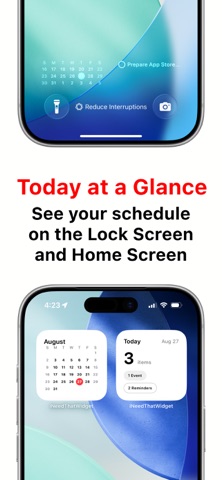
- Small: Month Calendar or Today Counts
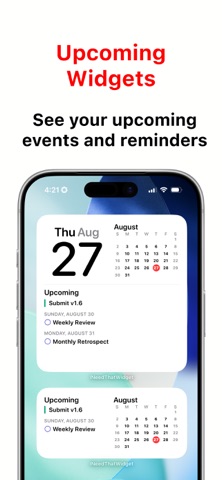
- Medium: Upcoming events and reminders, or Weekly Calendar
- Large: Full Month Grid or Compact Event List
- Lock Screen Widgets
- View a compact 3-week calendar directly on your Lock Screen
- See today's reminders from the Lock Screen with the reminder widget
- Focus Calendar Filters
- Choose which calendars stay visible while a Focus is active
- Apply the same calendar filter in the app and widgets
- Turn off the active Focus filter from the app when needed
- Today Counts Widget
- See today's total event and reminder count at a glance
- Get a quick summary for busy days or free days
- Reminder Support
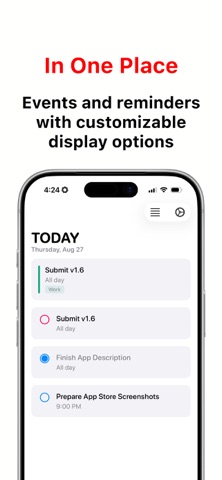
- View reminders alongside calendar events
- See today's reminders and upcoming reminders in widgets
- Choose whether to show overdue reminders and reminders without due dates
- View recurring and all-day reminders more reliably
- Open reminder details from supported widgets and app views
- Weekly Calendar Widget
- See your week in a clean 7-day layout
- Choose a rolling 7-day view starting today, or use your selected week-start setting
- Choose the first day of the week in the app settings, or follow your system setting
- Open in Your Preferred Calendar App
- Apple Calendar, Google Calendar, and Fantastical supported
- Tap widgets and jump into the calendar app you prefer
- Improved fallback helps widget taps recover when permissions or destination apps need attention
- Customizable
- Choose which calendars and reminder lists to show
- Choose between the new calendar-inspired app icon and the Classic icon
- Toggle all-day events
- Control reminder visibility
- Choose how to display past items
- Localized
- Available in English, Korean, German, Spanish, French, Arabic, Dutch, Hindi, Japanese, Simplified Chinese, Traditional Chinese, and Portuguese
- Includes regional variants such as English (UK), English (Canada), English (Australia), Spanish (Mexico), Spanish (Spain), Portuguese (Portugal), and Portuguese (Brazil)
- Privacy First
- Your calendar and reminder data stays on your device
- No accounts, no servers, no tracking
- Clean and Simple
- No ads
- No clutter
- No subscription
PERFECT FOR
- Checking your schedule without opening Calendar
- Seeing today's workload instantly
- Viewing reminders from the Home Screen or Lock Screen
- Planning your week from the Home Screen
- Keeping a calendar visible on the Lock Screen
- Filtering calendars around your current Focus
- Choosing a widget layout that fits your workflow
- People who want simple, readable calendar widgets
PRIVACY & SIMPLICITY
Your calendar and reminder data never leaves your device. "I Need That Widget" is built for people who want practical widgets, minimal design, and quick access to what matters most.
An in-app FAQ explains widget setup and answers common questions.