
iAudioTool is made and published by Julian Bunn. AppBrain is an independent app data site and isn't affiliated with Julian Bunn. The app name, icon, screenshots and description belong to Julian Bunn and are shown as published on the App Store.
AppBrain's verdict
Established- Rating on App Store
- 3.31
- 13 ratings
- Last updated
- December 7, 2022
- Size
- 882.0 KB
It doesn't have enough ratings yet to judge what users think. Its best ranking is #17 in Top Paid, Music in Portugal.
User feedback
Ratings and reviews on the App StoreComments on iAudioTool for iOS
We don't have enough comments to show example comments. Please check back later.
Store listing
By Julian Bunn, from the App Store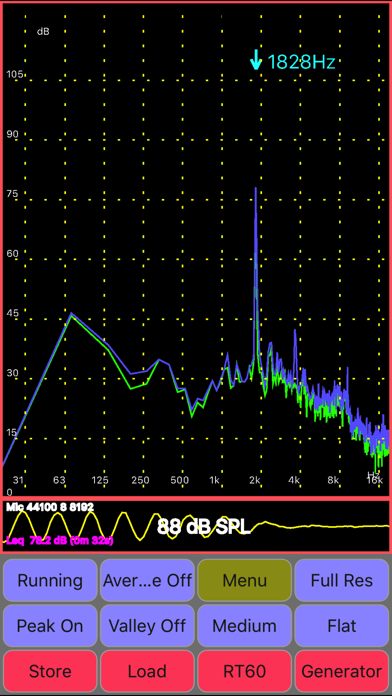
Description by Julian Bunn Written by the developer, not by AppBrain. Click to read.
Features 1/1, 1/3 & 1/6 octave RTA modes, Leq, RT60 (wideband, and Octave), spectrogram, peak frequency, Fast, Medium & Slow filters, Flat & A/C Weighting, Averaging, SPL Chart Recorder, Noise Criteria (NC), White/Pink Noise, Sine, Square, Triangle, Sweep, Ramp and Impulse signals & loudspeaker polarity checker. Frequency spectrum store & load, RT60 store, and Chart store. Stored files can be sent as Email.
Includes ISO Octave Calibration feature - corrects for your device's microphone response. Also includes wideband calibration. The calibration discs are moved up or down so as to obtain a flat response, and match the overall SPL to that of an external meter.
Use: home theater, audio engineer, car audio, etc
Online manual at: https://sites.google.com/site/bofinit/iaudiotool
Please join the AudioTool Discussion Group to request features or report problems:
http://groups.google.com/group/audiotool-discussion-group
AudioTools's Spectrum Analyzer component uses FFT on batches of samples recorded at the microphone. Hann windowing reduces aliasing. Recorded spectra may be stored as files in the device memory, and then loaded later and displayed together with the live spectrum.
The "Store" button will store the current live spectrum. The "Load" button brings up a list of stored spectra. One of these can be chosen, or the "Cancel" item selected to return to the main display, or the "Clear" item selected to remove the currently loaded spectrum.
Data collection can be paused and restarted.
The deciBel meter component uses IIR filters and exponential averaging to calculate Flat, A and C weighted response at speeds of Fast, Medium and Slow.
A pair of cursors can be shown on the RTA and Chart Recorder displays: each can be moved to any position, and will display the SPL & time/frequency values measured there. Initially, both cursors are positioned mid-screen - simply drag them to a new position with the fingertip. The cursors can be turned on and off in the Menu.
The loudspeaker polarity checker can be used to check whether a loudspeaker is wired in phase: connect the AudioTool output to the speaker under test, select "Polarity" from the signal generator screen, then return to the RTA screen. If the speaker is out of phase (polarity reversed) AudioTool will show "Pol ---", otherwise "Pol +++" if the speaker is in phase.
The Noise Criteria (available from the Menu) function shows a set of NC contours overlaid on the 1/1 Octave RTA display and the calculated real time current NC value is also shown.
The Chart Recorder shows a moving trace of the SPL measurements over the last few minutes.
Reverberation (RT60) measurements can be made by starting the RT60 component and using a loud clap (or similar) to trigger the measurement. RT60 times measure how much reverberation or echo there is in a room or auditorium.
The Signal Generator generates White and Pink Noise, Sine, Square, Triangle and Ramp waves, and Impulses. The generator uses multiple cycled buffers that are refreshed randomly so ensuring truly random White/Pink noise. The Pink Noise algorithm uses Kemmet's method to adjust White Noise into Pink.
Sine/Square/Ramp/Triangle Frequency can be set via the arrow buttons or directly entered using the keyboard.
The Impulse signal is a delta, issued approximately once per second.
The accuracy in frequency of the generated periodic signals is quite good: on the iPad, errors were of the order of 1% throughout most of the range. Sine wave fidelity is good throughout most of the audio range. Other signals' leading and trailing edges show ringing and decreasing frequency response artefacts in the upper ranges.
Disclaimer: iAudioTool's performance depends on the iPad/iPhone hardware, and is not guaranteed to meet any audio measurement or safety standards.
Safety and technology
Found in the app by AppBrain- Price
- $2.99
- App size
- 882.0 KB
- Content rating
- Everyone
Technologies used by iAudioTool
Releases
Updates seen on the App Store- Version
- 5.7.1
- Launched
- November 2012
No changelog data
Alternatives
Similar apps and more from Julian BunnAlternatives to iAudioTool





Rankings
App Store top charts- Highest rank
- #17
- Chart
- Top Paid
- Music
- Country
- Portugal
About the app and developer
About iAudioTool
iAudioTool is a music app developed by Julian Bunn.
What is the rating of iAudioTool?
iAudioTool is rated 3.31 out of 5 stars, based on 13 ratings.
Is iAudioTool free?
iAudioTool costs $2.99. The app size is 882.00 kB. The latest version available is 5.7.1. The last update was on December 7, 2022.
What are the requirements for iAudioTool?
The app has a content rating of Everyone. The app has been available on the App Store since November 2012.
Developer information for Julian Bunn
Address:
Frequently asked questions about iAudioTool
Is iAudioTool free?
No. iAudioTool costs $2.99 on the App Store.
Is iAudioTool still available?
Yes. iAudioTool is on the App Store, and the last update we saw was on December 7, 2022.
How large is iAudioTool?
iAudioTool is 882.00 kB.
Is iAudioTool suitable for children?
App Store rates the content of iAudioTool as suitable for everyone.
How do people rate iAudioTool?
iAudioTool scores 3.31 out of 5 stars, from 13 ratings on the App Store.
Who made iAudioTool?
iAudioTool was developed by Julian Bunn. It is listed in the music category on the App Store.
What are the best alternatives to iAudioTool?
People looking at iAudioTool also look at these music apps: AudioTools, dB, Sound & Audio, RT60, Open Sound Meter, RTA, EQ Trainer.