

iBarcoder Lite
iBarcoder Lite is made and published by Dmitry Kozlov. AppBrain is an independent app data site and isn't affiliated with Dmitry Kozlov. The app name, icon, screenshots and description belong to Dmitry Kozlov and are shown as published on the App Store.
AppBrain's verdict
- Last updated
- August 16, 2025
- Size
- 12.7 MB
User feedback
Ratings and reviews on the App StoreComments on iBarcoder Lite for iOS
We don't have enough comments to show example comments. Please check back later.
Store listing
By Dmitry Kozlov, from the App Store

Description by Dmitry Kozlov Written by the developer, not by AppBrain. Click to read.
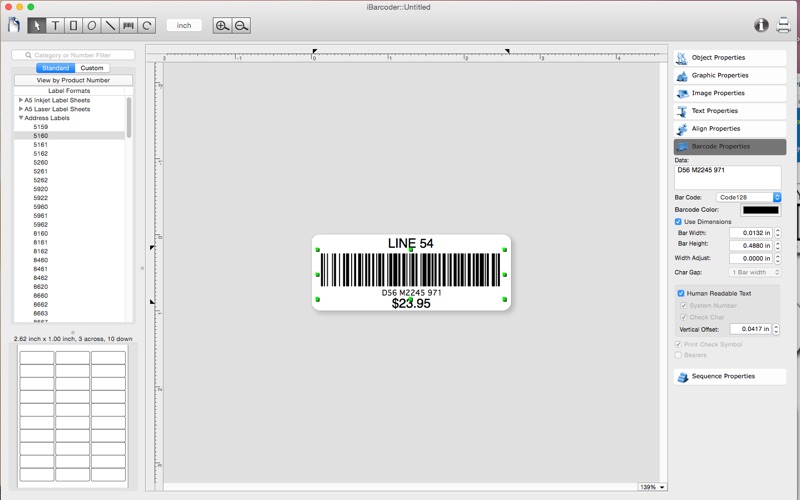
Whether you are a small, mid-size, or large-scale organization, iBarcoder Lite will easily create any number of barcode labels in your own style, of any size, or shape. There's no need to spend money for purchasing costly barcode stickers for your business! Use iBarcoder Lite version to design and print barcode labels, stickers, tags on your mac with a few mouse clicks.
Also you can use this mac barcode software as Datamatrix and QR Code generator. Create barcode graphics for retail packages, books, stickers, and more.
Print with Inkjet, Laser, Direct Thermal or any other special barcode printers. Barcode images created by Mac Barcode Generator are 100% Scannable with any Stationary, Cabled or Wireless Scanners.
Smart, intuitive mac barcode generating software:
- Create professional barcoded labels with a few mouse clicks,
- Live preview feature: start typing to create your barcode,
- Modify your mac barcode by changing types, sizes and other attributes intrinsic to a certain barcode symbology, advanced tools make customizing your barcode easy,
- Rotate generated barcode image,
- Support barcode preview functionality,
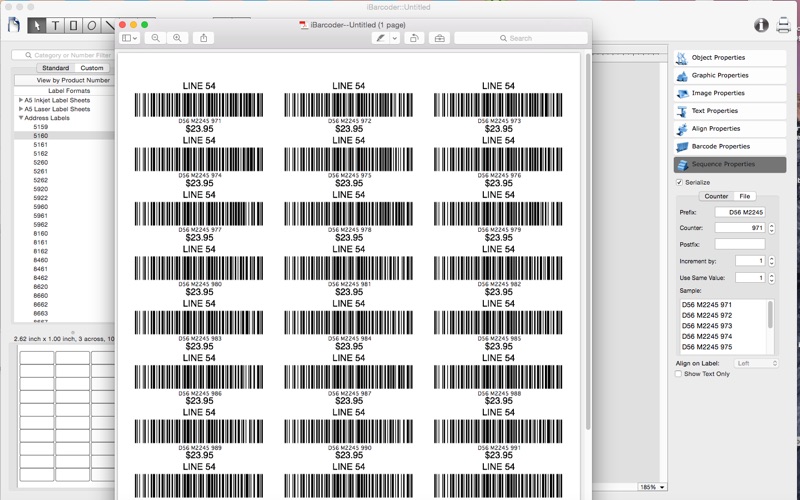
- Print barcodes directly to your printer using standard Avery label formats provided,
- Create and save your own custom label formats,
- Export barcode as a high-resolution (up to 4800 dpi) mac image file, or vector graphic,
-- PDF (vector)
-- EPS (vector)
-- TIFF
-- JPEG
-- JPEG 2000
-- PNG
-- and more...
- Make the desired barcode Font and Color settings,
- Copy, then paste finished graphics right to Adobe Illustrator, InDesign, Photoshop, or other software from mac clipboard.
Add text, borders, images, and more:
Add various objects and design elements like text boxes, image boxes, rectangles, ovals and lines to your labels. Type in the necessary text, insert the desired images, logos, illustrations to create the professional barcode labels for commercial use.
Sequential barcodes for catalogs and retail operations:
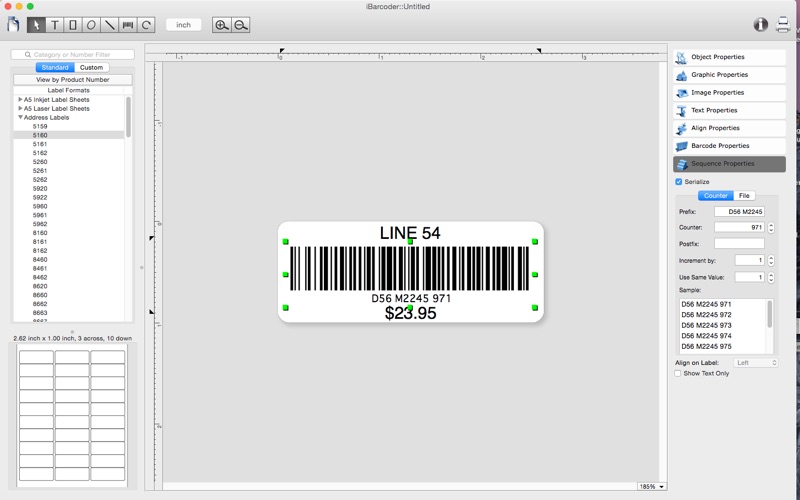
The powerful Sequential Numbers feature allows you to define the sequence in which barcodes are printed or exported. The barcode sequences can be created in two modes.
The Counter mode creates the next barcode automatically constructing the next barcode data string from user defined prefix, starting number and postix parts using the increment value. The Text File mode allows select a file containing the set of data strings to generate barcodes from.
iBarcoder Lite can support the following barcode types
- Postnet
- Japanpost customer mac barcode
- FIM Codes (3 types)
- Horizontal bars
- UPC barcode
-- UPC A (2 or 5 digit supplements allowed)
-- UPC E (2 or 5 digit supplements allowed)
- EAN barcode
-- EAN 13 (2 or 5 digit supplements allowed)
-- EAN 8 (2 or 5 digit supplements allowed)
- ISBN barcode
-- ISBN-13
-- ISBN-10
-- ISBN 2 digit supplements allowed)
-- ISBN 5 digit supplements allowed)
- ISMN
- ISSN (2 or 5 digit barcode supplements allowed)
- Code 128
-- Code 128 A
-- Code 128 B
-- Code 128 C
- Codabar
- ITF14
- Code 39
- Code 11
- Code 93
- MSI mac barcode
- Interleaved 2 of 5
- Datamatrix
- Intelligent Mail Barcode
- Pharmacode
- QR Code
- GS1-128
- SSCC-18
- GTIN-14
- GS1-Databar
- GS1-Databar Stacked
- GS1-Databar Stacked Omnidirectional
- GS1-Databar Limited
- PLANET
Some functionality of the iBarcoder is delivered by ordering an In-App Purchase upgrade:
1. Add the Code 11, Code 39, Code 93, UPC-A, UPC-E, EAN-13, EAN-8, ISBN, ISSN, ISMN barcodes,
2. Add the Code 128, Code 128 A, Code 128 B, Code 128 C, GS1-128, SSCC-18, GTIN-14, Datamatrix, QR Code, QR Code Micro barcodes,
3. Add barcode serialization functionality for printing and exporting predefined barcode sequences.
4. Add the GS1-Databar, GS1-Databar Stacked, GS1-Databar Stacked, Omnidirectional GS1-Databar Limited barcodes.
5. Open ALL functionality with $5 DISCOUNT value (1-4 items at once).
Safety and technology
Found in the app by AppBrain- Price
- Free
- App size
- 12.7 MB
- Content rating
- Everyone
Technologies used by iBarcoder Lite
Releases
Updates seen on the App Store- Version
- 3.16.0
- Launched
- February 2012
No changelog data
Alternatives
Similar apps and more from Dmitry KozlovMore from Dmitry Kozlov


Rankings
App Store top chartsApp Store Rankings for iBarcoder Lite
About the app and developer
About iBarcoder Lite
iBarcoder Lite is an utilities app developed by Dmitry Kozlov.
User Ratings
The app has no ratings yet.
App Information
iBarcoder Lite is freely available from the App Store. The app size is 12.69 MB. The latest version available is 3.16.0. The last update was on August 16, 2025.
Technical Requirements
The app has a content rating of Everyone. The app has been available on the App Store since February 2012.
Developer information for Dmitry Kozlov
Address: