Download Android Apps and Games
AppBrain
  • Apps
  • Apps being viewed right now Trending apps today Most popular apps All-time most downloaded apps Top rated apps
  • Intelligence ▾
    Intelligence overview → Track any Android app or your whole market
    Track & analyze
    Keyword Tracker & OptimizerTrack & improve Play rankings App Performance ReportOne-off PDF for any app StatisticsFree Android & Play market stats
    Promote your app
    Featured Apps App Links
  • Intelligence
  • Pricing
  • Dashboard
  • Sign up
  • Log in
Last updated on: 2026-06-23
App Store Apps > Navigation > iBFDmonochrome
iBFDmonochrome icon

iBFDmonochrome

2.30
Tatsuo Saeki
4.44
9 reviews
Free

iBFDmonochrome Screenshot 1 of 1
Download from the App Store

About iBFDmonochrome

iBFDmonochrome is an overall app developed by Tatsuo Saeki.

Download Statistics

User Ratings

iBFDmonochrome is rated 4.44 out of 5 stars. The rating is based on 9 ratings.

App Information

iBFDmonochrome is FREE to download. The APK download size is 12.26 MB. The latest version available is 2.30. The last update was on January 15, 2025.

Technical Requirements

The app has a content rating of Everyone. The app has been available on Google Play July 2018.

Description
integrated Backup Flight Display (iBFD)

Real pilots understand the risk of a primary flight instrument failure while flying.
In certain situations the loss of the Attitude Indicator is perhaps the greatest risk a pilot can face.

This iPhone based integrated Backup Flight Display (iBFD) is an inexpensive, easy to operate tool intended to reduce risk and improve safety if an instrument fails and no other backup is available.

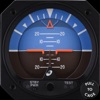
This application consists of an Attitude Indicator, Heading Indicator, Altimeter, Vertical Speed Indicator, speed Indicator, Side Slip Indicator, and Clock.

Furthermore, in the portrait mode of the iPad, a Map is displayed below the Attitude Indicator, and when you enter an airport code such as KFTW, the direction and distance to the airport are displayed.

It can also be used as Flight Data Recorder(FDR) and Cockpit Voice Recorder(CVR). This function is activated by touching the red circle in the upper left corner.
Recording is stopped by touching the red circle again or it will be stopped automatically when large G is applied.

iBFD uses the iPhone's 3 axis Gyro sensor as its primary sensor. Pitch and Roll angles are calculated using the Gyro data and the same algorithm as strap down Inertial Reference Systems (IRS).

GPS and Accelerometer are used with Kalman filter as sensor fusion to prevent gyro drift and improve Accuracy.

The iBFD performs noticeably better than other comparable applications on the market.

Unfortunately the iBFD doesn't have FAA certification. It doesn't have enough reliability for use as Primary Flight Instruments, and neither our software nor your iPhone have been subjected to rigorous certification tests.
And the accuracy of Map and Airport Information is not guaranteed.

All information displayed on the iBFD is for reference only!

Therefore, we are not responsible for any death, injury or damage as a result of using the iBFD.
USE THIS DEVICE AT YOUR OWN RISK!

Nevertheless, during an In Flight Emergency having an iBFD is far better than having no instrument at all. Particularly if in a limited visibility situation with an inoperative Attitude Indicator.

Engine vibration can affect accuracy of the iBFD, so special consideration must be given to mounting the iPhone to the cockpit instrument panel or glare shield.

Other features
(1) There are three display color modes; Day, Night or NVC.

(2) Altitude/Speed is selectable in units of feet/knots, feet/MPH or meter/kilometers per hour.

(3) Airspeed is calculated using GPS Speed, Wind Direction, and Wind Velocity.
Wind Direction and Velocity are obtained via ATIS and set manually.

(4) Pitch angle zero can be adjusted manually by touching center of the display or slider setting.

(5) Magnetic Heading or True Heading, and GPS or M.S.(Magnetic Sensor) are selectable.

(6) Settings Window for entering parameters and user preferences.

(7) Battery Icon indication.

(8) Recorded data can be accessed by Files.

(9) Magnetic Heading can be adjusted with the slider.

(10) Function to correct roll angle. However, when performing this function, the iPhone needs to be correctly placed horizontally.

(11) Local time or UTC is selectable.

(12) GPS Altimeter and Barometric Altimeter.

(13) Roll indicator (Sky pointer or Ground pointer) is selectable.

Note:
Initial roll and pitch angle are calculated using the accelerometer at the time of alignment (same as real IRS).
Therefore, if acceleration due to motion is applied during alignment, an angle error will occur.
However, such initial angle error automatically decreases with time and disappears after a few minutes in case of level flight.
Show more Show less

More data about iBFDmonochrome

Price Free to download
Rating 4.44 based on 9 ratings
Ranking Not ranked
Version 2.30
App download size 12.3 MB
Suitable for Everyone

Alternative downloads for the iBFDmonochrome app

AHRS Utility icon AHRS Utility
Levil Technology
3.0
Free
3 ratings
EFIS TA icon EFIS TA
Pantelis Georgiadis
4.6
Free
5 ratings
A-EFIS Black and White icon A-EFIS Black and White
Charalampos Baltzakis
4.9
Free
18 ratings
Horizon Portable Glass Cockpit icon Horizon Portable Glass Cockpit
Helios Avionics GmbH
4.4
Free
8 ratings
Wingman Aircraft Instruments icon Wingman Aircraft Instruments
Sky Laboratories Kft
4.0
Free
1 ratings
Levil Aviation icon Levil Aviation
Levil Technology
4.7
Free
363 ratings
Aircraft Horizon icon Aircraft Horizon
iAware
2.3
$0.99
7 ratings
Direct-To Pilot GPS - VFR, IFR icon Direct-To Pilot GPS - VFR, IFR
Flygo-Aviation Ltd
4.6
Free
682 ratings

More from Tatsuo Saeki

iBFD icon iBFD
Tatsuo Saeki
3.5
$11.99
4 ratings

Changelog of iBFDmonochrome

No changelog data

Developer information for Tatsuo Saeki

Tatsuo Saeki

Address:

Share iBFDmonochrome

Comments on iBFDmonochrome for iOS

We don't have enough comments to show example comments. Please check back later.

App Store Rankings for iBFDmonochrome

This app is not ranked

Technologies used by iBFDmonochrome

AHRS Utility icon AHRS Utility
EFIS TA icon EFIS TA
A-EFIS Black and White icon A-EFIS Black and White
Horizon Portable Glass Cockpit icon Horizon Portable Glass Cockpit
Wingman Aircraft Instruments icon Wingman Aircraft Instruments
Levil Aviation icon Levil Aviation
Aircraft Horizon icon Aircraft Horizon
Direct-To Pilot GPS - VFR, IFR icon Direct-To Pilot GPS - VFR, IFR

Back to top
AppBrain Intelligence premium content

Subscribe now to get full and unlimited access to AppBrain Intelligence. You'll have access to:

  • App Intelligence dashboard (performance timeline, competitor comparison, country rankings, insight cards)
  • Detailed ranking data per app
  • Full timeline per developer
  • Device market shares data per country
1 Month

$75/mo
(billed every month)

SAVE 0%
Subscribe
3 Months

$65/mo
($195 billed every 3 months)

SAVE 13%
Subscribe
1 Year

$57.50/mo
($690 billed every year)

SAVE 23%
Subscribe
Each subscription will automatically renew 3 days before the expiration date for the same time period. Subscriptions can be cancelled at any time before the renewal.

AppBrain is a directory focused on discovering great apps and games. We give statistics, rankings and search options that Google Play and the App Store don't have. All trademarks are owned by their respective owners. AppBrain doesn't offer APKs or binaries, and always lets users install the official version from Google Play or the App Store.

More apps

  • Top Android apps being viewed
  • ICUEE 2019
  • GroveCredit - Credit Assistant
  • PRISM Instrument stats

Android Statistics

  • Android statistics
  • Google Play Developer stats
  • Trending Android Apps
  • Top popular Apps
  • Buy the best Android phone

About AppBrain

  • Contact
  • Privacy
  • Documentation
  • DMCA takedowns
  • Articles
  • Blog
  • How to improve the earnings of your ad units
© 2010-2026 - AppBrain