

iCam Pro - Webcam Streaming
iCam Pro - Webcam Streaming is made and published by SKJM, LLC. AppBrain is an independent app data site and isn't affiliated with SKJM, LLC. The app name, icon, screenshots and description belong to SKJM, LLC and are shown as published on the App Store.
AppBrain's verdict
EstablishedWell rated- Rating on App Store
- 4.29
- 289 ratings
- Last updated
- September 20, 2021
Users rate it well: 4.3 stars from 289 ratings.
Rankings
App Store top chartsApp Store Rankings for iCam Pro - Webcam Streaming
Competitors
Similar apps and more from SKJM, LLCAlternatives to iCam Pro - Webcam Streaming





More from SKJM, LLC








Releases
Updates seen on the App Store- Version
- 1.5.1
- Launched
- June 2014
No changelog data
User feedback
Ratings and reviews on the App StoreComments on iCam Pro - Webcam Streaming for iOS
We don't have enough comments to show example comments. Please check back later.
Technology
Found in the app by AppBrain- Price
- Free
- App size
- 31.6 MB
- Content rating
- Everyone
Technologies used by iCam Pro - Webcam Streaming
About the app and developer
About iCam Pro - Webcam Streaming
iCam Pro - Webcam Streaming is an utilities app developed by SKJM, LLC.
User Ratings
iCam Pro - Webcam Streaming is rated 4.29 out of 5 stars. The rating is based on 290 ratings.
App Information
iCam Pro - Webcam Streaming is freely available from the App Store. The app size is 31.63 MB. The latest version available is 1.5.1. The last update was on September 20, 2021.
Technical Requirements
The app has a content rating of Everyone. The app has been available on the App Store since June 2014.
Developer information for SKJM, LLC
Address:
Store listing
By SKJM, LLC, from the App Store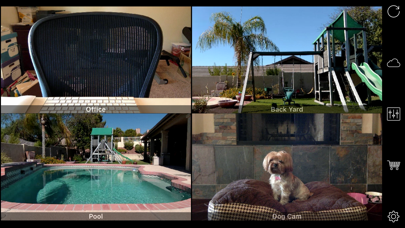
Description by SKJM, LLC Written by the developer, not by AppBrain. Click to read.
iCam Pro allows you to remotely monitor multiple live video and audio webcam feeds from your iPhone, iPod touch or iPad over WiFi and EDGE/3G/4G/LTE.
iCam Pro also includes support for iCam Pro Cloud, a service that automatically backs up iCamSource Pro events to the cloud as soon as they are recorded. Event backups can then be easily viewed from iCam Pro or downloaded directly from the web if the iCamSource Pro ever goes offline or the computer is stolen.
iCam has been featured on the Today Show, CNN, and Good Morning America in addition to the "Dog Lover" iPhone TV Ad - http://skjm.com/news.php
Popular uses include baby monitor, pet cam, nanny cam, spy cam, and security camera.
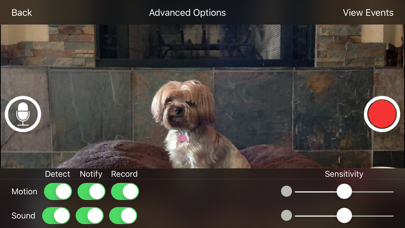
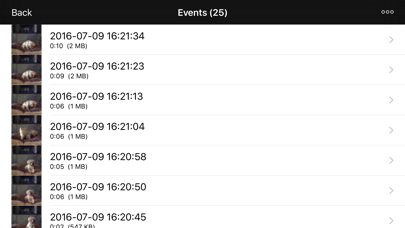
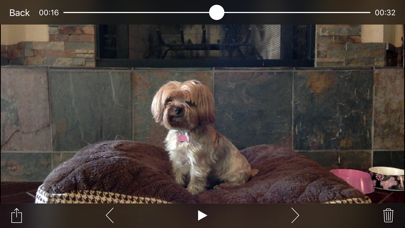
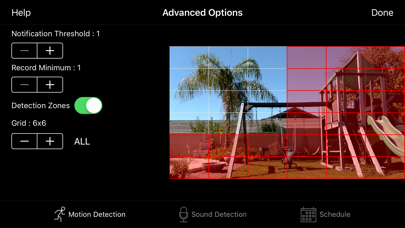
Record and playback recorded video Events and receive Notifications on your iPhone, iPod touch, or iPad when Motion or Sound are detected by your iCamSource Pro(s).
iCam Pro Features include:
- Widescreen video support.
- Significantly improved real-time video quality and frame rate.
- Sound detection and recording.
- Detection, notification, and scheduling settings can be set remotely from the iCam Pro app.
- Manually Start / Stop recording from the iCam Pro app.
- Talk Back to the computer running the iCamSource Pro from your mobile device.
- Receive and review brief animated summary notifications of your iCamSource Pro's most recent motion detection events on Apple Watch.
- Improved recording video / audio playback.
- User interface improvements in both the iCam Pro app and the iCamSource Pro.
- Auto-detection of network IP cam JPEG and MJPEG URLs in the iCamSource Pro.
iCam Pro is free to use on your local network. Remote access and notifications require iCam Pro Service, available either as a one-time purchase, or as a low-cost monthly subscription.
Please note that to use iCam Pro you will also need to download the free iCamSource Pro software from http://skjm.com/icampro/ or purchase our iCamSource Pro Mobile app.
The iCamSource Pro software supports Windows 7/8/10 and Mac OS X 10.9 and later. iCamSource Pro Mobile supports camera-enabled iOS devices running iOS 7 or later.
The iCam Pro Cloud service requires the purchase of a Cloud Storage auto-renewable subscription. There are three subscription levels available, starting at US$4.99/month for 5 GB of event storage. Please visit http://skjm.com/icampro/help/cloud.php for more information, including links to the iCam Pro Cloud Terms of Service and Privacy Policy.
NOTICE: If you are ever having issues please contact support instead of just leaving a bad review as we have no way of contacting you to help resolve your problem. Thanks!
You can also visit http://skjm.com/icampro/support.php#faq for a list of other Frequently Asked Questions.
Terms of Use: http://skjm.com/icam/terms.php
Privacy Policy: http://skjm.com/privacy.php
About Auto-Renewing Subscriptions:
- Payment will be charged to iTunes Account at confirmation of purchase.
- Subscription automatically renews unless auto-renew is turned off at least 24-hours before the end of the current period.
- Account will be charged for renewal within 24-hours prior to the end of the current period, and identify the cost of the renewal.
- Subscriptions may be managed by the user and auto-renewal may be turned off by going to the user's Account Settings after purchase.