IdeaLater - Save Ideas is an overall app developed by Tomasz Korolko.
Download Statistics
User Ratings
The app has no ratings yet.
App Information
IdeaLater - Save Ideas is FREE to download. The APK download size is 7.04 MB. The latest version available is 1.4.2. The last update was on March 30, 2026.
Technical Requirements
The app has a content rating of Everyone. The app has been available on Google Play January 2026.
Description
Never lose a good idea for something to do
Inspiration can appear anywhere, often when you don’t have time to act. IdeaLater helps you capture those moments instantly so they don’t disappear. Whenever something sparks your interest, save it in seconds without interrupting what you’re doing.
With IdeaLater you can save ideas like: • a recipe you want to cook • a book you want to read • a movie or series to watch • a restaurant to try • a place to visit • a gift idea for someone special • anything else you would like to do one day
Capture first. Organize later.
IdeaLater is designed for speed and simplicity. No long notes. No complicated systems. No pressure to organize everything right away. A photo, screenshot, link or just a few words are enough to save an idea.
The goal is simple: make sure the idea doesn’t get lost.
Ideas without a category appear directly on the main screen so they are always visible and easy to revisit. When you have more time, you can add details and organize them your way.
Save ideas directly from Safari and Photos
IdeaLater supports system sharing, so you can save ideas straight from Safari and Photos. Share a link, photo or screenshot to IdeaLater and it will instantly appear as a new idea.
Map view for location-based ideas
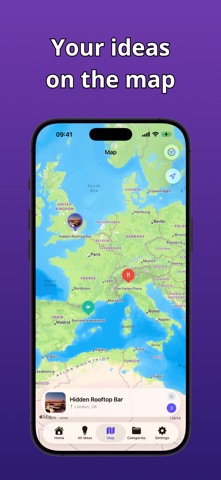
Ideas with a saved location automatically appear on the map. Browse ideas by location and quickly find on the map places you want to visit or restaurants to try.
Mark ideas as done instead of deleting them
When you complete an idea, you don’t have to remove it. Mark it as done and keep it saved for future reference or repetition.
AI summary with tips and recommendations
For every idea you can generate a short AI summary with useful tips and recommendations (on the basis of the idea name and description, which will be send to AI). For example, if your idea is a trip to a destination, the summary may include suggested sights or things worth doing there.
Widget with Idea of the Day
IdeaLater includes a widget displaying the Idea of the Day and a button for quickly adding a new idea directly from your Home Screen.
With IdeaLater you can: • save ideas quickly • create categories with custom colors and icons • organize ideas into categories • attach photos or screenshots to ideas • add locations to ideas (including location from photos) • view ideas on a map when a location is saved • generate short AI summaries with tips and recommendations • see the Idea of the Day on the Home Screen or widget • randomly draw an idea to do • mark ideas as done
More than just a list
IdeaLater helps you capture ideas before they disappear, keep future plans in one place and rediscover the right idea when you’re bored, curious or motivated. And AI summaries help you turn ideas into action.
Ideas can be easily searched by name, description and location, so the right idea is always easy to find.
IdeaLater isn’t a notes app or a to-do list. It’s your personal collection of ideas and inspirations waiting to be acted on.
iCloud sync and Dark Mode
Your ideas are securely synced with iCloud across your devices. IdeaLater also supports Dark Mode and adapts to your device’s appearance settings.
Free vs Premium
IdeaLater Free • Up to 10 to-do ideas • Unlimited done ideas • Up to 3 categories • Notes for ideas • 1 photo and 1 file per idea • Location tagging • 5 Expand Idea by AI uses
IdeaLater Premium • Unlimited to-do ideas • Unlimited done ideas • Unlimited categories • Notes for ideas • Unlimited photos and files • Location tagging • Unlimited Expand Idea by AI • Support IdeaLater development
IdeaLater Premium is available as a monthly or yearly subscription. The subscription automatically renews unless canceled before the end of the current billing period. You can manage or cancel your subscription in your App Store account settings.
Privacy Policy: https://idealater.app/privacy-policy Terms of Use: https://www.apple.com/legal/internet-services/itunes/dev/stdeula/
Each subscription will automatically renew 3 days before the expiration date for
the same time period. Subscriptions can be cancelled at any time before the renewal.