

iDo - To do list & Planner
iDo - To do list & Planner is made and published by Nguyen Khai. AppBrain is an independent app data site and isn't affiliated with Nguyen Khai. The app name, icon, screenshots and description belong to Nguyen Khai and are shown as published on the App Store.
AppBrain's verdict
- Last updated
- April 22, 2026
Rankings
App Store top chartsApp Store Rankings for iDo - To do list & Planner
Competitors
Similar apps and more from Nguyen KhaiAlternatives to iDo - To do list & Planner



More from Nguyen Khai








Releases
Updates seen on the App Store- Version
- 3.5
- Launched
- April 2026
No changelog data
User feedback
Ratings and reviews on the App StoreComments on iDo - To do list & Planner for iOS
We don't have enough comments to show example comments. Please check back later.
Technology
Found in the app by AppBrain- Price
- Free
- App size
- 43.2 MB
- Content rating
- Everyone
Technologies used by iDo - To do list & Planner
About the app and developer
About iDo - To do list & Planner
iDo - To do list & Planner is a productivity app developed by Nguyen Khai.
User Ratings
The app has no ratings yet.
App Information
iDo - To do list & Planner is freely available from the App Store. The app size is 43.21 MB. The latest version available is 3.5. The last update was on April 22, 2026.
Technical Requirements
The app has a content rating of Everyone. The app has been available on the App Store since April 2026.
Developer information for Nguyen Khai
Address:
Frequently asked questions about iDo - To do list & Planner
Is iDo - To do list & Planner free?
Yes. iDo - To do list & Planner is free on the App Store.
Is iDo - To do list & Planner still available?
Yes. iDo - To do list & Planner is on the App Store, and the last update we saw was on April 22, 2026.
How large is iDo - To do list & Planner?
iDo - To do list & Planner is 43.21 MB.
Is iDo - To do list & Planner suitable for children?
App Store rates the content of iDo - To do list & Planner as suitable for everyone.
Who made iDo - To do list & Planner?
iDo - To do list & Planner was developed by Nguyen Khai. It is listed in the productivity category on the App Store.
What are the best alternatives to iDo - To do list & Planner?
People looking at iDo - To do list & Planner also look at these productivity apps: MyQdo, TaskQuadrant - Task Planner, Productivity Matrix, Task & Goal Planner, TRIX: Eisenhower Task Planner.
Store listing
By Nguyen Khai, from the App Store



Description by Nguyen Khai Written by the developer, not by AppBrain. Click to read.
PRIORITIZE WITH THE EISENHOWER MATRIX
Organize every task into four clear quadrants:
• Do Now — Urgent and important. Handle it immediately.
• Schedule — Important but not urgent. Plan it for later.
• Delegate — Urgent but not important. Hand it off.
• Delete — Neither urgent nor important. Let it go.
See your entire workload at a glance on the Home Matrix. Tap any quadrant to dive into its task list, sorted by Overdue, Today, Upcoming, and No Due Date.
POWERFUL TASK MANAGEMENT
• Create tasks with titles, descriptions, due dates, tags, and assigned persons
• Set recurring tasks — daily, weekly, monthly, or yearly — with flexible end conditions
• Complete a single occurrence, all future occurrences, or the entire series
• Customize task duration from 15 to 120 minutes
• Search and filter tasks by category, tag, person, or completion status
• View your week at a glance with the Calendar and Week Tasks views
SPEAK TO CREATE TASKS
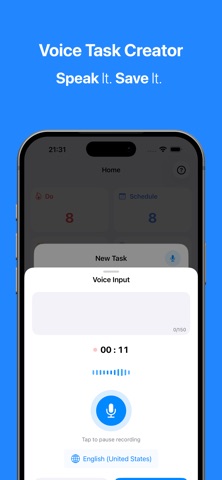
Say it, and iDo turns it into a task. Voice input can capture titles, detect due dates, recognize people you already manage in iDo, and suggest the best quadrant — in 11 supported languages.
WIDGETS FOR YOUR HOME SCREEN
Add beautiful widgets to your iPhone home screen. See your matrix summary, upcoming tasks, or the nearest deadline without opening the app. Seven widget styles to choose from.
SMART REMINDERS & NOTIFICATIONS
• Morning and evening reminders at your preferred time
• Automatic notifications 10 minutes before a task is due
• Weekend pause option — no interruptions on your days off
• Motivational quotes to start your day right
STREAKS & PRODUCTIVITY INSIGHTS
Track your consistency with daily streaks and 24 productivity stats, including weekly completion rate, on-time performance, average completion time, and overdue trends.
SECURE & SYNCED ACROSS DEVICES
• Cloud sync for seamless access across devices
• Encrypted local backups — automatic or manual
• Face ID lock to protect your tasks from prying eyes
• Your data stays private. Your backups stay encrypted.
MAKE IT YOURS
• Customize category colors and icons
• Customize tag & person
• Dark mode that looks stunning
• 11 languages: English, Vietnamese, Chinese, Japanese, Korean, French, German, Spanish, Italian, Portuguese, Russian
FREE TO START, POWERFUL TO GROW
Get started with up to 100 tasks, 5 tags, and 5 persons absolutely free. Upgrade to iDo Premium to unlock unlimited tasks, cloud sync, auto backup, custom icons, advanced stats, and more.
Subscription options:
• Weekly
• Monthly
• Yearly
Payment will be charged to your Apple ID account at confirmation of purchase. Subscriptions automatically renew unless canceled at least 24 hours before the end of the current period. You can manage or cancel your subscription anytime in your Apple ID account settings.
Privacy Policy: https://pegase.studio/privacy-policy/
Terms of Use: https://pegase.studio/terms-of-use/