

IDOUDO: Movable Do Solfège
IDOUDO: Movable Do Solfège is made and published by Kosuke Mawatari. AppBrain is an independent app data site and isn't affiliated with Kosuke Mawatari. The app name, icon, screenshots and description belong to Kosuke Mawatari and are shown as published on the App Store.
AppBrain's verdict
- Last updated
- October 5, 2026
Rankings
App Store top chartsApp Store Rankings for IDOUDO: Movable Do Solfège
Competitors
Similar apps and more from Kosuke MawatariAlternatives to IDOUDO: Movable Do Solfège




More from Kosuke Mawatari


Releases
Updates seen on the App Store- Version
- 1.1
- Launched
- August 2026
No changelog data
User feedback
Ratings and reviews on the App StoreComments on IDOUDO: Movable Do Solfège for iOS
We don't have enough comments to show example comments. Please check back later.
Technology
Found in the app by AppBrain- Price
- Free
- App size
- 2.72 MB
- Content rating
- Everyone
Technologies used by IDOUDO: Movable Do Solfège
About the app and developer
About IDOUDO: Movable Do Solfège
IDOUDO: Movable Do Solfège is a music app developed by Kosuke Mawatari.
User Ratings
The app has no ratings yet.
App Information
IDOUDO: Movable Do Solfège is freely available from the App Store. The app size is 2.72 MB. The latest version available is 1.1. The last update was on October 5, 2026.
Technical Requirements
The app has a content rating of Everyone. The app has been available on the App Store since August 2026.
Developer information for Kosuke Mawatari
Address:
Store listing
By Kosuke Mawatari, from the App Store




Description by Kosuke Mawatari Written by the developer, not by AppBrain. Click to read.
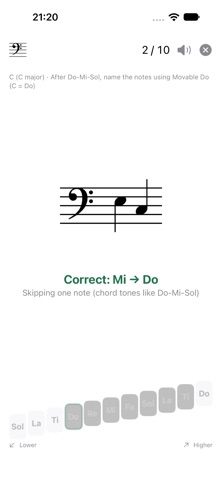
Answer each displayed note using the Do, Re, Mi, Fa, Sol, La, and Ti buttons. When the key changes, the same position on the staff has a different movable-Do syllable. Practice this essential movable-Do skill repeatedly in all 12 keys.
In addition to treble and bass clefs, IDOUDO supports the alto clef, a feature rarely found in music practice apps. It is useful both for the daily practice of musicians who read alto-clef music and for those who want to become more fluent in every key as they expand into jazz and pop sessions.
If you are just beginning to read staff notation, start with the key of C. In C, Do–Re–Mi and C–D–E correspond directly, so you can also use IDOUDO to practice the fundamentals of reading standard notation.
DRILLS
Reading
• Single notes: 1 Note, 2 Notes
• 1 Triad
• 1 Seventh Chord
Listening
• Ear training: 2, 3, and 4 notes
• Melody Shadowing: Major set 1, Major set 2, Minor set 1
EAR TRAINING
After a Do-Mi-Sol chord, listen to the notes and name them in movable Do. The answer buttons form a "staircase" from low on the left to high on the right, so you answer the pitch height too. A foundation for playing by ear.
MELODY SHADOWING
Hum short melodies from famous pieces in movable Do while the key changes. There is no scoring. Each time the key changes, an I–ii–V–I cue sets the new key's Do in your ear, and Do keeps sounding as the accompaniment while you sing.
Songs: Twinkle Twinkle Little Star, Canon, When the Saints Go Marching In, Ode to Joy, Swing Low, Sweet Chariot, Furusato, Sakura Sakura, Fate (Symphony No. 5), and Kojo no Tsuki (minor keys are read from La).
It is also good practice for the pentatonic and major scales.
KEY FEATURES
• Practice in all 12 keys
• Treble and bass clefs, plus the alto clef used by viola
• Note ranges for piano, guitar, violin, viola, cello, wind instruments, voice, and more
• Beginner, Intermediate, Advanced, and Custom ranges
• Fast 10-question rounds
• Average response time, mistakes, and personal-best records
• Pin the drills you practice to the top of Home
• Built-in know-how, including how to practice each drill
• Up to 50 local profiles
• Shareable result cards and progress
• Light and Dark Mode
READ CHORDS WITH MOVABLE DO
For triads and seventh chords, answer chord tones from bottom to top. The result also shows the chord symbol and Roman-numeral degree name.
NEW TO STAFF NOTATION?
The in-app Getting Started with Staff Notation guide explains why the key of C is a good place to begin, includes a quick note-reference chart, and shows how to use the app for classical music, ensemble playing, and sessions, with a suggested practice path.
PRICING
Keys C and G are free in every drill. The other 10 keys can be unlocked in either of two ways:
• A one-time in-app purchase for each drill
• All Drills, an auto-renewable subscription (monthly with a 1-month free trial, or yearly) that also includes drills added in the future. Prices are shown in the app and on the App Store.
The subscription renews automatically at the same price unless canceled at least 24 hours before the end of the current period. Payment is charged to your Apple Account. Manage or cancel it in Settings > [your name] > Subscriptions. The free trial is available once, on the monthly plan; cancel at least 24 hours before it ends and you won't be charged.
No ads are displayed, and no account registration is required. Profiles and practice records are stored on your device.
Terms of Use (EULA): https://www.apple.com/legal/internet-services/itunes/dev/stdeula/