IdScanner: Age & ID Check is an utilities app developed by Aksana Aheika.
User Ratings
The app has no ratings yet.
App Information
IdScanner: Age & ID Check is FREE to download. The download size is 5.33 MB. The latest version available is 1.0.2. The last update was on September 2, 2026.
Technical Requirements
The app has a content rating of Everyone. The app has been available on the App Store since September 2026.
Description
Check an ID in one second, from two metres away.
Point the camera at the barcode on the back of a licence — or the photo page of a passport. The verdict fills the screen: a colour field, a shape and one word, big enough to read at arm's length in a dark doorway, with a guest waiting.
PASS · UNDERAGE · EXPIRED · CHECK ID
BUILT FOR THE DOOR, NOT THE DESK
• Torch, guest counter and manual entry in one row, under your thumb • Quick mode returns to the camera by itself, ready for the next guest • Distinct haptics per verdict — you can feel the answer without looking • Works with gloves, one-handed, and with no connection at all • Dark and light: a night club and a daylight dispensary are both first-class
READS WHAT YOUR GUESTS ACTUALLY CARRY
• US and Canadian driver's licences and ID cards (AAMVA PDF417) • Passports and ID cards from any country (ICAO 9303 machine-readable zone) • Damaged barcode? Type the date of birth by hand — clearly flagged as manual • Age threshold 16+, 18+, 19+ or 21+, set once a shift
CATCHES WHAT A GLANCE MISSES
• Expired documents, missing or impossible dates, failed MRZ check digits • Pass-backs: the same ID scanned twice in a shift is flagged instantly • Front-side check: read the printed front and compare the surname and date of birth against the barcode or MRZ — the cheap fake reprints the front and keeps a donor card's barcode • Your own ban list: bar a guest from the result screen, recognise them next time
PRIVACY YOU CAN ACTUALLY EXPLAIN
• No account, no sign-in, no cloud. Nothing is uploaded, ever • Scan history is OFF by default. Turn it on and it auto-deletes after 24 hours, 7 days or 30 days — your choice • The ban list stores an irreversible per-install code, never names or numbers • Statistics are counts only: no names, no dates of birth, no licence numbers • The app never captures or processes anyone's face. Comparing the photo to the guest is the doorman's job, and it stays that way
KNOW YOUR DOOR
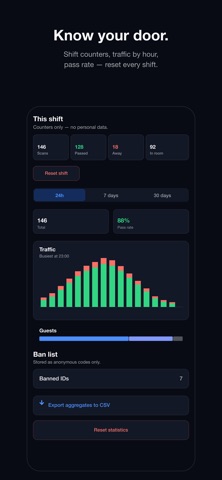
• Shift counters: scans, admitted, turned away, pass rate — reset each shift • Traffic by hour, so "when is it busiest" is a shape, not a guess • 24 hours, 7 days or 30 days; export aggregates to CSV • A visitor counter for occupancy, with the same big buttons
FREE, AND PRO
Your first 20 scans and your first 7 days are free — whichever runs out later. After that, 5 scans a day stay free, forever.
IdScanner Pro removes the limit: monthly, yearly, or one payment for good. Prices are shown in the app before you buy. Subscriptions renew automatically unless cancelled at least 24 hours before the period ends; manage or cancel them in your App Store account settings.
Privacy Policy: https://idscanner.slumbiapp.com/policy.html Terms of Use: https://idscanner.slumbiapp.com/terms.html
IdScanner reads what a document says and does the arithmetic. It does not authenticate documents, and it is not legal advice — complying with the rules that apply to your venue, including how long you may keep records, remains yours.
Each subscription will automatically renew 3 days before the expiration date for
the same time period. Subscriptions can be cancelled at any time before the renewal.