

IGMargin is made and published by Kai Takei. AppBrain is an independent app data site and isn't affiliated with Kai Takei. The app name, icon, screenshots and description belong to Kai Takei and are shown as published on the App Store.
AppBrain's verdict
- Last updated
- September 28, 2025
Rankings
App Store top chartsApp Store Rankings for IGMargin
Releases
Updates seen on the App Store- Version
- 1.1.1
- Launched
- September 2025
No changelog data
User feedback
Ratings and reviews on the App StoreComments on IGMargin for iOS
We don't have enough comments to show example comments. Please check back later.
Technology
Found in the app by AppBrain- Price
- Free
- App size
- 36.4 MB
- Content rating
- Everyone
Technologies used by IGMargin
About the app and developer
About IGMargin
IGMargin is a photo & video app developed by Kai Takei.
User Ratings
The app has no ratings yet.
App Information
IGMargin is freely available from the App Store. The app size is 36.35 MB. The latest version available is 1.1.1. The last update was on September 28, 2025.
Technical Requirements
The app has a content rating of Everyone. The app has been available on the App Store since September 2025.
Developer information for Kai Takei
Address:
Store listing
By Kai Takei, from the App Store



Description by Kai Takei Written by the developer, not by AppBrain. Click to read.
**Key Features:**
Automatic Social Media Format Support
• Feed Square (1:1)
• Feed Portrait (4:5)
• Feed Landscape (16:9)
• Stories (9:16)
Beautiful White Frame Addition
• Optimal frame sizing for each photo
• Professional finish
• Customizable frame colors
Photo Metadata Display
• Camera information (e.g., iPhone 15 Pro)
• Lens information (e.g., Nikkor 50mm f1.8)
• Capture date and time
• Camera settings (shutter speed, aperture, ISO)
Customization Options
• Multiple font styles
• Frame color selection
• Metadata display toggle
Multi-language Support
• Japanese
• English
**Perfect for:**
• Creating beautiful Social Media posts
• Sharing detailed photo information
• Professional-looking content
• Photography enthusiasts
**Simple to Use:**
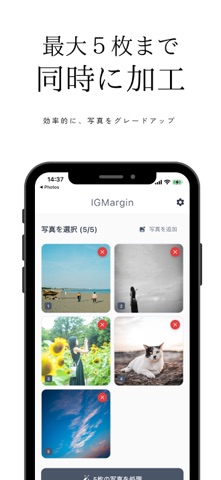
1. Select your photos
2. Choose Social Media format
3. Customize metadata display
4. Auto-process for perfect results
5. Save to gallery and post to Social Media
Elevate your Social Media game with IGMargin.